Your GoldenGate certificates should be granted by a trusted Certificate Authority, which normally handles the monitoring of certificates. However, if you don’t want your future you, or a colleague, to spend too much time debugging which certificate should be renewed, you could monitor your certificates. In this blog, I will present a way to do this with the REST API.
Certificates types in GoldenGate
The first thing you need to know is that there are three types of certificates in a GoldenGate deployment. Each of them can be monitored separately in the REST API.
- Server Certificates, which belong to the
servertype - Client Certificates, which belong to the
clienttype - CA Certificates, which belong to the
truststoretype
Certificate monitoring from the web UI
Before presenting the REST API monitoring of certificates, let’s see what we are supposed to be looking at. From the web UI, when connected to the Service Manager, you can observe the details of your certificates in the Certificate Management tab. I give below an example for both the Service Manager and a deployment in a secure GoldenGate installation.
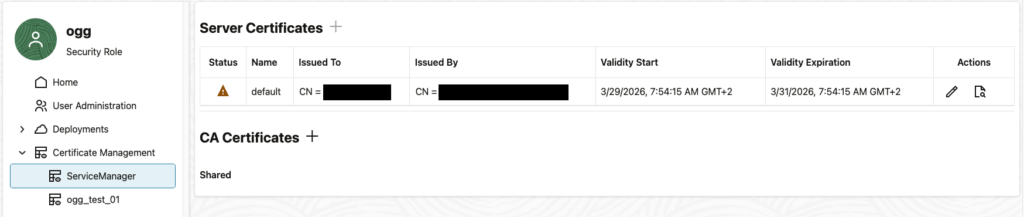
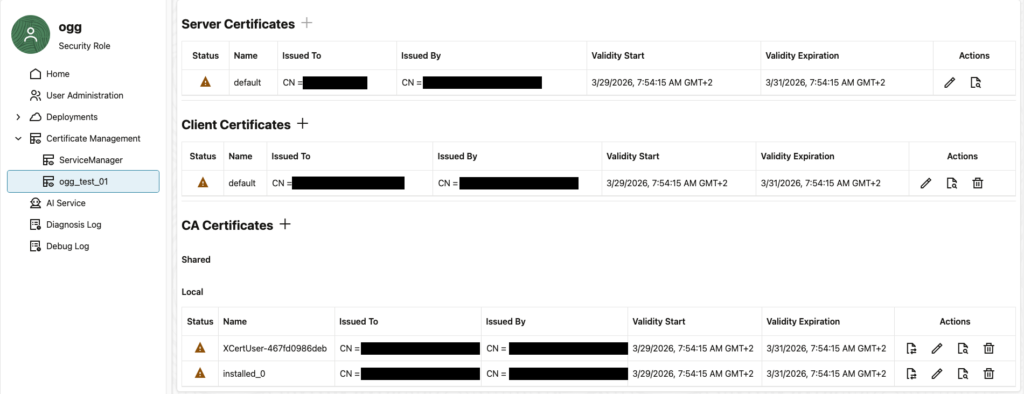
I create short-term certificates on purpose for the example, and we see that the UI is designed to tell the user when the certificates are close to expiration. But of course, it’s better to have some sort of monitoring do the job for us.
Certificate monitoring with the REST API
With GoldenGate REST API, it is rather easy to monitor certificate expiration. Unfortunately, you cannot ask the API for a list of certificates close to expiration, so you will have to iterate over all certificates in your monitoring script.
I will use the Python client I presented in another blog, but you can of course rebuild each call manually. Here are the methods / endpoints you should use:
- List Deployments –
GET /services/{version}/deployments, to retrieve the list of deployments. The Service Manager is considered as a normal deployment here, so there is no need to separate it from the other deployments. - Retrieve Available Certificate Types –
GET /services/{version}/deployments/{deployment}/certificates, to retrieve the collection of certificate types. It should always be the list given earlier (client,serverandtruststore). - Retrieve Certificate Types –
GET /services/{version}/deployments/{deployment}/certificates/{type}, to get the list of certificates that belong to a specific type inside a deployment. - Retrieve Certificate Information –
GET /services/{version}/deployments/{deployment}/certificates/{type}/{certificate}/info, to retrieve the information on a specific certificate.
I share below a full monitoring script that you can use to monitor all certificates in a GoldenGate setup. Feel free to adapt it to your own monitoring tool.
#!/usr/bin/env python3
"""
Oracle GoldenGate Certificate Monitoring Script
"""

from datetime import datetime, timezone
import sys

from oggrestapi import OGGRestAPI

if __name__ == '__main__':
    exit_code = 0  # 0=OK, 1=WARNING, 2=CRITICAL, 3=UNKNOWN

    try:
        # Initialize the OGG REST API client
        ogg_client = OGGRestAPI(
            url='https://vmogg:7809',
            username='ogg',
            password='ogg',
            verify_ssl=False)

        # Retrieve the list of deployments
        deployments = ogg_client.list_deployments()
        print(f"Deployments: {[d['name'] for d in deployments]}")

        # For each deployment, retrieve the list of certificates and check their expiration dates
        for deployment in deployments:
            deployment_name = deployment['name']
            print(f"    Checking certificates for deployment: {deployment_name}")

            certificate_types = ogg_client.retrieve_available_certificate_types_deployment(
                deployment=deployment_name)
            print(f"    Certificate types for deployment {deployment_name}: {[ct['name'] for ct in certificate_types]}")
            for cert_type in certificate_types:
                cert_type_name = cert_type['name']
                print(f"        Checking certificates for type: {cert_type_name}")
                certificates = ogg_client.retrieve_certificate_types(
                    deployment=deployment_name,
                    type=cert_type_name)
                for cert in certificates:
                    cert_name = cert['name']
                    print(f"            Certificate: {cert_name}")
                    certificate_information = ogg_client.retrieve_certificate_information_deployment(
                        deployment=deployment_name,
                        type=cert_type_name,
                        certificate=cert_name)
                    expiration_date = certificate_information['certificate']['validTo']
                    print(f"                Certificate Expiry Date: {expiration_date}")
                    expire_in = datetime.strptime(expiration_date, "%Y-%m-%dT%H:%M:%SZ").replace(tzinfo=timezone.utc) - datetime.now(timezone.utc)
                    is_expired = expire_in.total_seconds() < 0

                    if is_expired:
                        print(f"                WARNING: Certificate '{cert_name}' in deployment '{deployment_name}' of type '{cert_type_name}' has expired on {expiration_date}")
                        exit_code = max(exit_code, 2)  # CRITICAL
                    else:
                        days_left = int(expire_in.total_seconds() / 86400)
                        print(f"                Certificate '{cert_name}' in deployment '{deployment_name}' of type '{cert_type_name}' will expire in {days_left} days on {expiration_date}")
                        if days_left < 30:
                            exit_code = max(exit_code, 1)  # WARNING

    except Exception as e:
        print(f"UNKNOWN: {e}")
        sys.exit(3)

    sys.exit(exit_code)
On an installation where certificates are close to expire, the output looks like this:
Deployments: ['ServiceManager', 'ogg_test_01']
    Checking certificates for deployment: ServiceManager
    Certificate types for deployment ServiceManager: ['client', 'server', 'truststore']
        Checking certificates for type: client
        Checking certificates for type: server
            Certificate: default
                Certificate Expiry Date: 2026-03-31T05:54:15Z
                Certificate 'default' in deployment 'ServiceManager' of type 'server' will expire in 0 days on 2026-03-31T05:54:15Z
        Checking certificates for type: truststore
    Checking certificates for deployment: ogg_test_01
    Certificate types for deployment ogg_test_01: ['client', 'server', 'truststore']
        Checking certificates for type: client
            Certificate: default
                Certificate Expiry Date: 2026-03-31T05:54:15Z
                Certificate 'default' in deployment 'ogg_test_01' of type 'client' will expire in 0 days on 2026-03-31T05:54:15Z
        Checking certificates for type: server
            Certificate: default
                Certificate Expiry Date: 2026-03-31T05:54:15Z
                Certificate 'default' in deployment 'ogg_test_01' of type 'server' will expire in 0 days on 2026-03-31T05:54:15Z
        Checking certificates for type: truststore
            Certificate: XCertUser-467fd0986deb
                Certificate Expiry Date: 2026-03-31T05:54:15Z
                Certificate 'XCertUser-467fd0986deb' in deployment 'ogg_test_01' of type 'truststore' will expire in 0 days on 2026-03-31T05:54:15Z
            Certificate: installed_0
                Certificate Expiry Date: 2026-03-31T05:54:15Z
Certificate 'installed_0' in deployment 'ogg_test_01' of type 'truststore' will expire in 0 days on 2026-03-31T05:54:15Z![Thumbnail [60x60]](https://www.dbi-services.com/blog/wp-content/uploads/2025/05/JDE_Web-1-scaled.jpg)
![Thumbnail [90x90]](https://www.dbi-services.com/blog/wp-content/uploads/2022/08/MAW_web-min-scaled.jpg)