I have been asked to migrate a customer environment from WildFly 26 to WildFly 38. That’s a meaningful upgrade, not just a version bump, because WildFly 38 represents the latest stable baseline with modern Jakarta EE support, updated security, and long-term compatibility with modern Java runtimes like OpenJDK 17…
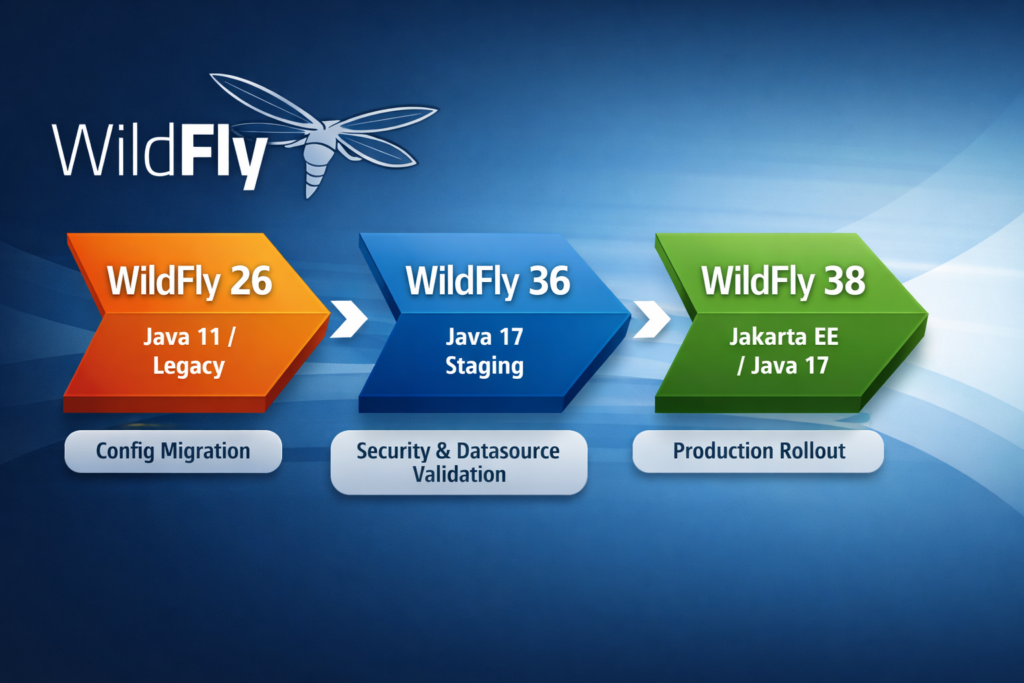
Before we dive into commands and configurations, let’s anchor this in version history and explain an important staging step that many teams overlook.
WildFly version history
WildFly releases follow a rapid cadence, but some versions carry particular importance for migration:
| Version | Release date | Notes |
| WildFly 26 | December 2021 | Last in the older Java EE family with early Jakarta EE support. Many legacy configurations still present. |
| WildFly 36 | April 2025 | Transitional release: consolidates Jakarta EE 9+ changes and stabilizes newer subsystems. |
| WildFly 38 | October 2025 | Latest stable release with Jakarta EE 10 alignment, updated security policies, and official baseline for Java 17. |
Why Not Jump Directly from 26 to 38?
In theory you could try, but in practice, this is discouraged for several reasons:
1. Evolving Jakarta EE Support
WildFly 26 still contains remnants of older namespace patterns from the earlier Jakarta EE transition. WildFly 38 assumes:
- Full Jakarta EE 10 compliance
- Removal of deprecated subsystem elements
Staging through WildFly 36 means you pass through a version that:
- Consolidated many breaking changes
- Served as a stepping stone for configuration syntax modernization
- Was widely adopted and battle-tested by community users before WildFly 38
This reduces the “shock” of incompatible subsystems in one big jump.
2. Migration Tool Patching
The WildFly Migration Tool is better optimized when configurations change incrementally:
- From 26 to 36, the migration tool handles early syntax conversions
- From 36 to 38, it can focus on more recent modular and namespace adjustments
If you try to leap directly from 26 to 38, the migration tool may:
- Miss subtle differences
- Produce overly noisy reports
- Increase your manual remediation effort
Staging through 36 results in cleaner migration scripts, fewer manual manual fixes, and a more predictable process.
3. Security and Subsystem Consistency
Between 26 and 38, several subsystems saw significant reconfiguration:
- Elytron security policy changes
- Credential store formats
- Datasource definitions (Oracle and others became stricter)
- Logging and management interfaces
WildFly 36 introduced many of these changes incrementally so that:
- Administrators could adapt
- Tooling could reflect real-world environments before further evolution in WildFly 38
This made 36 a natural “landing zone” between the older 26 semantics and the newer 38 mechanics.
Migration Flow
The migration from WildFly 26 to WildFly 38 is intentionally performed in two controlled phases. This staged approach reduces risk, isolates problems earlier, and provides clear validation points before reaching the final production target.
Step 1 – Baseline: WildFly 26 (Current State)
The starting point is the existing WildFly 26 environment, typically running on Java 11 and hosting a stable, production-tested application.
At this stage:
- The platform is known and stable
- Configuration reflects historical decisions and legacy syntax
- Security, datasources, and deployments are tightly coupled to this version
No changes are made here except:
- Full backups
- Configuration review
- Inventory of customizations
WildFly 26 remains untouched and fully rollback-capable throughout the migration.
Step 2 – First Migration: WildFly 26 to WildFly 36
The first technical migration is performed using the WildFly migration tool, targeting WildFly 36.
This step focuses on:
- Converting legacy configuration syntax
- Removing deprecated or removed subsystems
- Preparing the configuration for newer Jakarta EE expectations
WildFly 36 acts as a transition platform:
- It supports Java 17
- It consolidates many breaking changes introduced after WildFly 26
- It allows configuration issues to be addressed incrementally rather than all at once
At this stage, the goal is not production readiness, but configuration correctness.
Step 3 – Staging and Validation on WildFly 36
Once the configuration is migrated, WildFly 36 is used as a staging environment for in-depth validation.
Key activities include:
- Running WildFly on Java 17
- Rebuilding or adjusting Elytron security components
- Recreating credential stores
- Validating datasource connectivity
- Starting the application and ensuring it runs
- Performing smoke tests and basic functional checks
- Allowing customer or application teams to execute targeted tests
When all tests pass:
- Configuration is frozen
- Known issues are documented
- The environment is considered stable enough to move forward
This step significantly reduces uncertainty before the final upgrade.
Step 4 – Second Migration: WildFly 36 to WildFly 38
With a validated configuration on WildFly 36, the second migration step is executed toward WildFly 38.
This phase:
- Uses the migration tool again
- Applies final syntax and subsystem adjustments
- Introduces stricter validation and enforcement present in WildFly 38
Because most major changes were already handled in the previous step, this migration is usually:
- Shorter
- Cleaner
- Easier to troubleshoot
WildFly 38 now represents the target platform, not just a test environment.
Step 5 – Final Validation on WildFly 38
Before production rollout, WildFly 38 undergoes final validation:
- Server startup and stability checks
- Security and datasource verification
- Application deployment validation
- Final smoke and regression tests
At this point, the platform should behave identically (or better) than WildFly 26, with the added benefits of:
- A modern Java runtime
- Up-to-date Jakarta EE support
- Improved security and maintainability
Step 6 – Production Rollout and Retirement of WildFly 26
Once validated:
- WildFly 38 is promoted to production
- Traffic is switched according to the customer’s deployment strategy
- WildFly 26 is retired in a controlled manner
Rollback remains trivial until decommissioning is complete, since:
- WildFly 26 was never modified
- All migrations were performed side-by-side
Summary
This staged migration approach ensures that:
- Configuration changes are isolated and understandable
- Security and infrastructure issues are discovered early
- Application teams have time to adapt and validate
- Production risk is minimized
By treating WildFly 36 as a stabilization checkpoint, the transition to WildFly 38 becomes predictable, controlled, and repeatable.
Don’t hesitate to reach out to discuss your WildFly or JBoss EAP migration project, we’ll be happy to help you move forward safely, efficiently, and with full transparency.
Related interesting blog: JBoss EAP vs Wildfly
![Thumbnail [60x60]](https://www.dbi-services.com/blog/wp-content/uploads/2022/09/DDI_web-min-scaled.jpg)