In this article, I will try to evaluate the benefits of AI on a development project and what concrete changes it makes to our development practices.
The test case and the approach
I chose a familiar environment for my comparison: a new NestJS project from scratch.
For my project, I want to:
- Use a .env file for configuration
- Connect to a PostgreSQL database
- Store users in a database table
- Create a CRUD API to manage my users
- Manage JWT authentication based on my user list
- Secure CRUD routes for authenticated users using a guard
To help me, I’m going to use the GitHub Copilot agent with the GTP5-mini model. I’ll ask it to generate code on my behalf, as much as possible. However, I’ll continue to follow NestJS best practices by using the documentation recommendations and initializing the project myself. I will focus on prompting, initializing the context and reviewing the code generated by the AI.
For better results, I will develop the application step by step and control the generated code at each step.
Intialize the project
At first, I initialize a new NestJS project using the CLI, as mentioned in the documentation:
npm i -g @nestjs/cli
nest new nestjs-project
First contact with the AI agent
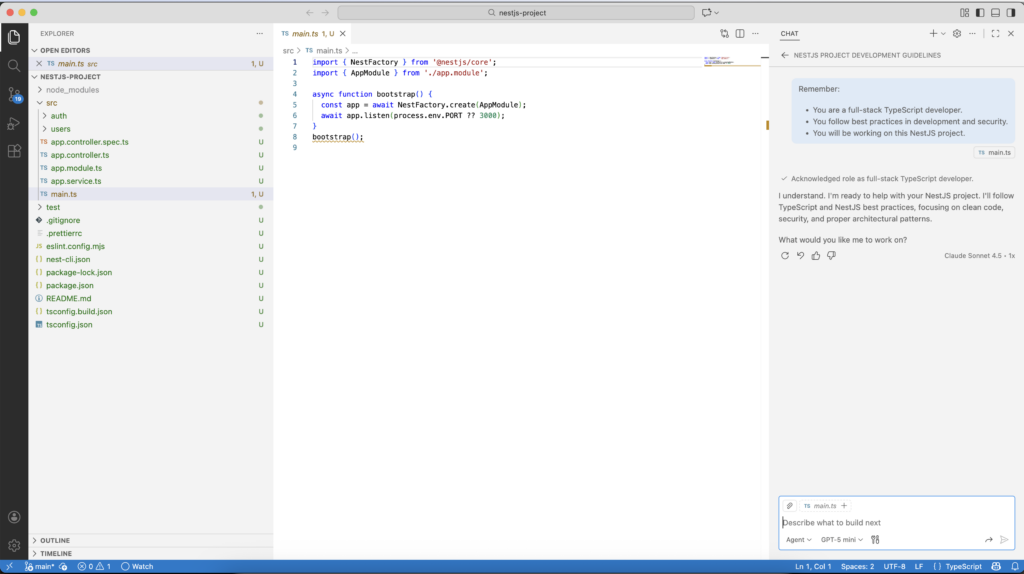
I start by opening the project in VSCode and I open a new chat with the AI agent. I’m trying to give it some general instructions for the rest of the tasks:
Remember:
- You are a full-stack TypeScript developer.
- You follow best practices in development and security.
- You will be working on this NestJS project.
The AI agent discovers the project:
First Task, add application configuration
I followed the documentation to add configuration support using .env files
I’ve manually added the required package:
npm i --save @nestjs/configAnd asked the AI to generate the code:
@nestjs/config is installed. Add support for .env in the application. The config file must contain the credentials to access to the database (host, database name, user, password).Second Task, connect to the database and create the users table
I want to use TypeORM to manage my database connections and migrations.
First, I install the required packages:
npm install --save @nestjs/typeorm typeorm pgAnd then ask the AI agent to generate the code:
I will use typeorm and postgres. Connect the application to the database.
Save the credentials in the .env file.
Use the credentials:
- host: localhost
- name: nestjs,
- user: nest-user
- password XXX
Note : Be careful when you send credentials to AI
Next request to the AI agent: create a migration to initialize the database schema:
Add a migration to create a "users" table with the following fields: id (primary key), username (string), email (string), password (string), is_admin (boolean), disabled (boolean), created_at (timestamp), updated_at (timestamp).In addition, in my package.json, the agent adds the migration command to npm in the project:
"typeorm:migration:run": "ts-node -r tsconfig-paths/register ./node_modules/typeorm/cli.js migration:run -d ./data-source.ts",To simplify the process, I asked the AI agent to generate a default user for my application:
In the migration, add a default admin user with the following values:
    username: "admin"
    email: "[email protected]"
    password: "Admin@123" (hash the password using bcrypt)
    is_admin: true
    disabled: false
After the completion by the AI agent, I run the migration.
First module, service and controller for users with CRUD endpoints
Now, I ask the agent to create the users module with detailed endpoints:
Add a module, service, and controller for "users" with the following endpoints:
- GET /users: Retrieve a list of all users.
- GET /users/:id: Retrieve a user by ID.
- POST /users: Create a new user.
- PUT /users/:id: Update a user by ID.
- DELETE /users/:id: Delete a user by ID.
This step is very quick, and the code is generated in 4min only !
Add Swagger documentation
To test the first REST module, I ask the AI to add Swagger UI to the project.
As with the other steps, I add the packages myself:
npm install --save @nestjs/swaggerNote: This step is very tricky for the AI, if you don’t specify the already installed package, it will try to install an outdated version.
Then, I ask the AI agent to generate the code:
@nestjs/swagger is installed
Add swagger to the application.
Document the users endpoints.
In few minutes, we have the API documentation:
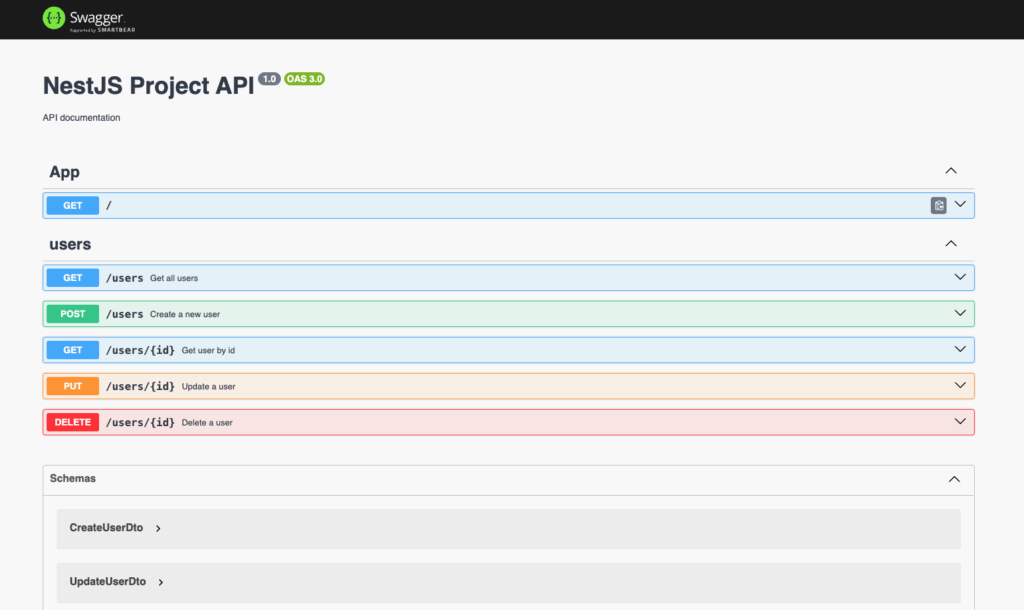
During API testing, I noticed that the password hash was returned in the user list. However, initially, I had instructed the AI to follow security best practices…
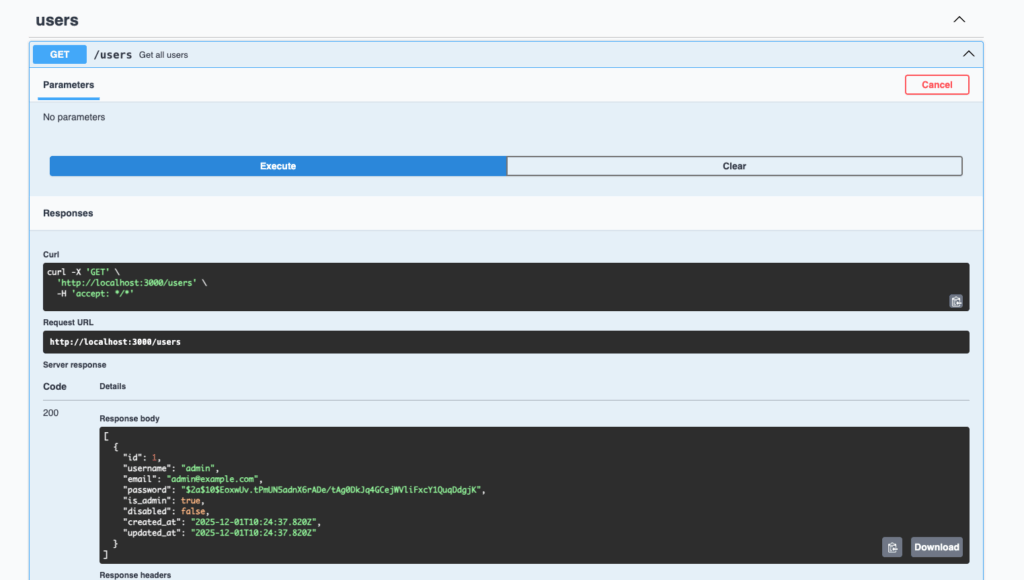
I asked the AI agent to fix this issue:
The users password field must be excluded from the responses.Last task, add JWT authentication
As authentication mechanism, I use JWT tokens provided by passport library.
I install the required packages:
npm install --save @nestjs/passport
npm install --save @nestjs/jwt passport-jwt
npm install --save-dev @types/passport-jwt
Then, I ask the AI agent to generate the code:
Implement the JWT authentication strategy, @nestjs/jwt passport-jwt and @types/passport-jwt are installed.
Add a login endpoint that returns a JWT token when provided with valid user credentials (username and password from the users table).
And I instruct the AI to use .env file for the JWT secret and expiration:
Add the JWT secrets and expiration into the .env file, Fix the typescript errors, Improve the swagger documentation for login endpoint (message definition)Now, I want to secure the users endpoints to allow only authenticated users and ask the agent the following:
Add a guard on the users endpoints to allow only connected usersLast point, I want to be able to authenticate on the Swagger interface, so I ask it:
Add the ability to authenticate on the Swagger interface with a bearer token.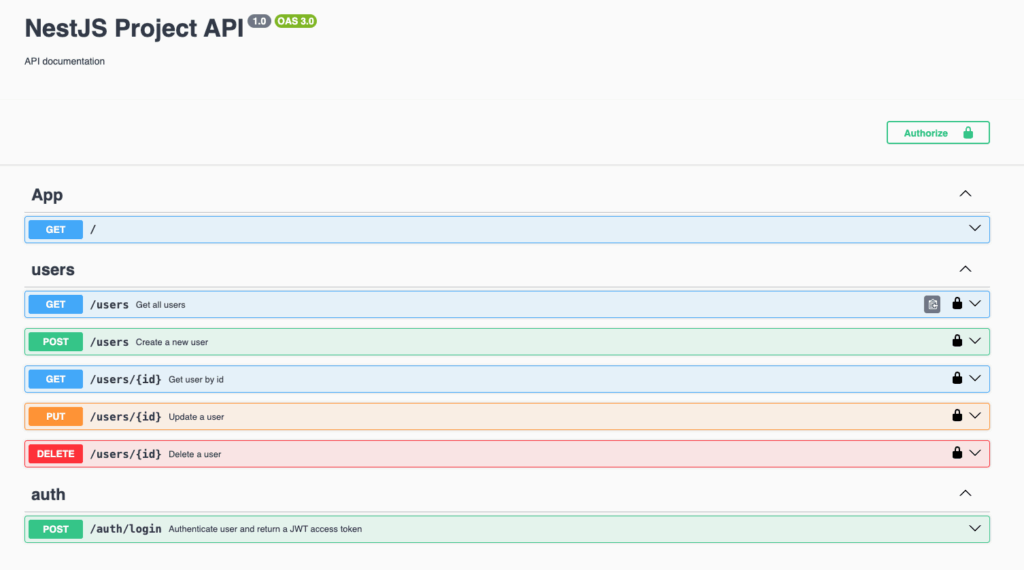
Conclusion
All of this took me around 1h30 to complete, including prompting and reviewing the steps.
Reading the documentation, understanding the technologies, adding the dependancies remained the same.
The initial estimate, without AI, was between 2 and 4 hours to complete the project :
| Task | Estimated Time | AI Coding / prompting | Review |
|---|---|---|---|
| .env | 15–30 min | 6 min | 5 min |
| Connexion PostgreSQL | 20–40 min | 4 min | 2 min |
| Table User + migration | 15–25 min | 7 min | 2 min |
| CRUD Users | 30–45 min | 5 min | 10 min |
| Swagger UI | 15–30 min | 6 min | 6 min |
| Auth JWT | 30–60 min | 12 min | 15 min |
| Guards | 15–30 min | 5 min | 5 min |
| TOTAL | 2h20 – 4h20 | 45min | 45 min |
During development, AI makes certain errors or inaccuracies like TypeScripts compilation errors, password or security issues such as returning the password hash in the user list. However, the time spent to review and correct these issues is largely compensated by the speed of code generation.
At the end, coding with AI is very fast, the generated code with a well documented technology (NestJS) is good.
Even if formulating a clear request requires careful consideration and wording, coding is comfortable. However, the job is no longer the same; it now requires good code planning and architecture and the ability to review the generated code. Coding with AI can be effective, but only if you have a clear idea of what you want from the very beginning, use clear instructions and leave no room for interpretation by the AI.
![Thumbnail [60x60]](https://www.dbi-services.com/blog/wp-content/uploads/2022/08/NME_web-min-scaled.jpg)
![Thumbnail [90x90]](https://www.dbi-services.com/blog/wp-content/uploads/2022/08/DWE_web-min-scaled.jpg)
![Thumbnail [90x90]](https://www.dbi-services.com/blog/wp-content/uploads/2025/11/LTO_WEB.jpg)