This summer I start a series of blog posts on the ‘green SQL Server DBA’, as it’s a topic that continues to interest me and one that hasn’t been covered very much so far. I hope you’ll enjoy my tips, starting with this one on unused indexes.
When discussing SQL Server performance, we often hear our performance tool say, ‘An index is missing’, but never ‘There are too many indexes’.
However, in many databases, certain indexes are never used by business queries and they are maintained with every INSERT, UPDATE or DELETE operation.
The question is really simple:
- How much does an unused index actually cost?
- Why is an unused index a problem?
Every time there is a change to the data, SQL Server must also update all the relevant indexes, and that is not free.
As an example, I’m going to use a widely recognised database: the famous DynamicsBC.
The AUDIT
The first step in any study is always to carry out an inventory to gather all the data required for the analysis. I need the size of the database, size of each data file, size of the data and size of the indexes
I will use a query using the DMV: sys.dm_db_partition_stats
USE DynamicsBC;
GO

SELECT
DB_NAME() AS DatabaseName,
CAST(SUM(reserved_page_count) * 8.0 / 1024 AS DECIMAL(18,2)) AS TotalSizeMB,
CAST(SUM(used_page_count) * 8.0 / 1024 AS DECIMAL(18,2)) AS UsedSizeMB,
CAST((SUM(reserved_page_count) - SUM(used_page_count)) * 8.0 / 1024 AS DECIMAL(18,2)) AS FreeSizeMB,
CAST(SUM(
CASE
WHEN index_id < 2 THEN in_row_data_page_count
+ lob_used_page_count
+ row_overflow_used_page_count
ELSE 0
END
) * 8.0 / 1024 AS DECIMAL(18,2)) AS DataSizeMB,
CAST(SUM(
CASE
WHEN index_id >= 2 THEN used_page_count
ELSE 0
END
) * 8.0 / 1024 AS DECIMAL(18,2)) AS IndexSizeMB
FROM sys.dm_db_partition_stats;
GO
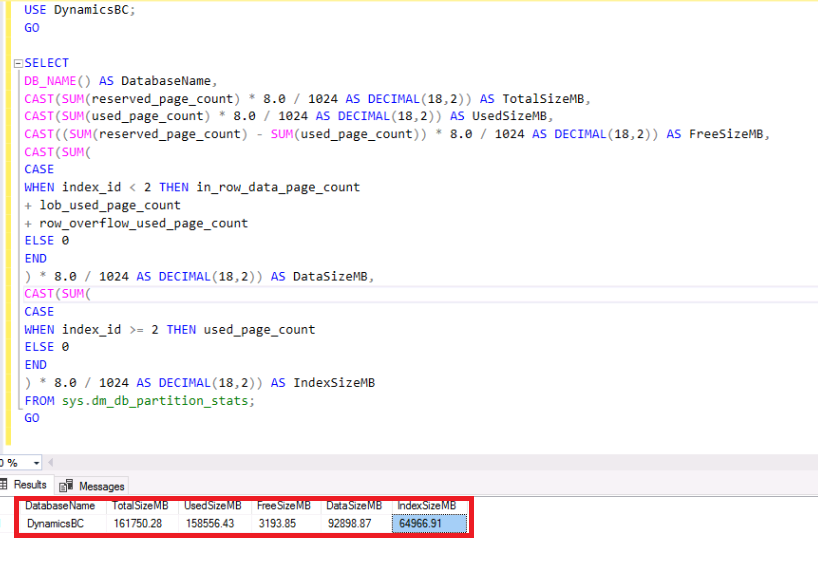
If we look at the ratio between the indexes and the data, we get:
64966.91/92898.87 × 100 = ~70 %
A ratio exceeding 50–60 % often requires an analysis of unused indexes, index overlap and compression.
YES, we are good with this database! 😉
Now, let see if we have unused Indexes I use a script that I created years ago for DWH audit:
/******************************************************************************************/
--Summary
/******************************************************************************************/
USE [master];

DECLARE @sqlcmd NVARCHAR(max);
DECLARE @ExcludeFlag BIT = 0;
DECLARE @IncludeDB VARCHAR(1000);
DECLARE @ExcludeDB VARCHAR(1000);


SET  @IncludeDB = 'DynamicsBC'

SELECT @ExcludeFlag = 0;
--SELECT @ExcludeDB = 'distribution,master,model,msdb,tempdb';


DECLARE @InDBList TABLE (indb SYSNAME);
DECLARE @ExDBList TABLE (exdb SYSNAME);
DECLARE @dbList TABLE (dbID INT NOT NULL PRIMARY KEY, dbName SYSNAME NOT NULL);


IF (@ExcludeFlag = 0)
BEGIN
	INSERT INTO @InDBList SELECT * FROM string_split(@IncludeDB,',');
	INSERT INTO @dbList (dbID, dbName)
		SELECT d.database_id, d.name
		FROM sys.databases d
		WHERE d.name IN (SELECT indb FROM @InDBList);
END
ELSE
BEGIN
--	INSERT INTO @ExDBList SELECT * FROM string_split(@ExcludeDB,',');
	INSERT INTO @dbList (dbID, dbName)
		SELECT d.database_id, d.name
		FROM sys.databases d
--		WHERE d.name NOT IN (SELECT exdb FROM @ExDBList);
--		WHERE d.name NOT IN ('distribution','master','model','msdb','tempdb');

END

/*********************************************************************
Creation of the result table variable to store the information
--*********************************************************************/

IF (SELECT OBJECT_ID('tempdb.dbo.#dbUnUsedIndex')) IS NOT NULL
	DROP TABLE dbo.#dbUnUsedIndex
CREATE TABLE #dbUnUsedIndex (
	dbID INT NOT NULL,
	dbName SYSNAME NOT NULL,
	objName SYSNAME NULL,
	idxName SYSNAME NULL,
	idxID INT NULL,
	UserSeek BIGINT NULL,
	UserScans BIGINT NULL,
	UserLookups BIGINT NULL,
	UserUpdates BIGINT NULL,
	nbRows BIGINT NULL,
	dropStatement NVARCHAR(1000) NULL)

DECLARE @dbID INT;
DECLARE @dbName SYSNAME;
DECLARE cur_dblst CURSOR
  LOCAL STATIC READ_ONLY FORWARD_ONLY
FOR
SELECT dbID, dbName
FROM @dbList;

OPEN cur_dblst
FETCH NEXT FROM cur_dblst INTO @dbID, @dbName
WHILE @@FETCH_STATUS = 0
BEGIN
    --Do something with Id here

	SELECT @sqlcmd = N'
		USE [' + @dbName + ']'
		+ ' SELECT
			@dbID
			, @dbName
			, o.name AS objName
			, i.name AS idxName
			, i.index_id AS idxID
			, dm_ius.user_seeks AS UserSeek
			, dm_ius.user_scans AS UserScans
			, dm_ius.user_lookups AS UserLookups
			, dm_ius.user_updates AS UserUpdates
			, p.TableRows AS nbRows
			, ''DROP INDEX '' + QUOTENAME(i.name)
			+ '' ON '' + QUOTENAME(s.name) + ''.''
			+ QUOTENAME(OBJECT_NAME(dm_ius.OBJECT_ID)) AS ''dropStatement''
		FROM sys.dm_db_index_usage_stats dm_ius
			INNER JOIN sys.indexes i ON i.index_id = dm_ius.index_id AND dm_ius.OBJECT_ID = i.OBJECT_ID
			INNER JOIN sys.objects o ON dm_ius.OBJECT_ID = o.OBJECT_ID
			INNER JOIN sys.schemas s ON o.schema_id = s.schema_id
			INNER JOIN (SELECT SUM(p.rows) TableRows, p.index_id, p.OBJECT_ID
			FROM sys.partitions p GROUP BY p.index_id, p.OBJECT_ID) p
			ON p.index_id = dm_ius.index_id AND dm_ius.OBJECT_ID = p.OBJECT_ID
		WHERE OBJECTPROPERTY(dm_ius.OBJECT_ID,''IsUserTable'') = 1
			AND dm_ius.database_id = DB_ID()
			AND i.type_desc = ''nonclustered''
			AND i.is_primary_key = 0
			AND i.is_unique_constraint = 0
		ORDER BY (dm_ius.user_seeks + dm_ius.user_scans + dm_ius.user_lookups) ASC; '

	INSERT INTO #dbUnUsedIndex (
					dbID,
					dbName,
					objName,
					idxName,
					idxID,
					UserSeek,
					UserScans,
					UserLookups,
					UserUpdates,
					nbRows,
					dropStatement)
	EXEC sp_executesql  @sqlCmd, N'@dbID INT, @dbName SYSNAME', @dbID, @dbName

    FETCH NEXT FROM cur_dblst INTO @dbID, @dbName
END
CLOSE cur_dblst
DEALLOCATE cur_dblst

SELECT Count(*) FROM #dbUnUsedIndex

SELECT * FROM #dbUnUsedIndex
ORDER BY dbName, objName


 IndexInfo;
GO
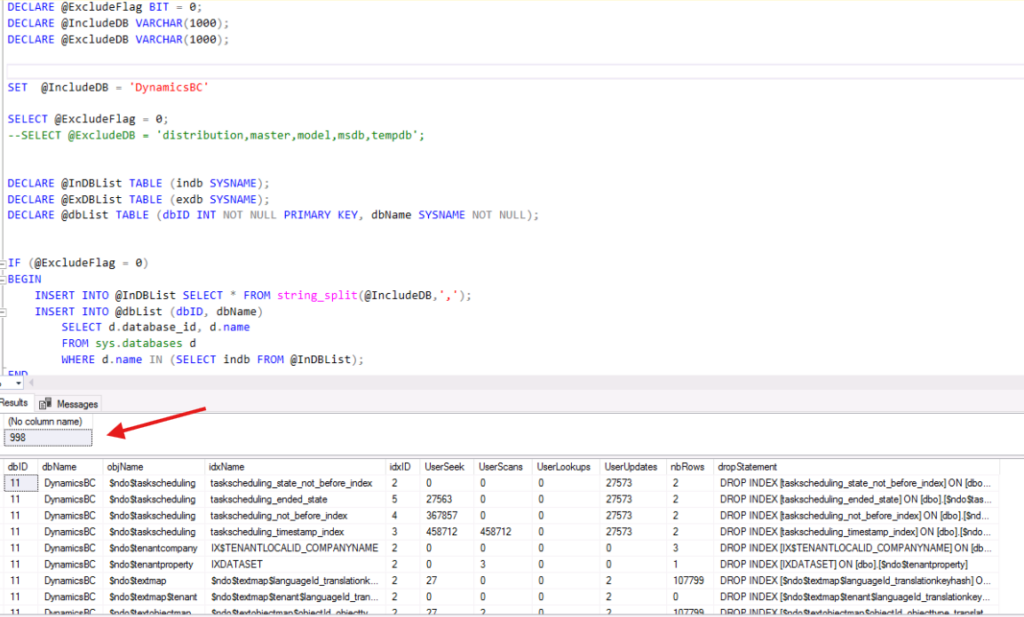
For the total number of Indexes, we use this simple query:
SELECT COUNT(*) AS TotalIndexes
FROM dynamicsBC.sys.indexes i
INNER JOIN sys.tables t
ON i.object_id = t.object_id
WHERE i.index_id > 0;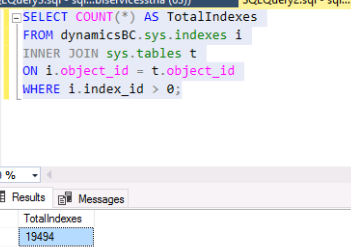
We have 998 unused Index for a total of 19494 Index. This is 5% of the Indexes.
In this case, we will not win a lot. 5% is good but we can have a look because we never known…
The IMPACT
The first impact is on DML INSERT and UPDATE operations.
INSERT
With every insertion, the data is written to the table and several index structures must also be updated, even when one of these indexes is never used by a query.
So we have the following sequence:
INSERT –> write to the table –> update index 1 –> update index 2 –> update index 3 –> update index 4 ….
This is even more costly for this command because, for each operation, the sequence is as follows:
UPDATE
UPDATE –> Delete the old index entry + Create the new entry for each index
The result of all of this is more I/O, more CPU usage and also more entries in the Transaction Log
On heavily used transactional tables, a few unused indexes can account for several per cent of additional load.
The second impact is the storage and the backup
If the unused index represents ~100B of the database.
If 100 GB of indexes are never used, that’s 100 GB backed up unnecessarily, 100 GB restored unnecessarily and, above all, 100 GB stored unnecessarily and just for one environment.
If you have Dev, Test, PreProd & Prod and all in HA… I let you do the calculation but it’s near 1 TB!
The third impact is on the maintenance plan
The following operations must also handle unused indexes:
– Rebuild Index
– Reorganise Index
– CheckDB
– Backups
– Restores
Each additional index extends the maintenance windows…
The ADVISE
You really need to be careful before deleting anything, as an unused index is not necessarily useless.
You should check several factors before you delete unused indexes:
– Full business cycle
– End/Begin of month
– Annual processing
– Reporting
– ETL
– SQL Agent jobs
I generally recommend observing the index between 1 and 3 months before deleting it and without restart. A restart will reset the DMV used for the stats… And always keep the script for recreating the index to hand!
The Green SQL Server DBA Score
Just for fun, we’re going to set up a ‘SQL Server DBA Score’ to use for my tips on the subject:
| Unused index rates (unused index/total index) | Score |
| < 5% | 10/10 |
| 5 to 10% | 8/10 |
| 10 to 20 % | 5/10 |
| > 20 % | 2/10 |
Conclusion
An unused index is a bit like car that never gets driven:
it takes up space;it costs money;it requires maintenance;but it produces no value.
The Green SQL Server DBA doesn’t just seek to add indexes.
They aim to retain only those that deliver measurable business value.
See you soon for the next one!
![Thumbnail [60x60]](https://www.dbi-services.com/blog/wp-content/uploads/2022/08/STH_web-min-scaled.jpg)
![Thumbnail [90x90]](https://www.dbi-services.com/blog/wp-content/uploads/2022/11/TBR-web-min-scaled.jpg)
![Thumbnail [90x90]](https://www.dbi-services.com/blog/wp-content/uploads/2025/11/LTO_WEB.jpg)
![Thumbnail [90x90]](https://www.dbi-services.com/blog/wp-content/uploads/2023/01/APY_web-scaled.jpg)