In the first article, we discovered Exascale from a high level overview with a focus on Exascale Infrastructure. In this new article, we will dive into the Exascale storage architecture, with details about the physical components as well as the services and processes managing this new storage management approach for Exadata.
In this blog post, we will explore the Exascale storage architecture and processes pertaining to Exascale. But before diving in, a quick note to avoid any confusion about Exascale: even though in the previous article, we focused on Exascale Infrastructure and its various benefits in terms of small footprint and hyper-elasticity based on modern cloud characteristics, it is important to keep in mind that Exascale is an Exadata technology and not a cloud-only technology. You can benefit from it in non-cloud deployments as well such as on Exadata Database Machine deployed in your data centers.
Exascale storage components
Here is the overall picture:
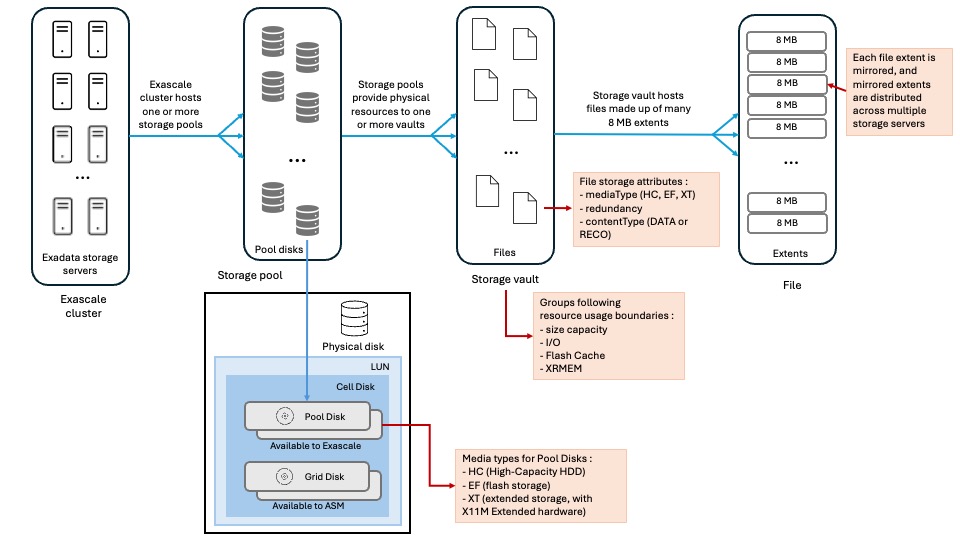
Exascale cluster
An Exascale Cluster is composed of Exadata storage servers to provide storage to Grid Infrastructure clusters and the databases. An Exadata storage server can belong to only one Exascale cluster.
Software services (included in the Exadata System Software stack) run on each Exadata cluster for managing the cluster resources made available to GI and databases, namely pool disks, storage pools, vaults, block volumes and many other.
With Exadata Database Service on Exascale Infrastructure, the number of Exadata storage servers included in the Exascale cluster can be quite huge, hundreds maybe even thousands storage servers, to enable cloud-scale storage resource pooling.
Storage pools
A storage pool is a collection of pool disks (see below for details about pool disks).
Each Exascale cluster requires at least one storage pool.
A storage pool can be dynamically reconfigured by changing pool disks size, allocating more pool disks or adding Exadata storage servers.
The pool disks found inside a storage pool must be of the same media type.
Pool disks
A pool disk is physical storage space allocated from an Exascale-specific cell disk to be integrated in a storage pool.
Each storage server physical disk has a LUN in the storage server OS and a cell disk is created as a container for all Exadata-related partitions within the LUN. Each partition in a cell disk is then designated as a pool disk for Exascale (or grid disk in case of ASM is used instead of Exascale).
A media type is associated to each pool disk based on the underlying storage device and can be one of the following :
- HC : points to high capacity storage using hard disk drives
- EF : based on extreme flash storage devices
- XT : corresponds to extended storage using hard disk drives found in Exadata Storage Server X11M Extended (XT) hardware
Vaults
Vaults are logical storage containers used for storing files and are allocated from storage pools. By default, without specific provisioning attributes, vaults can use all resources from all storage pools of an Exascale cluster.
Here are the two main services provided by vaults:
- Security isolation: a security perimeter is associated with vaults based on user access controls which guarantee a strict isolation of data between users and clusters.
- Resource control: storage pool resources usage is configured at the vault level for attributes like storage space, IOPS, XRMEM and flash cache sizing.
For those familiar with ASM, think of vaults as the equivalent to ASM disk groups. For example, instance parameters like ‘db_create_file_dest’ and ‘db_recovery_file_dest’ reference vaults instead of ASM disk groups by using ‘@vault_name’ syntax.
Since attributes like redundancy, type of file content, type of media are positioned at the file level instead at the logical storage container, there is no need to organize vaults in the same manner as we did for disk groups. For instance, we don’t need to create a first vault for data and a second vault for recovery files as we are used to with ASM.
Beside database files, vaults can also store other types of files even though it is recommended to store non database files on block volumes. That’s because Exascale is optimized for storing large files such as database files whereas regular files are typically much smaller and fit more on block volumes.
Files
The main files found on Exascale storage are Database and Grid Infrastructure files. Beyond that, all objects in Exascale are represented as files of a certain type. Each file type has storage attributes defined in a template. The file storage attributes are :
- mediaType : HC, EF or XT
- redundancy : currently high
- contentType : DATA and RECO
This makes a huge difference with ASM where different redundancy needs required to create different disk groups. With Exascale, it is now possible to store files with different redundancy requirements in the same storage structure (vaults). This also enables to optimize usage of the storage capacity.
Files are composed of extents of 8MB in size which are mirrored and stripped across all vault’s storage resources.
The tight integration of the database kernel with Exascale makes it possible for Exascale to automatically understand the type of file the database asks to create and thus applies the appropriate attributes defined in the file template. This prevents Exascale to store data and recovery files extents (more on extents in the next section) on the same disks and also guarantees that mirrored extents are located on different storage servers than the primary extent.
File extents
Remember that in Exascale, storage management moved from the compute servers to the storage servers. Specifically, this means the building blocks of files, namely extents, are managed by the storage servers.
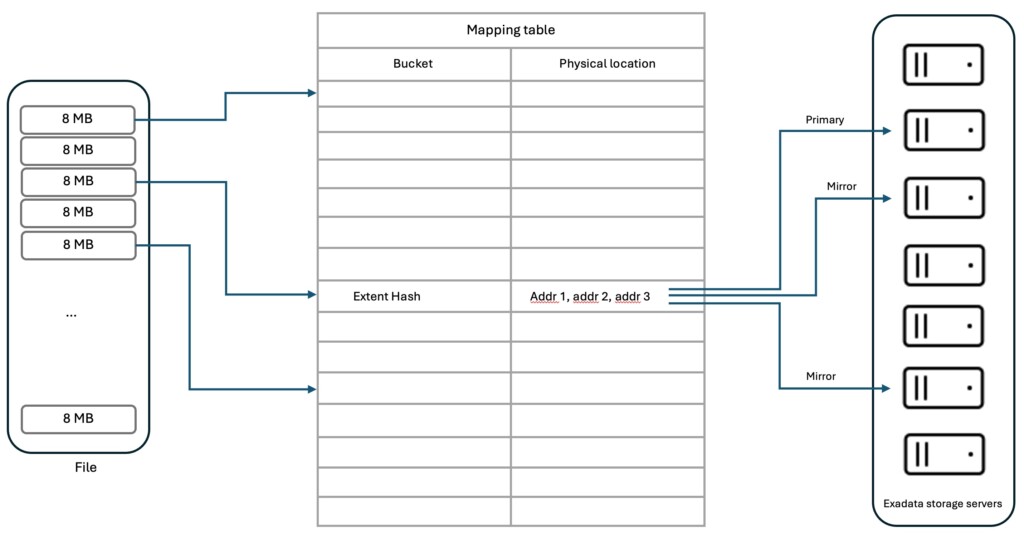
The new data structure used for extent management is a mapping table which tracks for each file extent the location of the primary and mirror copy extents in the storage servers. This mapping table is cached by each database server and instance to retrieve its file extents location. Once the database has the extent location, it can directly make an I/O call to the appropriate storage server. In case the mapping table is no more up-to-date because of database physical structure changes or storage servers addition or removal, an I/O call can be rejected, triggering a mapping table refresh allowing the I/O call to be retried.
Exascale Block Store with RDMA-enabled block volumes
Block volumes can be allocated from storage pools to store regular files on file systems like ACFS or XFS. They also enable centralization of VC VM images, thus cutting the dependency of VM images to internal compute node storage and streamlining migrations between physical database servers. Clone, snapshot and backup and restore features for block volumes can leverage all resources of the available storage servers.
Exascale storage services
From a software perspective, Exascale is composed of a number of software services available in the Exadata System Software (since release 24.1). These software services run mainly on the Exadata Storage Servers but also on the Exadata Database Servers.
Exascale storage server services
| Service | Description |
| EGS – Cluster Services | EGS (Exascale Global Services) main task is to manage the storage allocated to storage pools. In addition, EGS also controls storage cluster membership, security and identity services as well as monitoring the other Exascale services. |
| ERS – Control Services | ERS (Exascale RESTful Services) provide the management endpoint for all Exascale management operations. The new Exascale command-line interface (ESCLI), used for monitoring and management functions, leverages ERS for command execution. |
| EDS – Exascale Vault Manager Services | EDS (Exascale Data Services) are responsible for files and vaults metadata management and are made up of two groups of services: System Vault Manager and User Vault Manager. System Vault Manager (SYSEDS) manages Exascale vaults metadata, such as the security perimeter through ACL and vaults attributes User Vault Manager (USREDS) manages Exascale files metadata, such as ACLs and attributes as well as clones and snapshots metadata |
| BSM – Block Store Manager | BSM manages Exascale block storage metadata and controls all block store management operations like volume creation, attachment, detachment, modification or snapshot. |
| BSW – Block Store Worker | These services perform the actual requests from clients and translate them to storage server I/O. |
| IFD – Instant Failure Detection | IFD service watches for failures which could arise in the Exascale cluster and triggers recovery actions when needed. |
| Exadata Cell Services | Exadata cell services are required for Exascale to function and both services work in conjunction to provide the Exascale features. |
Exascale database server services
| Service | Description |
| EGS – Cluster Services | EGS instances will run on database servers when the Exadata configuration has fewer than five storage servers |
| BSW – Block Store Worker | Services requests from block store clients and performs the resulting storage server I/O |
| ESNP – Exascale Node Proxy | ESNP provides Exascale cluster state to GI and Database processes. |
| EDV – Exascale Direct Volume | EDV service exposes Exascale block volumes to Exadata compute nodes and runs I/O requests on EDV devices. |
| EGSB/EDSB | Per database instance services that maintain metadata about the Exascale cluster and vaults |
Below diagram depicts how the various Exascale services are dispatched on the storage and compute nodes:
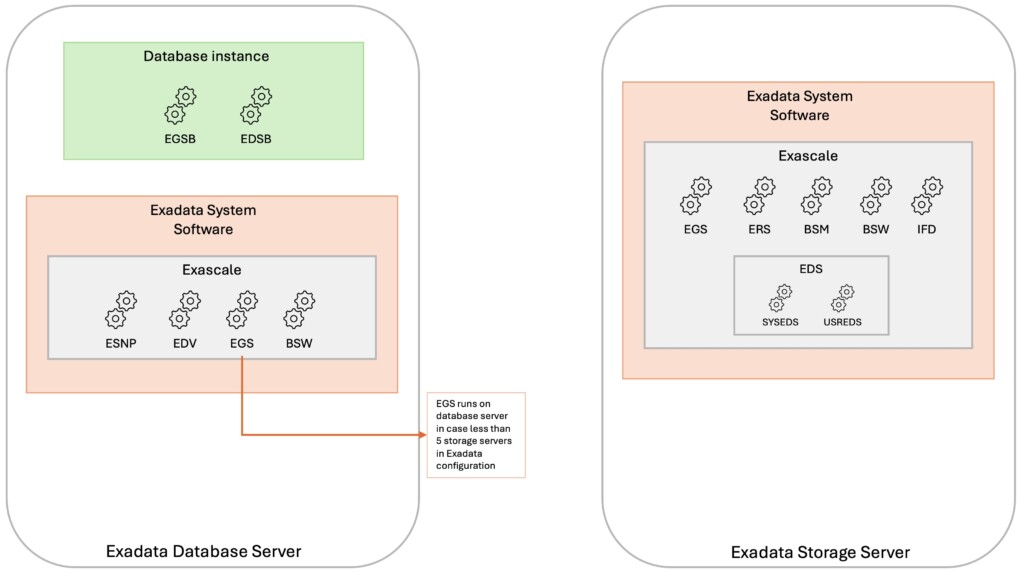
Wrap-up
By rearchitecting Exadata storage management with focus on space efficiency, flexibility and elasticity, Exascale can now overcome the main limitations of ASM:
- diskgroup resizing complexity and time-consuming rebalance operation
- space distribution among DATA and RECO diskgroups requiring rigorous estimation of storage needs for each
- sparse diskgroup requirement for cloning with a read-only test master or use of ACFS without smart scan
- redundancy configuration at the diskgroup level
The below links will provide you further details on the matter:
Oracle Exadata Exascale advantages blog
Oracle Exadata Exascale storage fundamentals blog
Oracle And Me blog – Why ASM Needed an Heir Worthy of the 21st Century
Oracle And Me blog – New Exascale architecture
More on the exciting Exascale technology in coming posts …
![Thumbnail [60x60]](https://www.dbi-services.com/blog/wp-content/uploads/2025/07/ALK_MIN.jpeg)
![Thumbnail [90x90]](https://www.dbi-services.com/blog/wp-content/uploads/2025/05/JDE_Web-1-scaled.jpg)
![Thumbnail [90x90]](https://www.dbi-services.com/blog/wp-content/uploads/2024/02/XFG-web.jpg)