Is it possible to create a new GoldenGate deployment with the REST API ? This is the question I will try to answer in this blog, based on my experience with the REST API. I will dive in what is done by the oggca.sh script when adding a new deployment and see if we can replicate this with the REST API.
Deployment creation REST API endpoint
When I was designing the GoldenGate Python client, I realized that some endpoints are listed in the documentation but not usable in practice. This is the case of the create_connection endpoint/method, which is read-only. But is it the case for the deployment creation ?
The GoldenGate REST API provides three endpoints to manage your deployments’ life cycle:
- Create a Deployment –
POST–/services/{version}/deployments/{deployment} - Remove a Deployment –
DELETE–/services/{version}/deployments/{deployment} - Update a Deployment –
PATCH–/services/{version}/deployments/{deployment}
In the GoldenGate Python client I released, they are available through the create_deployment, remove_deployment and update_deployment methods.
The same REST API provides three endpoints to manage the services inside your deployments:
- Create a Service –
POST–/services/{version}/deployments/{deployment}/services/{service} - Remove a Service –
DELETE–/services/{version}/deployments/{deployment}/services/{service} - Update Service Properties –
PATCH–/services/{version}/deployments/{deployment}/services/{service}
In the GoldenGate Python client, these endpoints are available through the create_service, remove_service and update_service_properties methods.
What does oggca.sh do in the background ?
Before even attempting to create a new deployment with the REST API, I figured I would reverse engineer the configuration assistant script oggca.sh. In this section, I will use the method I described in this blog to analyze the restapi.log efficiently.
After creating a new deployment named ogg_test_02 with oggca.sh, I looked at the logs of the service manager and the deployment to see what was done in the background.
restapi_read.py /u01/app/oracle/product/ogg26sm/var/log/ restapi.ndjson
restapi_read.py /u01/app/oracle/product/ogg_test_02/var/log/ restapi_02.ndjson
Again, look at this blog if you don’t understand where this restapi_read.py script comes from. To only retrieve the non-GET requests made to the API, I use the following commands. I’m also narrowing down the search with START_EPOCH and END_EPOCH.
START_EPOCH=$(date -d "2026-02-25 18:18:01 UTC" +%s)
END_EPOCH=$(date -d "2026-02-25 18:19:02 UTC" +%s)
jq -c --argjson s "$START_EPOCH" --argjson e "$END_EPOCH" 'select(.restapi_epoch >= $s and .restapi_epoch <= $e and .request.context.verb != "GET")' restapi.ndjson | jq -r '{verb: .request.context.verb, uri: .request.context.uri, http_code: .response.context.code, request: .request.content, date: .restapi_datetime}' -c
The commands above give me the following JSON documents for the restapi.log of the service manager.
{"verb":"POST","uri":"/services/v2/deployments/ogg_test_02","http_code":"201 Created","request":{"passwordRegex":".*","environment":[{"name":"TNS_ADMIN","value":"/u01/app/oracle/network/admin"}],"oggConfHome":"/u01/app/oracle/product/ogg_test_02/etc/conf","oggVarHome":"/u01/app/oracle/product/ogg_test_02/var","oggHome":"/u01/app/oracle/product/ogg26","oggEtcHome":"/u01/app/oracle/product/ogg_test_02/etc","metrics":{"servers":[{"protocol":"uds","socket":"PMSERVER.s","type":"pmsrvr"}],"enabled":true},"oggSslHome":"/u01/app/oracle/product/ogg_test_02/etc/ssl","oggArchiveHome":"/u01/app/oracle/product/ogg_test_02/var/lib/archive","oggDataHome":"/u01/app/oracle/product/ogg_test_02/var/lib/data","enabled":true,"status":"running"},"date":"2026-02-25 18:18:09.112+0000"}
{"verb":"POST","uri":"/services/v2/deployments/ogg_test_02/services/adminsrvr","http_code":"201 Created","request":{"critical":true,"config":{"authorizationDetails":{"common":{"allow":["Digest","x-Cert","Basic","Bearer"]}},"securityDetails":{"network":{"common":{"fipsEnabled":false,"id":"OracleSSL"}}},"authorizationEnabled":false,"network":{"ipACL":[{"address":"ANY","permission":"allow"}],"serviceListeningPort":{"address":"127.0.0.1","port":7820}}},"enabled":true,"status":"running"},"date":"2026-02-25 18:18:09.126+0000"}
{"verb":"PATCH","uri":"/services/v2/deployments/ogg_test_02/services/adminsrvr","http_code":"200 OK","request":{"config":{"csrfHeaderProtectionEnabled":false,"securityDetails":{"network":{"common":{"fipsEnabled":false,"id":"OracleSSL"},"inbound":{"authMode":"clientOptional_server","role":"server","crlEnabled":false,"sessionCacheDetails":{"limit":20480,"timeoutSecs":1800},"cipherSuites":"^((?!anon|RC4|NULL|3DES).)*$","certACL":[{"name":"ANY","permission":"allow"}],"sessionCacheEnabled":false},"outbound":{"authMode":"client_server","role":"client","crlEnabled":false,"cipherSuites":"^.*$","sessionCacheEnabled":false}}},"workerThreadCount":5,"csrfTokenProtectionEnabled":true,"network":{"ipACL":[{"address":"ANY","permission":"allow"}],"serviceListeningPort":[{"address":"0.0.0.0","port":7820}]},"hstsEnabled":true,"authorizationDetails":{"movingExpirationWindowSecs":900,"common":{"allow":["Digest","x-Cert","Basic","Bearer"],"customAuthorizationEnabled":true},"useMovingExpirationWindow":false,"sessionDurationSecs":3600},"defaultSynchronousWait":30,"authorizationEnabled":true,"hstsDetails":"max-age=31536000;includeSubDomains","asynchronousOperationEnabled":true,"taskManagerEnabled":true,"legacyProtocolEnabled":false},"status":"restart"},"date":"2026-02-25 18:18:12.175+0000"}
{"verb":"POST","uri":"/services/v2/deployments/ogg_test_02/services/distsrvr","http_code":"201 Created","request":{"critical":true,"config":{"authorizationDetails":{"common":{"allow":["Digest","x-Cert","Basic","Bearer"]}},"securityDetails":{"network":{"common":{"fipsEnabled":false,"id":"OracleSSL"}}},"authorizationEnabled":true,"network":{"ipACL":[{"address":"ANY","permission":"allow"}],"serviceListeningPort":[{"address":"0.0.0.0","port":7821}]}},"enabled":true,"status":"running"},"date":"2026-02-25 18:18:12.203+0000"}
{"verb":"POST","uri":"/services/v2/deployments/ogg_test_02/services/recvsrvr","http_code":"201 Created","request":{"critical":true,"config":{"authorizationDetails":{"common":{"allow":["Digest","x-Cert","Basic","Bearer"]}},"securityDetails":{"network":{"common":{"fipsEnabled":false,"id":"OracleSSL"}}},"authorizationEnabled":true,"network":{"ipACL":[{"address":"ANY","permission":"allow"}],"serviceListeningPort":[{"address":"0.0.0.0","port":7822}]}},"enabled":true,"status":"running"},"date":"2026-02-25 18:18:12.237+0000"}
{"verb":"POST","uri":"/services/v2/deployments/ogg_test_02/services/pmsrvr","http_code":"201 Created","request":{"critical":false,"config":{"authorizationDetails":{"common":{"allow":["Digest","x-Cert","Basic","Bearer"]}},"securityDetails":{"network":{"common":{"fipsEnabled":false,"id":"OracleSSL"}}},"authorizationEnabled":true,"network":{"ipACL":[{"address":"ANY","permission":"allow"}],"serviceListeningPort":[{"address":"0.0.0.0","port":7823}]}},"enabled":true,"status":"running"},"date":"2026-02-25 18:18:12.288+0000"}
And the same commands applied to the deployment’s log give me the following:
{"verb":"POST","uri":"/services/v2/authorizations/security/ogg","http_code":"201 Created","request":{"credential":"** Masked **","info":"Oracle GoldenGate Administrator"},"date":"2026-02-25 18:18:10.147+0000"}
{"verb":"POST","uri":"/services/v2/config/files/GLOBALS","http_code":"201 Created","request":{"lines":["GGSCHEMA OGGADMIN"]},"date":"2026-02-25 18:18:13.334+0000"}
In total, six non-GET requests are passing through the API in the Service Manager, and two are passing through the administration service of the newly created deployment. Here is the detail, in the correct order.
POSTon/services/v2/deployments/ogg_test_02(create_deploymentmethod in the client) : Creation of the deployment.POSTon/services/v2/deployments/ogg_test_02/services/adminsrvr(create_servicemethod) : Creation of the Administration Service, unsecured at this point.POSTon/services/v2/authorizations/security/ogg(create_usermethod) : Creation of the Security user on the new deployment.PATCHon/services/v2/deployments/ogg_test_02/services/adminsrvr(update_service_properties) : Update on the Administration Service.POSTon/services/v2/config/files/GLOBALS(create_configuration_filemethod) : Creation of theGLOBALSparameter file, based on the input fromoggca.sh.POSTon/services/v2/deployments/ogg_test_02/services/distsrvr: Creation of the Distribution ServicePOSTon/services/v2/deployments/ogg_test_02/services/recvsrvr: Creation of the Receiver ServicePOSTon/services/v2/deployments/ogg_test_02/services/pmsrvr: Creation of the Performance Metrics Service.
If we analyze the content of the request, we see that all services are created with nearly the same configuration. The administration service is created with the following configuration:
{"critical":true,"config":{"authorizationDetails":{"common":{"allow":["Digest","x-Cert","Basic","Bearer"]}},"securityDetails":{"network":{"common":{"fipsEnabled":false,"id":"OracleSSL"}}},"authorizationEnabled":false,"network":{"ipACL":[{"address":"ANY","permission":"allow"}],"serviceListeningPort":{"address":"127.0.0.1","port":7820}}},"enabled":true,"status":"running"}And the other services with the following configuration:
{"request":{"critical":false,"config":{"authorizationDetails":{"common":{"allow":["Digest","x-Cert","Basic","Bearer"]}},"securityDetails":{"network":{"common":{"fipsEnabled":false,"id":"OracleSSL"}}},"authorizationEnabled":true,"network":{"ipACL":[{"address":"ANY","permission":"allow"}],"serviceListeningPort":[{"address":"0.0.0.0","port":7823}]}},"enabled":true,"status":"running"}}Only the authorizationEnabled and address are different, but they are corrected in the PATCH request made to the administration service. The reason is that when creating the unsecured administration service first (authorizationEnabled = False), you might not want to make it available to everyone, so you limit its access (address = 127.0.0.1).
Now that we know what the configuration assistant does, let’s try to replicate this with the REST API.
Creating a GoldenGate deployment with the REST API
In this section, I will be using the Python client I presented in a previous blog, but you can do this with direct calls to the API, in Python or in any other language. Let’s start by listing the deployments in our current environment:
>>> from oggrestapi import OGGRestAPI
>>> ogg_client = OGGRestAPI(url="http://vmogg:7809", username="ogg", password="ogg")
Connected to OGG REST API at http://vmogg:7809
>>> ogg_client.list_deployments()
[{'name': 'ServiceManager', 'status': 'running'}, {'name': 'ogg_test_01', 'status': 'running'}, {'name': 'ogg_test_02', 'status': 'running'}]
Now, let’s try to add an ogg_test_03 deployment, following the same order given above.
ogg_client.create_deployment(
    deployment="ogg_test_03",
    data={
        "passwordRegex":".*",
        "environment":[{"name":"TNS_ADMIN","value":"/u01/app/oracle/network/admin"}],
        "oggConfHome":"/u01/app/oracle/product/ogg_test_03/etc/conf",
        "oggVarHome":"/u01/app/oracle/product/ogg_test_03/var",
        "oggHome":"/u01/app/oracle/product/ogg26",
        "oggEtcHome":"/u01/app/oracle/product/ogg_test_03/etc",
        "metrics":{"servers":[{"protocol":"uds","socket":"PMSERVER.s","type":"pmsrvr"}],"enabled":True},
        "oggSslHome":"/u01/app/oracle/product/ogg_test_03/etc/ssl",
        "oggArchiveHome":"/u01/app/oracle/product/ogg_test_03/var/lib/archive",
        "oggDataHome":"/u01/app/oracle/product/ogg_test_03/var/lib/data",
        "enabled":True,
        "status":"running"
    }
)
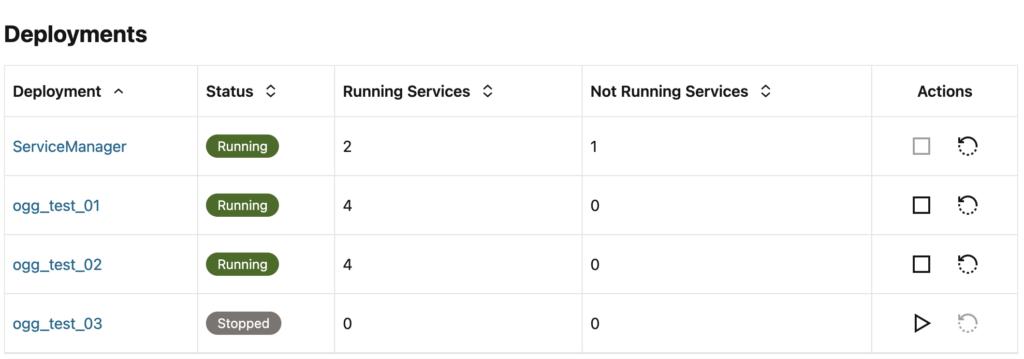
In the web UI, we can see the new deployment ogg_test_03 without any service at this point.
Then, create the administration service.
ogg_client.create_service(
    service='adminsrvr',
    deployment='ogg_test_03',
    data={
        "$schema": "ogg:service",
        "critical":True,
        "config":{
            "authorizationDetails":{"common":{"allow":["Digest","x-Cert","Basic","Bearer"]}},
            "securityDetails":{"network":{"common":{"fipsEnabled":False,"id":"OracleSSL"}}},
            "authorizationEnabled":False,
            "network":{"ipACL":[{"address":"ANY","permission":"allow"}],
            "serviceListeningPort":{"address":"127.0.0.1","port":7830}}
        },
        "enabled":True,
        "status":"running"
    })
We can see the new administration service in the list of services of the new deployment:

To secure the administration service, let’s create the Security user. To do this, you need to connect locally to the administration service with the port chosen above (7830). You can choose username=None and password=None, since the service is not yet secured. And for a way to do this remotely, read the blog until the end !
ogg_client_adm = OGGRestAPI(url="http://127.0.0.1:7830", username=None, password=None)

ogg_client_adm.create_user(
    user='ogg',
    role='Security',
    data={
        "credential": "your_password",
        "info": "Oracle GoldenGate Administrator"
    })
Since we are already connected, let’s add the GLOBALS file.
ogg_client_adm.create_configuration_file(
    file='GLOBALS',
    data={
        "lines": [
            "GGSCHEMA OGGADMIN"
        ]
    })
Then, we can update the administration service properties to secure the service and make it available.
ogg_client.update_service_properties(
    service='adminsrvr',
    deployment='ogg_test_03',
    data={
        "config":{
            "csrfHeaderProtectionEnabled":False,
            "securityDetails":{"network":{"common":{"fipsEnabled":False,"id":"OracleSSL"},"inbound":{"authMode":"clientOptional_server","role":"server","crlEnabled":False,"sessionCacheDetails":{"limit":20480,"timeoutSecs":1800},"cipherSuites":"^((?!anon|RC4|NULL|3DES).)*$","certACL":[{"name":"ANY","permission":"allow"}],"sessionCacheEnabled":False},"outbound":{"authMode":"client_server","role":"client","crlEnabled":False,"cipherSuites":"^.*$","sessionCacheEnabled":False}}},
            "workerThreadCount":5,
            "csrfTokenProtectionEnabled":True,
            "network":{"ipACL":[{"address":"ANY","permission":"allow"}],"serviceListeningPort":[{"address":"0.0.0.0","port":7830}]},
            "hstsEnabled":True,
            "authorizationDetails":{"movingExpirationWindowSecs":900,"common":{"allow":["Digest","x-Cert","Basic","Bearer"],"customAuthorizationEnabled":True},"useMovingExpirationWindow":False,"sessionDurationSecs":3600},
            "defaultSynchronousWait":30,
            "authorizationEnabled":True,
            "hstsDetails":"max-age=31536000;includeSubDomains",
            "asynchronousOperationEnabled":True,
            "taskManagerEnabled":True,
            "legacyProtocolEnabled":False
        },
        "status":"restart"
    })
And finally, we can add the three remaining services:
- Distribution service, on port
7831. - Receiver service, on port
7832. - Performance metrics service, on port
7833.
ogg_client.create_service(
    service='distsrvr',
    deployment='ogg_test_03',
    data={
        "$schema": "ogg:service",
        "critical":True,
        "config":{
            "authorizationDetails":{"common":{"allow":["Digest","x-Cert","Basic","Bearer"]}},
            "securityDetails":{"network":{"common":{"fipsEnabled":False,"id":"OracleSSL"}}},
            "authorizationEnabled":True,
            "network":{"ipACL":[{"address":"ANY","permission":"allow"}],
            "serviceListeningPort":{"address":"0.0.0.0","port":7831}}
        },
        "enabled":True,
        "status":"running"
    })

ogg_client.create_service(
    service='recvsrvr',
    deployment='ogg_test_03',
    data={
        "$schema": "ogg:service",
        "critical":True,
        "config":{
            "authorizationDetails":{"common":{"allow":["Digest","x-Cert","Basic","Bearer"]}},
            "securityDetails":{"network":{"common":{"fipsEnabled":False,"id":"OracleSSL"}}},
            "authorizationEnabled":True,
            "network":{"ipACL":[{"address":"ANY","permission":"allow"}],
            "serviceListeningPort":{"address":"0.0.0.0","port":7832}}
        },
        "enabled":True,
        "status":"running"
    })

ogg_client.create_service(
    service='pmsrvr',
    deployment='ogg_test_03',
    data={
        "$schema": "ogg:service",
        "critical":True,
        "config":{
            "authorizationDetails":{"common":{"allow":["Digest","x-Cert","Basic","Bearer"]}},
            "securityDetails":{"network":{"common":{"fipsEnabled":False,"id":"OracleSSL"}}},
            "authorizationEnabled":True,
            "network":{"ipACL":[{"address":"ANY","permission":"allow"}],
            "serviceListeningPort":{"address":"0.0.0.0","port":7833}}
        },
        "enabled":True,
        "status":"running"
    })
And that’s it ! You just created a functional deployment with the REST API.
Can I create a deployment from a remote server ?
When running oggca.sh or the API method described above, you first create an unsecured administration service, only accessible locally. But if you want to do all of this remotely, you just have to create the unsecured administration service with .config.network.serviceListeningPort.[0].address set to 0.0.0.0 right from the start. This way, you will be able to create the Security user remotely, and add deployments to your GoldenGate setups without even connecting to the server !
![Thumbnail [60x60]](https://www.dbi-services.com/blog/wp-content/uploads/2025/05/JDE_Web-1-scaled.jpg)
![Thumbnail [90x90]](https://www.dbi-services.com/blog/wp-content/uploads/2024/04/SIT_web.png)