Introduction
In this article, I will explain how I containerized my Vuetify + Vue 3 application with GitLab CI/CD.
My goal was to deploy my application on Kubernetes. To achieve this, I need to:
- Build the Vue 3 application
- Build the Docker image
- Push the image to the GitLab registry
Quick overview: overall, the full project uses a micro-service architecture and runs on Kubernetes. The Vue 3 project only contains the UI, and we containerize it and serve it with an Nginx image. The backend is a REST API built with NestJS, and we containerize it separately.
Add a Dockerfile to the project
First, I need a Dockerfile to build the image for my application. In this Dockerfile, I use a double-stage build. As a result, a final image containing only what is strictly necessary.
# Build the Vue.js application
FROM node:current-alpine AS build
COPY . ./app
WORKDIR /app
RUN npm install
RUN npm run build

# Final Nginx container
FROM nginx:alpine
COPY --from=build /app/dist /usr/share/nginx/html
The important part in this Dockerfile is the multi-stage build.
The first part, with the Node container, build the application, but production does not require all the tools used during this step.
As a result, the second step copies only the dist folder, the result of the build, and embeds it into an Nginx container to serve the generated files.
Add the CI/CD pipeline configuration
In the second step, I add the .gitlab-ci.yml file to the project root directory.
This file configures the pipeline, I use the docker-in-docker service to build the image. First, I login into the registry of my project. Next, I build and push the image.
stages:
- build

build:
  # Use the official docker image.
  image: docker:latest
  stage: build
  services:
    - docker:dind
  before_script:
    # Login to the gitlab registry
    - docker login -u "$CI_REGISTRY_USER" -p "$CI_REGISTRY_PASSWORD" $CI_REGISTRY
  script:
    # Build and push the image
    - docker build --pull -t "$CI_REGISTRY_IMAGE:$CI_COMMIT_SHA" .
    - docker push "$CI_REGISTRY_IMAGE:$CI_COMMIT_SHA"

  # Run this job where a Dockerfile exists
  rules:
    - if: $CI_COMMIT_BRANCH
      exists:
        - Dockerfile
Note: all the variables ($CI_REGISTRY_IMAGE, $CI_COMMIT_SHA…) used in the .gitlab-ci.yml are predefined variables provided by GitLab CI/CD.
Build the container
Once I push the .gitlab-ci.yml file, GitLab automatically triggers the pipeline following the rules definition.
After completion, the status of the pipeline is green and the status passed
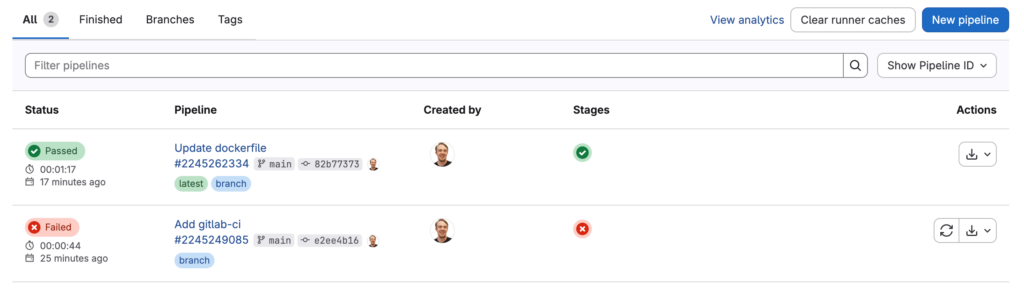
As expected, the image is available in the registry of the project.

Conclusion
In summary, properly containerizing a Vue application is easy, but it requires to separate build and execution. A multi-step build with an Nginx container produces a lightweight, production-ready image.
![Thumbnail [60x60]](https://www.dbi-services.com/blog/wp-content/uploads/2022/08/NME_web-min-scaled.jpg)
![Thumbnail [90x90]](https://www.dbi-services.com/blog/wp-content/uploads/2022/08/ADE_WEB-min-scaled.jpg)
![Thumbnail [90x90]](https://www.dbi-services.com/blog/wp-content/uploads/2022/08/GRE_web-min-scaled.jpg)
![Thumbnail [90x90]](https://www.dbi-services.com/blog/wp-content/uploads/2022/08/DWE_web-min-scaled.jpg)