As part of a GoldenGate setup automation, changing the Default profile of your extracts and replicats seems like a good start if you don’t want to deal with custom profiles or changing each individual configuration.
Unfortunately, there is no easy way to modify an existing profile from the adminclient (there is no alter profile command). The Default profile makes no exception, so you will have to use the REST API for this. In this blog, I will present two ways of doing it:
- Updating the
Defaultprofile directly. - Creating a custom profile, and set it as
Default.
Using the Python client for GoldenGate I presented in another blog post, you can easily create a session connecting to your GoldenGate setup and retrieve the existing configuration. For this, we will use the following methods / endpoints:
retrieve_configuration_valueto get the current configuration (GET /services/{version}/config/types/{type}/values/{value})replace_configuration_valueto update the profile (PUT /services/{version}/config/types/{type}/values/{value})
from oggrestapi import OGGRestAPI

ogg_client=OGGRestAPI(
    url="https://vmogg:7810",
    username="ogg",
    password="ogg"
)

ogg_client.retrieve_configuration_value(
    value='ogg:managedProcessSettings:Default',
    type='ogg:managedProcessSettings')
This gives us the basic configuration of all new extracts and replicats in GoldenGate. Let’s see the default values:
>>> ogg_client.retrieve_configuration_value(
    value='ogg:managedProcessSettings:Default',
    type='ogg:managedProcessSettings')
{'$schema': 'ogg:managedProcessSettings', 'autoStart': {'enabled': False, 'delay': 0}, 'autoRestart': {'enabled': False, 'onSuccess': False, 'delay': 0, 'retries': 9, 'window': 60, 'disableOnFailure': True}}
Let’s have a look at the different parameters here:
autoStart.enabled: whether the process will start automatically after the Administration Server starts.autoStart.delay: delay in seconds before starting the process.autoRestart.enabled: whether to restart the process after it fails.autoRestart.onSuccess: the process is only restarted if it fails.autoRestart.delay: waiting time (in seconds) before attempting to restart a process once it fails.autoRestart.retries: maximum number of retries before stopping restart attempts.autoRestart.window: timeframe before GoldenGate will attempt to restart the process again.autoRestart.disableOnFailure: if set to True, GoldenGate will disable the restart if it fails to restart within theretries/windowsetting. You will have to start the process manually if this happens.
Updating the Default profile directly
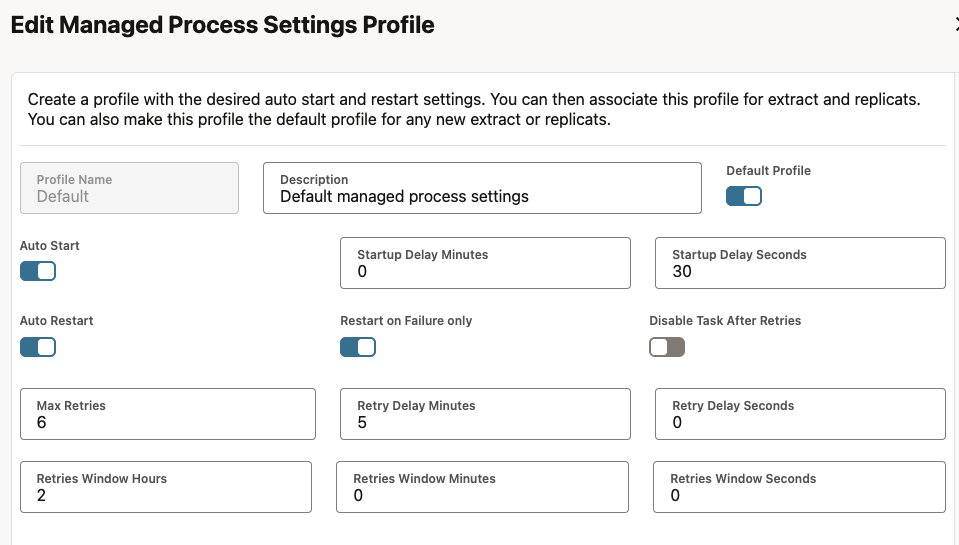
To update the Default profile, just create your own configuration and use the following example (based on the description given above) to push it to your GoldenGate deployment. Here, for instance, autoStart will be delayed by 30 seconds, and the process will try to restart every 5 minutes, and stop trying to restart after six retries. It will attempt to start again after two hours.
ogg_client.replace_configuration_value(
    value='ogg:managedProcessSettings:Default',
    type='ogg:managedProcessSettings',
    data={
        '$schema': 'ogg:managedProcessSettings',
        'autoStart': {
            'enabled': True,
            'delay': 30
        },
        'autoRestart': {
            'enabled': True,
            'retries': 6,
            'delay': 300,
            'window': 7200,
            'onSuccess': False,
            'disableOnFailure': False
        }
    }
)
We can check by retrieving the configuration again.
# Checking new configuration with the REST API
ogg_client.retrieve_configuration_value(
    value='ogg:managedProcessSettings:Default',
    type='ogg:managedProcessSettings')
{'$schema': 'ogg:managedProcessSettings', 'autoStart': {'enabled': True, 'delay': 30}, 'autoRestart': {'enabled': True, 'retries': 6, 'delay': 300, 'window': 7200, 'onSuccess': False, 'disableOnFailure': False}}
Or you can check in the web UI in the Managed Process Profiles tab.

Setting a custom profile to Default
If for some reason, you would rather keep the Default profile and having a custom profile as default, you have to create a new profile first, and set it as default. To do this, we use the create_configuration_value method / endpoint, which is the same endpoint as before but with the POST verb. If we keep the same profile as in the previoux example, here is the script to run. Only the method changes, as well as the value, where Default is changed with the name of your profile (NewDefaultProfile, here).
ogg_client.create_configuration_value(
    value='ogg:managedProcessSettings:NewDefaultProfile',
    type='ogg:managedProcessSettings',
    data={
        '$schema': 'ogg:managedProcessSettings',
        'autoStart': {
            'enabled': True,
            'delay': 30
        },
        'autoRestart': {
            'enabled': True,
            'retries': 6,
            'delay': 300,
            'window': 7200,
            'onSuccess': False,
            'disableOnFailure': False
        }
    }
)
After this, you need to do two things:
- Create the
isDefaultflag for your new profile, and set it toTrue. This is done with the samecreate_configuration_valuemethod, but on a different type calledogg:configDataDescription. - Update the
isDefaultflag for theDefaultprofile toFalse. Since the property already exists, we will use thereplace_configuration_valuemethod.
Here is how to do the creation of the flag :
ogg_client.create_configuration_value(
    value='ogg:managedProcessSettings:NewDefaultProfile',
    type='ogg:configDataDescription',
    data={
        'isDefault': True
    }
)
And to update the Default profile:
ogg_client.replace_configuration_value(
    value='ogg:managedProcessSettings:Default',
    type='ogg:configDataDescription',
    data={
        'isDefault': False
    }
)
From now on, any new extract or replicat will be assigned to this NewDefaultProfile !
![Thumbnail [60x60]](https://www.dbi-services.com/blog/wp-content/uploads/2025/05/JDE_Web-1-scaled.jpg)
![Thumbnail [90x90]](https://www.dbi-services.com/blog/wp-content/uploads/2022/08/MAW_web-min-scaled.jpg)