

In Enterprise Manager 12c, if you need to display the database storage, from the report menu you have the following possibilities:

From now on, with Enterprise Manager 13c, this possibility does not exist anymore in the report menu, you have to use the BI publisher feature. If during the EM13c installation phase, you choose not to configure BI publisher, you will see the following message while trying to access the BIP page:

If you have a look at the Troubleshooting information, you will understand that as the previous 12c version, it is not necessary to setup the BI publisher, in EM 13c BI publisher is installed and automatically configured, you cannot de-install or de-configure it as it is a base framework component of Enterprise Manager.
We can check the status of BI publisher:
oracle@vmtestoraCC13c:/home/oracle/ [oms13c] emctl status oms -bip_only
Oracle Enterprise Manager Cloud Control 13c Release 1
Copyright (c) 1996, 2015 Oracle Corporation.  All rights reserved.
BI Publisher Server is Down
BI Publisher is disabled, to enable BI Publisher on this host,
use the 'emctl config oms -enable_bip' command
So we enable BI publisher:
oracle@vmtestoraCC13c:/home/oracle/ [oms13c] emctl config oms -enable_bip
Oracle Enterprise Manager Cloud Control 13c Release 1
Copyright (c) 1996, 2015 Oracle Corporation.  All rights reserved.
Enter Enterprise Manager Root (SYSMAN) Password :
BI Publisher is enabled for startup on this host with the 'emctl start oms'
 and 'emctl start oms -bip_only' commands.
Overall result of operations: SUCCESS
Then we only start the BI publisher:
oracle@vmtestoraCC13c:/home/oracle/ [oms13c] emctl start oms -bip_only
Oracle Enterprise Manager Cloud Control 13c Release 1
Copyright (c) 1996, 2015 Oracle Corporation.  All rights reserved.
Starting BI Publisher Server only.
Starting BI Publisher Server ...
WebTier Successfully Started
BI Publisher Server Successfully Started
BI Publisher Server is Up
And finally we have access to the BI publisher reports:
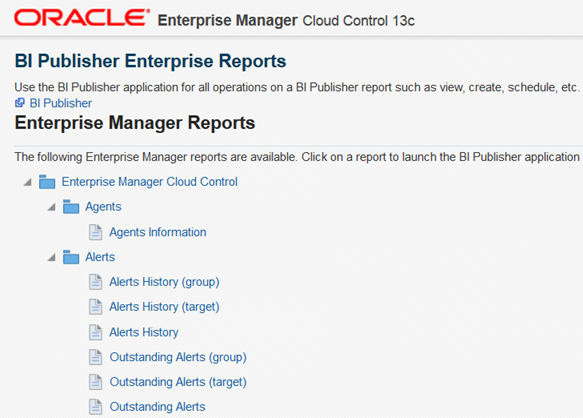
Watch out: Do not forget in Enterprise Manager, the included license for BI publisher only covers reporting against the Oracle Management Repository. If you use BI publisher against other targets, you will need to be licensed for each.