

Recently I exported an Oracle Virtual Box VM as an “.ova” file. When the file was imported again I faced issues with the network devices inside the VM. This post is about what I experienced and how I resolved it.
In my example I have two networks devices configured for the VM in the Virtual Box:
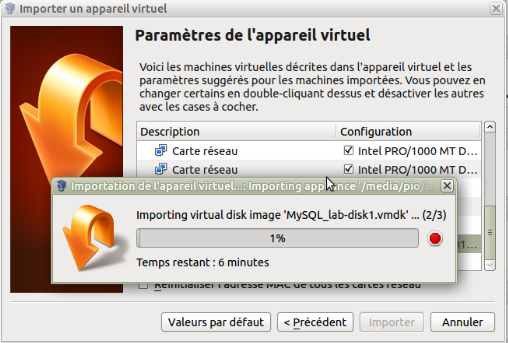
When I logged in I found that eth0 and eth1 are not available:
[root@MYSQL ~]# ifconfig

lo Link encap:Local Loopback

inet addr:127.0.0.1 Mask:255.0.0.0

inet6 addr: ::1/128 Scope:Host

UP LOOPBACK RUNNING MTU:65536 Metric:1

RX packets:16 errors:0 dropped:0 overruns:0 frame:0

TX packets:16 errors:0 dropped:0 overruns:0 carrier:0

collisions:0 txqueuelen:0

RX bytes:960 (960.0 b) TX bytes:960 (960.0 b)

[root@MYSQL ~]#
The issue is with the udev rules for the network devices. You can check these in “/etc/udev/rules.d”. Usually the file which defines the rules for the network devices is named “70-persistent-net.rules”:
[root@MYSQL ~]# cd /etc/udev/rules.d/

[root@MYSQL rules.d]# ll

total 44

-rw-r--r--. 1 root root 1652 Nov 12 2010 60-fprint-autosuspend.rules

-rw-r--r--. 1 root root 1060 Nov 11 2010 60-pcmcia.rules

-rw-r--r--. 1 root root 316 Oct 15 2014 60-raw.rules

-rw-r--r--. 1 root root 134 Aug 18 2015 60-vboxadd.rules

-rw-r--r--. 1 root root 530 Apr 29 2015 70-persistent-cd.rules

-rw-r--r--. 1 root root 1245 Mar 19 19:23 70-persistent-net.rules

-rw-r--r--. 1 root root 320 Jan 12 2015 90-alsa.rules

-rw-r--r--. 1 root root 83 Oct 15 2014 90-hal.rules

-rw-r--r--. 1 root root 2486 Nov 11 2010 97-bluetooth-serial.rules

-rw-r--r--. 1 root root 308 Apr 15 2015 98-kexec.rules

-rw-r--r--. 1 root root 54 Dec 8 2011 99-fuse.rules
To resolve this check the MAC address for the VM in VirtualBox and adapt the file with the same values that VirtualBox shows for the network device:
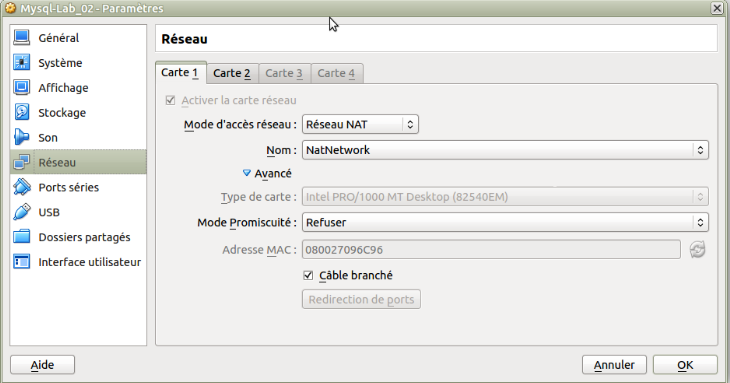
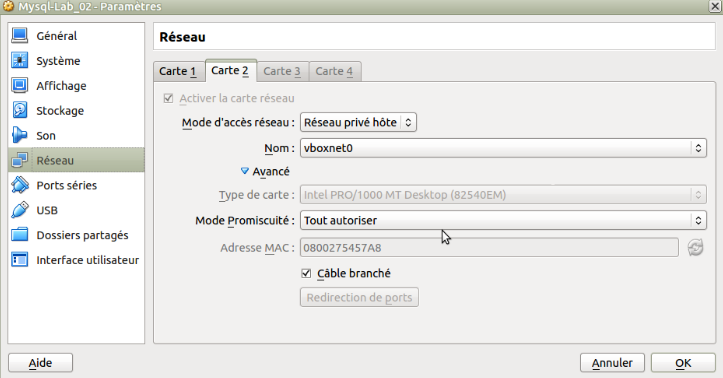
Why? When you clone a VM that causes VirtualBox to generate a new MAC address for the network device. The new device is auto detected when VM boots and added as a new device in “/etc/udev/rules.d/70-persistent-net.rules”:
[root@MYSQL rules.d]# vi 70-persistent-net.rules

This file was automatically generated by the /lib/udev/write_net_rules

# program, run by the persistent-net-generator.rules rules file.

#

# You can modify it, as long as you keep each rule on a single

# line, and change only the value of the NAME= key.

#

# PCI device 0x8086:0x100e (e1000)

SUBSYSTEM=="net", ACTION=="add", DRIVERS=="?*", ATTR{address}=="08:00:27:4a:32:87", ATTR{type}=="1", KERNEL=="eth*", NAME="eth0"

..

# PCI device 0x8086:0x100e (e1000)

SUBSYSTEM=="net", ACTION=="add", DRIVERS=="?*", ATTR{address}=="08:00:27:87:cc:59", ATTR{type}=="1", KERNEL=="eth*", NAME="eth1"

..

# PCI device 0x8086:0x100e (e1000)

SUBSYSTEM=="net", ACTION=="add", DRIVERS=="?*", ATTR{address}=="08:00:27:05:19:40", ATTR{type}=="1", KERNEL=="eth*", NAME="eth3"

..

# PCI device 0x8086:0x100e (e1000)

SUBSYSTEM=="net", ACTION=="add", DRIVERS=="?*", ATTR{address}=="08:00:27:ba:d7:60", ATTR{type}=="1", KERNEL=="eth*", NAME="eth2"

..

# PCI device 0x8086:0x100e (e1000)

SUBSYSTEM=="net", ACTION=="add", DRIVERS=="?*", ATTR{address}=="08:00:27:54:57:a8", ATTR{type}=="1", KERNEL=="eth*", NAME="eth4"

..

# PCI device 0x8086:0x100e (e1000)

SUBSYSTEM=="net", ACTION=="add", DRIVERS=="?*", ATTR{address}=="08:00:27:09:6c:96", ATTR{type}=="1", KERNEL=="eth*", NAME="eth5"
Edit the file “70-persistent-net.rules” and adapt your network configuration for eth0 and eth1.
# This file was automatically generated by the /lib/udev/write_net_rules

# program, run by the persistent-net-generator.rules rules file.

#

# You can modify it, as long as you keep each rule on a single

# line, and change only the value of the NAME= key.

#

# PCI device 0x8086:0x100e (e1000)

#SUBSYSTEM=="net", ACTION=="add", DRIVERS=="?*", ATTR{address}=="08:00:27:4a:32:87", ATTR{type}=="1", KERNEL=="eth*", NAME="eth0"

..

# PCI device 0x8086:0x100e (e1000)

#SUBSYSTEM=="net", ACTION=="add", DRIVERS=="?*", ATTR{address}=="08:00:27:87:cc:59", ATTR{type}=="1", KERNEL=="eth*", NAME="eth1"

..

# PCI device 0x8086:0x100e (e1000)

#SUBSYSTEM=="net", ACTION=="add", DRIVERS=="?*", ATTR{address}=="08:00:27:05:19:40", ATTR{type}=="1", KERNEL=="eth*", NAME="eth3"

..

# PCI device 0x8086:0x100e (e1000)

#SUBSYSTEM=="net", ACTION=="add", DRIVERS=="?*", ATTR{address}=="08:00:27:ba:d7:60", ATTR{type}=="1", KERNEL=="eth*", NAME="eth2"

..

# PCI device 0x8086:0x100e (e1000)

SUBSYSTEM=="net", ACTION=="add", DRIVERS=="?*", ATTR{address}=="08:00:27:54:57:a8", ATTR{type}=="1", KERNEL=="eth*", NAME="eth1"

..

# PCI device 0x8086:0x100e (e1000)

SUBSYSTEM=="net", ACTION=="add", DRIVERS=="?*", ATTR{address}=="08:00:27:09:6c:96", ATTR{type}=="1", KERNEL=="eth*", NAME="eth0"
Execute the following command: “udevadm trigger –type=devices –action=add” without reboot and restart the network service :
[root@MYSQL network-scripts]# udevadm trigger --type=devices --action=add

[root@MYSQL network-scripts]# service network restart

Shutting down interface eth0:                              [  OK  ]

Shutting down interface eth1:                              [  OK  ]

Shutting down loopback interface:                          [  OK  ]

Bringing up loopback interface:                            [  OK  ]

Bringing up interface eth0:

Determining IP information for eth0... done.

[  OK  ]

Bringing up interface eth1:  Determining if ip address 192.168.56.11 is already in use for device eth1...

[  OK  ]

[root@MYSQL network-scripts]#
After this change the network devices in the Virtual Machine are up and running again:
[root@MYSQL ~]# ifconfig

eth0 Link encap:Ethernet HWaddr 08:00:27:09:6C:96

inet addr:10.0.0.11 Bcast:10.0.0.255 Mask:255.255.255.0

inet6 addr: fe80::a00:27ff:fe09:6c96/64 Scope:Link

UP BROADCAST RUNNING MULTICAST MTU:1500 Metric:1

RX packets:2 errors:0 dropped:0 overruns:0 frame:0

TX packets:11 errors:0 dropped:0 overruns:0 carrier:0

collisions:0 txqueuelen:1000

RX bytes:1180 (1.1 KiB) TX bytes:1346 (1.3 KiB)

..

eth1 Link encap:Ethernet HWaddr 08:00:27:54:57:A8

inet addr:192.168.56.11 Bcast:192.168.56.255 Mask:255.255.255.0

inet6 addr: fe80::a00:27ff:fe54:57a8/64 Scope:Link

UP BROADCAST RUNNING MULTICAST MTU:1500 Metric:1

RX packets:8 errors:0 dropped:0 overruns:0 frame:0

TX packets:11 errors:0 dropped:0 overruns:0 carrier:0

collisions:0 txqueuelen:1000

RX bytes:506 (506.0 b) TX bytes:726 (726.0 b)

..

lo Link encap:Local Loopback

inet addr:127.0.0.1 Mask:255.0.0.0

inet6 addr: ::1/128 Scope:Host

UP LOOPBACK RUNNING MTU:65536 Metric:1

RX packets:40 errors:0 dropped:0 overruns:0 frame:0

TX packets:40 errors:0 dropped:0 overruns:0 carrier:0

collisions:0 txqueuelen:0

RX bytes:3004 (2.9 KiB) TX bytes:3004 (2.9 KiB)

[root@MYSQL ~]#
