How many times have I found, during a migration, that I also have to clean up the databases no more used?
Why keep them for so long if we’re not going to use them?
This is something we often see among our customers. If we assume that we carry out a migration project roughly every five years, this means we’re keeping databases that are taking up space for no reason.
We, however, are Green SQL Server DBA; we’ll look to manage it correctly.
The AUDIT
First of all, what do we need to analyse?
This does not apply to all databases, but only to those that are obsolete.
They can be categorised into two types:
- Databases Never Accessed
- No application connections detected
- No recent transactions or queries after a period (3 months for exemple)
- Abandoned Databases
- Linked to cancelled projects
- No activity and nobody tell it
To see databases never accessed and abandoned databases I use the DMV sys.dm_db_index_usage_stats to see if I have an access to the database (read or write):
SELECT d.name AS DatabaseName, MAX(ius.last_user_seek) AS LastSeek,MAX(ius.last_user_scan) AS LastScan,
    MAX(ius.last_user_lookup) AS LastLookup,

    (
        SELECT MAX(v.ActivityDate)
        FROM (VALUES
                (MAX(ius.last_user_seek)),
                (MAX(ius.last_user_scan)),
                (MAX(ius.last_user_lookup))
             ) v(ActivityDate)
    ) AS LastReadActivity,

    MAX(ius.last_user_update) AS LastWriteActivity,

    DATEDIFF(DAY,
        (
            SELECT MAX(v.ActivityDate)
            FROM (VALUES
                    (MAX(ius.last_user_seek)),
                    (MAX(ius.last_user_scan)),
                    (MAX(ius.last_user_lookup))
                 ) v(ActivityDate)
        ),
        GETDATE()
    ) AS DaysSinceLastRead,

    DATEDIFF(DAY,
        MAX(ius.last_user_update),
        GETDATE()
    ) AS DaysSinceLastWrite

FROM sys.databases d
LEFT JOIN sys.dm_db_index_usage_stats ius
    ON d.database_id = ius.database_id
WHERE d.database_id > 4  -- Exclude system databases
GROUP BY d.name
ORDER BY LastWriteActivity ASC;
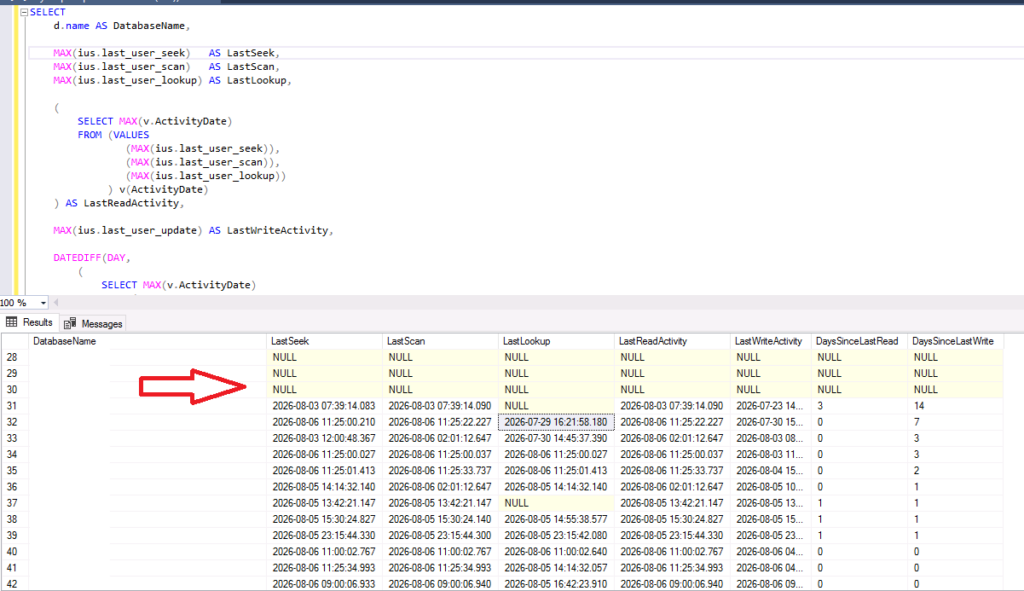
We can see on the first databases in the list, that we have null everywhere… This means that the databases were not solicited since the last restart… Good candidate for unused databases!
This brings us to the next point.
The ANALISYS
If we can see that there is little activity on the database, we can, of course, carry out an initial analysis using criteria such as these:
< 30 days –> the database is still active
30–180 days –> the database is on hold pending to be dropped
> 180 days –> the database is a strong candidate to be dropped
Of course, it also depends on your environment – whether it’s dev, test or prod – and the criteria will vary accordingly.
The IMPACT
Like in my precedent post, we will have same impacts but not for queries of courses!
The first impact is the storage and the backup
If the database represents ~100 GB on the disk , it’s also 100 GB backed up unnecessarily.
If you have Dev, Test, PreProd & Prod and all in HA… I let you do the calculation but it’s more 1 TB!
The third impact is on the maintenance plan
The following operations must also handle the unused database:
– CheckDB
– Backups
As the database is not used, the index rebuild/reorg & update Stats will be fast!
Each unused database extends the maintenance windows for the checkdb and backups…
The ADVISE
The first advice would be to plan well in advance.
Indeed, when creating or restoring a database, it is important to know its lifecycle.
Don’t hesitate to challenge the application owners on a deadline and make sure to add it to your calendar +1day.
The second advice is to set up a monthly monitoring process prior to Windows or SQL Server patch cycles so that you can identify these unnecessary databases.
And before dropping a database, I advice you to put the database offline and see if after some days somebody complaints…
In the majority of cases, you will not have reactions, believe me! 😉
The Green SQL Server DBA Score
Like for my precedent post, I setup a ‘SQL Server DBA Score’ to use for my tips on the subject:
| Database unused per instance per 3 months | Score |
| 0 to 2 | 10 |
| 3 to 5 | 8 |
| 6 to 10 | 5 |
| 11 to 20 | 2 |
| > 20 | 0 |
Conclusion
A traditional SQL Server DBA or system administrator will let the unused databases until the next migration.
A Green SQL Server DBA will check it periodically and manage it.
An unused database is like a car that never leaves the garage.
It still costs money, requires maintenance, and consumes resources.
The Green SQL Server DBA notices it before it becomes waste…
Think about it and begin now to see to monitor your unused databases!
See you soon for the next one!
![Thumbnail [60x60]](https://www.dbi-services.com/blog/wp-content/uploads/2022/08/STH_web-min-scaled.jpg)
![Thumbnail [90x90]](https://www.dbi-services.com/blog/wp-content/uploads/2025/05/martin_bracher_2048x1536.jpg)
![Thumbnail [90x90]](https://www.dbi-services.com/blog/wp-content/uploads/2025/11/LTO_WEB.jpg)
Louis Tochon
10.08.2026Hey Stéphane !
Great article, and indeed, cleaning up unused databases is a real challenge.
Your audit does allow you to carry out the required analysis, but these views are refreshed during a failover or a restart.
Personally, when conducting audits, I use XE to add persistence to my audit.
Here is an example script:
DECLARE @server_name NVARCHAR(128) = @@SERVERNAME;
DECLARE @base_path NVARCHAR(500) = N'C:\xe\';
DECLARE @file_path NVARCHAR(500) = @base_path + @server_name + N'\XE_Login_Session_Database_Trace.xel';
DECLARE @sql NVARCHAR(MAX);
SET @sql = N'
CREATE EVENT SESSION [XE_Login_Session_Database_Trace] ON SERVER
ADD EVENT sqlserver.login(
ACTION(
sqlserver.client_app_name,
sqlserver.client_hostname,
sqlserver.server_principal_name,
sqlserver.database_name,
sqlserver.session_id))
ADD TARGET package0.event_file(
SET filename=N''' + @file_path + N''',
max_file_size=(400),
max_rollover_files=(5))
WITH (MAX_MEMORY=51200 KB
See you soon !