

Skip to content

SQL Server Tips: How to know if In-Memory Feature is supported by your server?

A customer asks me, how to know if In-Memory Feature is supported by my SQL Server server?
An easy way is to check the edition, version etc. but now, you have directly a property for that.

On msdn here, you find all property that you can search with the T-SQL Command: SERVERPROPERTY

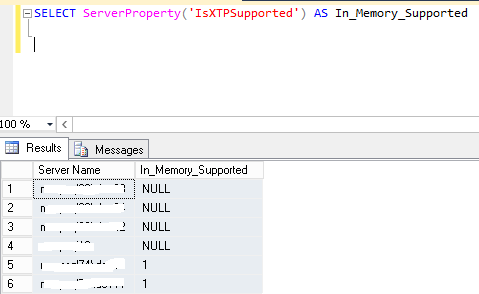
But if you try to run through all your servers with CMS (Central Management Server), for all SQL Server below than SQL Server 2014, you have a NULL value.
InMemory_Property01.png

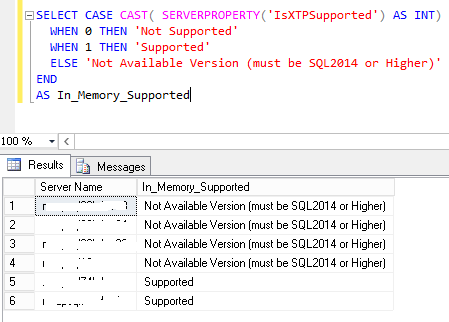
I write rapidly this script to have no NULL value and have an usable info:

SELECT CASE CAST( ServerProperty('IsXTPSupported') AS INT)  WHEN 0 THEN 'Not Supported'  WHEN 1 THEN 'Supported'  ELSE 'Not Available Version (must be SQL2014 or Higher)'ENDAS In_Memory_Supported
 

InMemory_Property02.png

I hope this script can help you and if you want to know more on SQL Server In-Memory Technology come to our Event in June 2015: inscription & details here 

Let’s work together

Ready to operate at
the next level?

Tell us about your challenge. We’ll bring the depth, the expertise, and the Swiss precision.

Stéphane Haby

Stéphane Haby

Stéphane Haby has more than 20 years of experience in Microsoft solutions, specializing in the installation, migration, best practices, and performance analysis of Microsoft SQL Server, as well as Microsoft Business Intelligence solutions (SharePoint, Office) and .NET development for the banking sector. A former Microsoft Most Valuable Professional (MVP) and early adopter of Microsoft Team System in France, he has authored several technical articles. He holds Microsoft Certified Solutions Associate (MCSA) and Expert (MCSE) for SQL Server, MCTS, MCITP for SQL Server 2008, and ITIL V3 Foundation certifications. His industry experience covers chemicals and pharma, banking, and financial services.View Author posts

182 posts since April 2011

Leave a Comment

Your email address will not be published. Required fields are marked *