“One single alerting email is missing, and all your monitoring feels deserted.”
This is the harsh lesson many SQL Server DBAs learned the hard way this week. If your inbox has been suspiciously quiet since your last maintenance window, don’t celebrate just yet: your instance might have simply lost its voice.
CU23: The poisoned gift
The Cumulative Update 23 for SQL Server 2022 (KB5074819), released on January 15 2026, quickly became the “hot” topic on technical forums. The reason? A major regression that purely and simply breaks Database Mail.
Could not load file or assembly 'Microsoft.SqlServer.DatabaseMail.XEvents, Version=17.0.0.0, Culture=neutral, PublicKeyToken=89845dcd8080cc91' or one of its dependencies. The system cannot find the file specified.
This error message is the visible part of the iceberg. Beyond the technical crash, it is the silence of your monitoring that should worry you. The real danger here is that while the mailing engine fails, your SQL Agent jobs don’t necessarily report an error. Since the mail items are never even processed, they don’t appear in the failed_items or unsent_items views with typical error statuses. For most monitoring configurations, this means you stay completely unaware that your instance has lost its voice. You aren’t getting alerts, but everything looks fine on the surface.
Database Mail: The (Too) Quiet Hero
We often tend to downplay the importance of Database Mail, treating it as a minor utility. Yet, for many of us, it is the backbone of our monitoring. From SQL Agent job failure notifications to corruption alerts or disk space thresholds, Database Mail is a critical component. When it fails, your infrastructure visibility evaporates, leaving you flying blind in a rather uncomfortable technical fog.
Rollback or Status Quo?
While waiting for an official fix, the best way to protect your production remains a rollback (guidelines available here). Uninstalling a CU is never an easy task: it implies additional downtime and a fair amount of stress. However, staying in total darkness regarding your servers’ health is a much higher risk. Microsoft has promised a hotfix “soon” but in the meantime, a server that reboots is better than a server that suffers in silence.
The Light at the End of the Tunnel (is in the MSDB)
If a rollback is impossible due to SLAs or internal policies, remember that not all is lost. Even if the emails aren’t being sent, the information itself isn’t volatile. SQL Server continues to conscientiously log everything it wants to tell you inside the msdb system tables.
You can query the following table to keep an eye on the alerts piling up:
SELECT mailitem_id, recipients, subject, body, send_request_date, sent_date
 FROM [msdb].[dbo].[sysmail_mailitems]
 where sent_date is null
 and send_request_date > '2026-01-15 00:00:00.000'
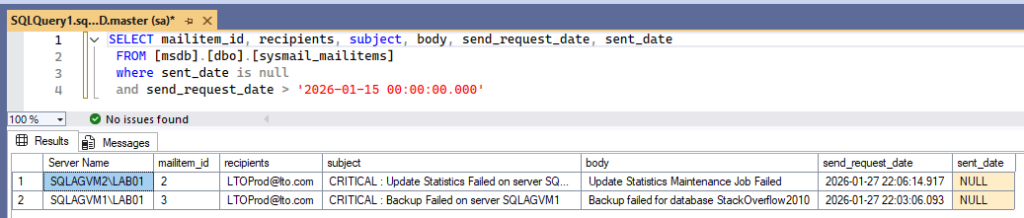
It’s less stylish than a push notification, but it’s your final safety net to ensure your Log Shipping hasn’t flatlined or your backups haven’t devoured the last available Gigabyte.
How to Build a Solid “Home-Made” Quick Fix
If you have an SMTP gateway reachable via PowerShell, you can bridge the gap using the native Send-MailMessage cmdlet. This approach effectively bypasses the broken DatabaseMail.exe by using the PowerShell network stack to ship your alerts.
Testing with Papercut
In a Lab environment, you likely don’t have a full-blown Exchange server. To test this script, I recommend using Papercut. It acts as a local SMTP gateway that catches any outgoing mail and displays it in a UI without actually sending it to the internet. Simply run the Papercut executable, and it will listen on localhost:25.
The Recovery Script
For the purpose of this article’s demonstration, the following Central Management Server (CMS) setup is used:
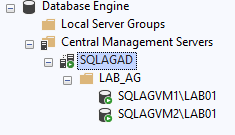
Run the following script as a scheduled task every 15 minutes to replay any messages stuck in the msdb queue:
Import-Module -Name dbatools;

Set-DbatoolsConfig -FullName 'sql.connection.trustcert' -Value $true;

$cmsServer = "SQLAGAD\LAB01"
$cmsGroupName = "LAB_AG"
$smtpServer = "localhost"

try {
    $instances = Get-DbaRegServer -SqlInstance $cmsServer -ErrorAction Stop |
                 Where-Object group -match $cmsGroupName;

    if (-not $instances) {
        Write-Warning "No instances found in the group '$cmsGroupName' on $cmsServer."
        return
    }

    foreach ($server in $instances) {
        Write-Host "Processing: $($server.Name)" -ForegroundColor Cyan

        $query = "SELECT SERVERPROPERTY('ServerName') SQLInstance, * FROM [msdb].[dbo].[sysmail_mailitems] where sent_date is null and send_request_date > DATEADD(minute, -15, GETDATE())"

        $blockedMails = Invoke-DbaQuery -SqlInstance $server.Name -Database msdb -Query $query -ErrorAction SilentlyContinue

        if ($blockedMails) {
            foreach ($mail in $blockedMails) {
                Send-MailMessage -SmtpServer $smtpServer `
                                 -From "[email protected]" `
                                 -To $mail.recipients `
                                 -Subject "[CU23-RECOVERY] $($mail.subject)" `
                                 -Body $mail.body `
                                 -Priority High

                Write-Host "Successfully re-sent: $($mail.subject)" -ForegroundColor Green
            }
        }
    }
}
catch {
    Write-Error "Error accessing the CMS: $($_.Exception.Message)"
}
Resulting alerts in the Papercut mailbox:
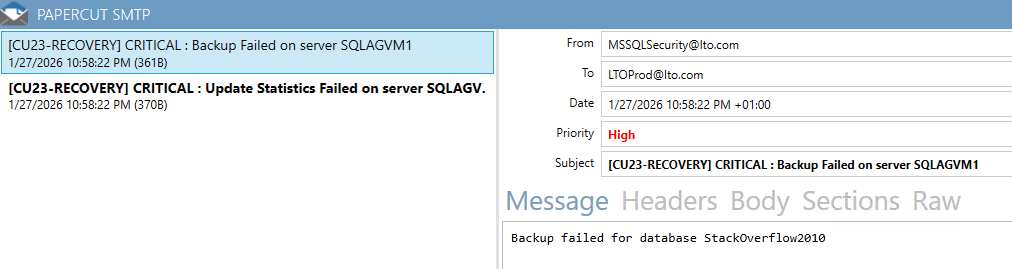
By leveraging the dbatools module and the native Send-MailMessage function, we can create a “recovery bridge.” The following script is designed to be run as a scheduled task (e.g., every 15 minutes). It scans your entire infrastructure via your CMS, identifies any messages that failed to send in the last 15-minute window, and replays them through PowerShell’s network stack instead of SQL Server’s.
Note on Data Integrity: You will notice that this script intentionally performs no UPDATE or DELETE operations on the msdb tables. We chose to treat the system database as a read-only ‘source of truth’ to avoid any further corruption or inconsistency while the instance is already in an unstable state.
Let’s wrap-up !
Until Microsoft releases an official fix for this capricious CU23, this script acts as a life support system for your monitoring alerts. It is simple, effective, and most importantly, it prevents the Monday morning nightmare of discovering failed weekend backups that went unnoticed because the notification engine was silent.
So, if your SQL alerts prefer staying cozy in the msdb rather than doing their job, you now have the bridge to get them moving. Set up the scheduled task, run the script, and go grab a coffee, your emails are finally back on track.
Until the hotfix lands, keep your scripts ready!
![Thumbnail [60x60]](https://www.dbi-services.com/blog/wp-content/uploads/2025/11/LTO_WEB.jpg)
![Thumbnail [90x90]](https://www.dbi-services.com/blog/wp-content/uploads/2025/05/martin_bracher_2048x1536.jpg)