Updated in June 2026, based on the latest version of the client.
In this blog, I provide GoldenGate administrators with a fully working, production-ready Python client to efficiently handle GoldenGate REST API calls. From extract creation to user management, it has never been easier to manage and monitor your GoldenGate deployments !
Table of contents
Basic OGGRestAPI Python class
In a previous blog post, I presented a basic Python script for making calls to the GoldenGate REST API. I also provided an OGGRestAPI Python class to handle the connections and API responses. This class is the base structure of the client.
import getpass
import requests
import time
import urllib3
from pprint import pprint


class OGGRestAPI:
    """Oracle GoldenGate REST API client (base class)."""

    # HTTP statuses worth retrying (transient / server-side).
    _RETRY_STATUSES = frozenset({429, 502, 503, 504})
    # Exceptions worth retrying (transient network issues).
    _RETRY_EXCEPTIONS = (
        requests.exceptions.ConnectionError,
        requests.exceptions.Timeout,
        requests.exceptions.ChunkedEncodingError,
    )

    def __init__(self, url, username=None, password=None, deployment=None, ca_cert=None,
                 reverse_proxy=False, verify_ssl=True, test_connection=True, timeout=None, version='v2'):
        """
        Initialize Oracle GoldenGate REST API client.

        :param url: Base URL of the OGG REST API. It can be:
                    'http(s)://hostname:port' without NGINX reverse proxy,
                    'https://nginx_host:nginx_port' with NGINX reverse proxy.
        :param username: service username
        :param password: service password. If omitted, the user is prompted to
                         enter it securely (input is not echoed).
        :param deployment: when reverse proxy is used, the deployment name to use (e.g. 'ogg_test_01')
        :param ca_cert: path to a trusted CA cert (for self-signed certs)
        :param reverse_proxy: bool, whether to use NGINX reverse proxy
        :param verify_ssl: bool, whether to verify SSL certs
        :param test_connection: if True, will attempt a simple GET on /services on init
        :param timeout: request timeout in seconds
        """
        self.swagger_version = '2026.01.27'
        self.version = version
        self.base_url = url
        self.username = username
        if password is None:
            password = getpass.getpass(f'Password for {username or "OGG REST API"}: ')
        self.auth = (self.username, password)
        self.headers = {'Accept': 'application/json', 'Content-Type': 'application/json'}
        self.deployment = deployment
        self.reverse_proxy = reverse_proxy
        self.verify_ssl = ca_cert if ca_cert else verify_ssl
        self.timeout = timeout
        self.session = requests.Session()
        self.session.headers.update(self.headers)

        if not verify_ssl and self.base_url.startswith('https://'):
            # Disable InsecureRequestWarning if verification is off
            urllib3.disable_warnings(urllib3.exceptions.InsecureRequestWarning)

        # Test connection
        if test_connection:
            # Verify connectivity. Raises on failure so callers can catch and handle
            # connection issues gracefully. The base class has no generated endpoint
            # methods, so a simple GET on /services is used here.
            resp = self._request('GET', '/services', raw_response=True)
            if resp.status_code == 200:
                print(f'Connected to OGG REST API at {self.base_url}')
            elif resp.status_code == 403:
                raise RuntimeError(
                    f"Authentication failed connecting to OGG REST API at {self.base_url} "
                    f"with user {self.username}. Please check your credentials."
                )
            else:
                raise RuntimeError(
                    f"Failed to connect to OGG REST API at {self.base_url}. "
                    f"HTTP {resp.status_code}: {resp.text}"
                )

    def _request(self, method, path, *, params=None, data=None, max_retries=3,
                 backoff_factor=1.0, raw_response=False):
        """Make an HTTP request, retrying transient failures, then parse the response.

        Retries are attempted for transient network exceptions (connection errors,
        timeouts, chunked-encoding errors) and for retryable HTTP statuses
        (429, 502, 503, 504), using exponential backoff. When the server sends a
        ``Retry-After`` header, that value is honored instead of the computed delay.

        Args:
            method (str): The HTTP method to use.
            path (str): The API endpoint path.
            params (dict, optional): Query parameters for the request. Defaults to None.
            data (dict, optional): The request body data. Defaults to None.
            max_retries (int, optional): Maximum number of attempts. Defaults to 3.
            backoff_factor (float, optional): Base delay (seconds) for exponential
                backoff. Delay for attempt n is backoff_factor * 2**(n-1). Defaults to 1.0.
            raw_response (bool, optional): Whether to return the raw response object. Defaults to False.

        Returns:
            dict or requests.Response: The parsed response or the raw response object.
        """
        url = f'{self.base_url}{path}'
        response = None
        last_exc = None
        for attempt in range(1, max_retries + 1):
            try:
                response = self.session.request(
                    method,
                    url,
                    auth=self.auth,
                    params=params,
                    json=data,
                    verify=self.verify_ssl,
                    timeout=self.timeout
                )
            except self._RETRY_EXCEPTIONS as exc:
                last_exc = exc
                if attempt >= max_retries:
                    raise
                delay = self._retry_delay(attempt, backoff_factor)
                print(f"Request to {url} failed ({exc.__class__.__name__}: {exc}); "
                      f"retrying in {delay:.1f}s (attempt {attempt}/{max_retries})...")
                time.sleep(delay)
                continue

            # Retry transient server-side statuses while attempts remain.
            if response.status_code in self._RETRY_STATUSES and attempt < max_retries:
                delay = self._retry_delay(attempt, backoff_factor, response=response)
                print(f"Request to {url} returned HTTP {response.status_code}; "
                      f"retrying in {delay:.1f}s (attempt {attempt}/{max_retries})...")
                time.sleep(delay)
                continue

            break

        if response is None:
            # Every attempt raised a network exception; surface the last one.
            raise last_exc

        if raw_response:
            return response
        result = self._parse(response)
        self._check_response(response, url)
        return self._extract_main(result)

    def _retry_delay(self, attempt, backoff_factor, response=None):
        """Compute the delay before the next retry.

        Honors a ``Retry-After`` response header (seconds) when present, otherwise
        falls back to exponential backoff: backoff_factor * 2**(attempt - 1).
        """
        if response is not None:
            retry_after = response.headers.get('Retry-After')
            if retry_after:
                try:
                    return float(retry_after)
                except (TypeError, ValueError):
                    pass
        return backoff_factor * (2 ** (attempt - 1))

    def _build_path(self, template, ogg_service=None, path_params=None):
        path_params = dict(path_params or {})
        if "{version}" in template and "version" not in path_params:
            path_params["version"] = self.version

        # If reverse proxy is enabled, the full service must be added before /v2/
        #   - /services/ServiceManager/v2/... for Service Manager
        #   - /services/deployment_name/ogg_service/v2/... for other services when a deployment is specified
        if self.reverse_proxy and template != '/services':
            if ogg_service == 'ServiceManager' or not self.deployment:
                template = f'/services/ServiceManager/{template.removeprefix("/services/")}'
            else:
                template = f'/services/{self.deployment}/{ogg_service}/{template.removeprefix("/services/")}'
        return template.format(**path_params)

    def _call(self, method, template, *, ogg_service=None, path_params=None, params=None,
              data=None, body_params=None, raw_response=False, if_exists='fail'):
        if self.reverse_proxy and ogg_service == '' and self.deployment:
            # This is a common endpoint and a deployment is specified. Choosing adminsrvr service by default.
            ogg_service = "adminsrvr"
        path = self._build_path(template, ogg_service=ogg_service, path_params=path_params)
        url = f'{self.base_url}{path}'

        # Merge body_params into data when provided. body_params is a dict mapping
        # payload field names to values (the generated methods pass their
        # explicit body params here). Only merge when `data` is a dict or None.
        if body_params:
            if data is None:
                data = {}
            if isinstance(data, dict):
                # Copy first so the caller's dict is never mutated.
                data = dict(data)
                for k, v in body_params.items():
                    if v is not None:
                        data[k] = v
            if not data:
                data = None

        # If caller asked to skip on existing resource, inspect the raw response and
        # treat a 409 (already exists) as a no-op instead of an error. Routing through
        # _request means this path inherits the same retry handling as normal calls.
        if if_exists == 'skip':
            response = self._request(method, path, params=params, data=data, raw_response=True)
            parsed = self._parse(response)

            if response.status_code == 409:
                titles = []
                if isinstance(parsed, dict):
                    for m in parsed.get('messages', []):
                        if isinstance(m, dict) and m.get('title'):
                            titles.append(m['title'])
                message = '; '.join(titles) if titles else 'Resource exists'
                print(f"{message} (if_exists set to skip)")
                return {'status': 'skipped', 'message': message, 'http_status': 409, 'raw': parsed}

            # Otherwise behave like normal _call: raise on errors, return parsed or extracted
            self._check_response(response, url)
            if raw_response:
                return parsed
            return self._extract_main(parsed)

        # Default behavior: use existing request flow
        result = self._request(method, path, params=params, data=data, raw_response=raw_response)
        return result

    def _get(self, path, params=None, raw_response=False):
        return self._request('GET', path, params=params, raw_response=raw_response)

    def _post(self, path, data=None, raw_response=False):
        return self._request('POST', path, data=data, raw_response=raw_response)

    def _put(self, path, data=None, raw_response=False):
        return self._request('PUT', path, data=data, raw_response=raw_response)

    def _patch(self, path, data=None, raw_response=False):
        return self._request('PATCH', path, data=data, raw_response=raw_response)

    def _delete(self, path, raw_response=False):
        return self._request('DELETE', path, raw_response=raw_response)

    def _check_response(self, response, url):
        if response.ok:
            return

        # Parse the body once; _parse returns text (not a dict) for non-JSON bodies.
        body = self._parse(response)
        messages = body.get('messages') if isinstance(body, dict) else None
        if messages:
            error_messages = []
            for message in messages:
                if isinstance(message, dict):
                    severity = message.get('severity', 'ERROR')
                    title = message.get('title', message)
                else:
                    severity, title = 'ERROR', message
                error_messages.append(
                    f"{severity} (code {response.status_code}) - {url}: {title}"
                )
            raise RuntimeError(' ; '.join(error_messages))

        print(f'HTTP {response.status_code}: {response.text}')
        response.raise_for_status()

    def _parse(self, response):
        try:
            return response.json()
        except ValueError:
            return response.text

    def close(self):
        self.session.close()

    def __enter__(self):
        return self

    def __exit__(self, *_exc):
        self.close()
        return False

    def _extract_main(self, result):
        if not isinstance(result, dict):
            return result

        resp = result.get('response', result)
        if 'items' not in resp:
            return resp

        exclude = {'links', '$schema'}
        return [{k: v for k, v in i.items() if k not in exclude} for i in resp['items']]

    def pretty_print(self, result):
        pprint(result)
While this is already useful when starting with GoldenGate automation, searching for the correct endpoints and methods or providing the correct parameters can quickly become daunting. That is why I decided to build and release an easy-to-use Python client for the GoldenGate REST API.
To make things easier for developers, REST APIs often come with some sort of standard template file that will guide the user on how to query the API and interpret the results. Oracle provides a swagger.json file, which you can get for GoldenGate 26ai and 19c.
There are multiple ways online to transform these Swagger files into working Python clients, but they are very often not tailored to the specific needs of the API, and unusable in practice. Hence my proposal with this blog post.
Example of a REST API method in the client
There are around 300 methods included in the client that I provide. Here is an example with the create_alias method.
# Endpoint: /services/{version}/credentials/{domain}/{alias}
def create_alias(
    self,
    domain,
    alias,
    userid=None,
    password=None,
    data=None,
    raw_response=False,
    if_exists='fail'
):
    """
    Administration Service/Credentials
    POST /services/{version}/credentials/{domain}/{alias}
    Required Role: Administrator
    Create a new alias in the credential store.

    Parameters:
        domain (str): Credential store domain name. Required. Example: OracleGoldenGate
        alias (str): Credential store alias. Required. Example: ggnorth
        userid (str):  Example: userid_example
        password (str):  Example: password_example
        data (dict): Override body payload with a raw dict. Individual parameters are merged into this
            dict when provided.
        raw_response (bool): If True, return raw parsed response from _parse() instead of
            _extract_main().
        if_exists (str): Action if resource exists: 'fail' (error) or 'skip' (no action). Example:
            if_exists_example

    Example:
        client.create_alias(
            domain='OracleGoldenGate',
            alias='ggnorth',
            data={
                "userid": "c##ggadmin@//server1.dc1.north.example.com:1521/ORCLCDB",
                "password": "password-DB_A1"
            }
        )

        client.create_alias(
            domain='OracleGoldenGate',
            alias='ggnorth',
            userid='c##ggadmin@//server1.dc1.north.example.com:1521/ORCLCDB',
            password='password-DB_A1'
        )
    """
    return self._call(
        method="POST",
        template="/services/{version}/credentials/{domain}/{alias}",
        path_params={
            "domain": domain,
            "alias": alias,
        },
        data=data,
        body_params={
            "userid": userid,
            "password": password,
        },
        ogg_service="adminsrvr",
        if_exists=if_exists,
        raw_response=raw_response
    )
With this method, you can easily create an alias in GoldenGate with the following code. But more on that later.
Where to find the code ?
The full code is available in this GitHub repository. Feel free to use it in your deployments. I provided one Python class for GoldenGate 26ai, one for 23ai (if you are still using it) and another one for GoldenGate 19c. For the most basic functions, there is not much difference between the clients, but for more advanced usage, I would suggest using the code dedicated to the proper version of GoldenGate.
How to use the client ?
Administering your GoldenGate deployments with this client is straightforward. Just start by importing the class and creating a client instance.
from oggrestapi import OGGRestAPI

# Connect to http://vmogg:7809 with user 'ogg'
ogg_client = OGGRestAPI(url="http://vmogg:7809", username="ogg", password="ogg")
If you would rather not hardcode the password, simply omit it and you will be prompted to enter it securely (the input is not echoed):
>>> ogg_client = OGGRestAPI(url="http://vmogg:7809", username="ogg")
Password for ogg:
Connected to OGG REST API at http://vmogg:7809
The client also supports the context-manager protocol, so the underlying HTTP session is always closed for you:
with OGGRestAPI(url="http://vmogg:7809", username="ogg") as ogg_client:
    print(ogg_client.list_deployments())
The connection status is displayed when the client is initialized:
>>> from oggrestapi import OGGRestAPI
>>> ogg_client = OGGRestAPI(url="http://vmogg:7809", username="ogg", password="ogg")
Connected to OGG REST API at http://vmogg:7809
To illustrate the benefits of using this client, here is what a standard API call to create a GoldenGate user would look like with Python.
import requests

role = "User"
user = "ogg_username"
url = f"http://vmogg:7809/services/v2/authorizations/{role}/{user}"
auth = ("ogg_user", "ogg_password")
data = {
    "credential": "your_password"
}

result = requests.post(url, auth=auth, json=data)
The same operation using the Python client becomes:
ogg_client.create_user(
    user="ogg_username",
    role="User",
    data={"credential": "your_password"}
)
All endpoint parameters (such as user and role, in the example above) are now method arguments (create_user, in this case). To keep things simple and not over-engineer, the data payload of the API is kept. But depending on the endpoint, you could easily add wrapper functions to further simplify usage.
Call examples
I give below a few other basic calls that you can use. You should pay attention to the port you are using when making calls to the API. Some endpoints are only accessible on specific services. For instance, list_extracts will only work on the administration service of a deployment (default port 7810), while list_deployments only works on the service manager (default port 7809).
- List deployments associated with a service manager.
>>> ogg_client.list_deployments()
[{'name': 'ServiceManager', 'status': 'running'}, {'name': 'ogg_test_01', 'status': 'running'}]- List extracts in a deployment (for this one,
ogg_clienthas to be created on the administration service of the deployment if you are not using an NGINX proxy).
>>> ogg_client.list_extracts()
[{'name': 'EXT01', 'status': 'stopped'}, {'name': 'EXT02', 'status': 'running'}, {'name': 'EXT03', 'status': 'running'}]- List and get tasks
>>> ogg_client.list_tasks()
[{'name': 'purge_aa'}]

>>> ogg_client.get_task('purge_aa')
{'enabled': True, 'critical': False, 'status': 'stopped', 'command': {'name': 'purge', 'purgeType': 'trails', 'useCheckpoints': True, 'trails': [{'name': 'aa', 'path': 'PDB1'}], 'keep': [{'type': 'min', 'value': 48, 'units': 'hours'}]}, 'schedule': {'every': {'units': 'days', 'value': 1}}, 'restart': {'enabled': False}, '$schema': 'ogg:task'}
And of course, you can create and manage extracts, replicats, etc. through this client. All tasks available through the API are replicated in the client.
Method naming explanation
I only wrote this section of the blog for those who would like to dig a bit deeper. Method names are generated from the Swagger definition and then normalized for consistency through a curated mapping, so that the same action always uses the same verb across the whole client:
list_for endpoints returning a collection (e.g.list_deployments,list_extracts,list_users).get_for endpoints returning a single resource or its details (e.g.get_extract,get_task).create_/update_/delete_for the correspondingPOST/PATCH–PUT/DELETEoperations (e.g.create_user,update_extract,delete_user).
This naming is built using three layers:
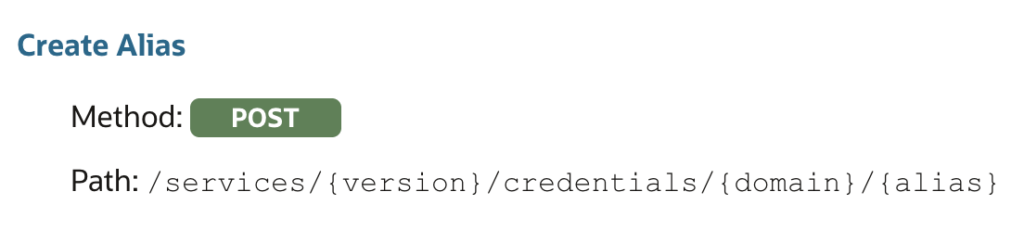
- The basic method name comes from the summary given by Oracle, normalized to the verbs above. For instance, the “Create an Alias” summary is associated with the
create_aliasmethod. Words likea,anorofare removed from the name. This way, the vast majority of methods have a very simple and canonical name that is easy to remember or to retrieve from the documentation.
- Unfortunately, some methods still share the same summary. A good example is the “Retrieve Status” summary, which is available for both extracts and replicats. To avoid a collision, the resource is added to the name. In this specific case, there is no
get_statusmethod, but there areget_extract_statusandget_replicat_statusmethods.


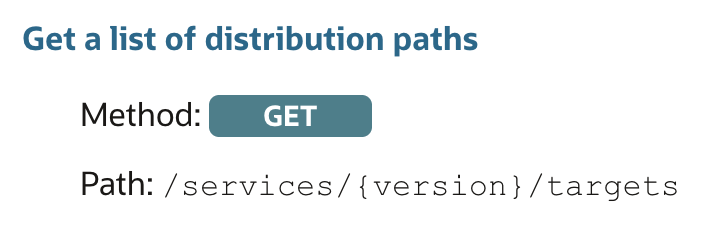
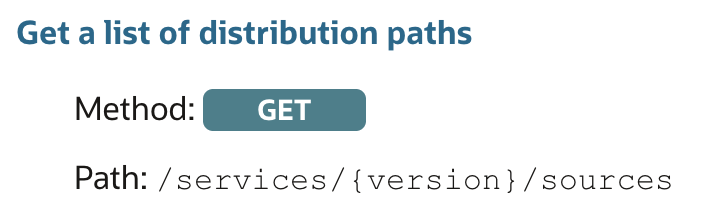
- More than 99% of methods are covered by the first two cases. When that is not enough — like the “Get a list of distribution paths” summary, which exists for both source and target paths — the names are disambiguated by their role. Source paths are listed with
list_distribution_paths(endpoint/sources), while target paths are listed withlist_receiver_paths(endpoint/targets).
In upcoming blog posts, I will provide concrete examples on how to manage your GoldenGate deployments from A to Z with this client. In the meantime, do not hesitate if you have any feedback on this little project !
![Thumbnail [60x60]](https://www.dbi-services.com/blog/wp-content/uploads/2025/05/JDE_Web-1-scaled.jpg)
![Thumbnail [90x90]](https://www.dbi-services.com/blog/wp-content/uploads/2025/11/LTO_WEB.jpg)