Oracle GoldenGate REST API has been around for quite some time now, but I’ve yet to see it used in practice at customers. Every time I tried to introduce it, it was some sort of novelty. Mainly because DBAs tend to dislike automation, but also for technical reasons. Even though the REST API was introduced in GoldenGate 12c with the Microservices Architecture, some customers are still stuck with the Classic Architecture. As a reminder, the classic architecture is now completely absent from the 23ai version (plan your migration now !).
That being said, where to start when using the GoldenGate REST API? Oracle has some basic documentation using curl, but I want to take things a bit further by leveraging the power of Python, starting with basic requests.
Make your first request to the GoldenGate REST API
If you really have no idea what a REST API is, there are tons of excellent articles online for you to get into it. Getting back to the basics, in Python, the requests module will handle the API calls for us.
The most basic REST API call would look like what I show below. Adapt the credentials, and the service manager host and port.
import requests

url = "http://vmogg:7809/services"
auth = ("ogg_user", "ogg_password")
result = requests.get(url, auth=auth)
Until now, nothing fascinating, but with the 200 return code below, we know that the call succeeded. The ok flag gives us the status of the call:
>>> result
<Response [200]>
>>> result.ok
True
And to get the real data returned by the API, use the json method.
>>> result.json()
{'$schema': 'api:versions', 'links': [{'rel': 'current', 'href': 'http://vmogg:7809/services/v2', 'mediaType': 'application/json'}, {'rel': 'canonical', 'href': 'http://vmogg:7809/services', 'mediaType': 'application/json'}, {'rel': 'self', 'href': 'http://vmogg:7809/services', 'mediaType': 'application/json'}], 'items': [{'$schema': 'api:version', 'version': 'v2', 'isLatest': True, 'lifecycle': 'active', 'catalog': {'links': [{'rel': 'canonical', 'href': 'http://vmogg:7809/services/v2/metadata-catalog', 'mediaType': 'application/json'}]}}]}
Up until that point, you are successfully making API connections to your GoldenGate service manager, but nothing more. What you need to change is the URL, and more specifically the endpoint.
/services is called an endpoint, and the full list of endpoints can be found in the GoldenGate documentation. Not all of them are useful, but when looking for a specific GoldenGate action, this endpoint library is a good starting point.
For instance, to get the list of all the deployments associated with your service manager, use the /services/v2/deployments endpoint. If you get an OGG-12064 error, it means that the credentials are not correct (they were technically not needed for the first example).
>>> url = "http://vmogg:7809/services/v2/deployments"
>>> requests.get(url, auth=auth).json()
{
    '$schema': 'api:standardResponse',
    'links': [
        {'rel': 'canonical', 'href': 'http://vmogg:7809/services/v2/deployments', 'mediaType': 'application/json'},
        {'rel': 'self', 'href': 'http://vmogg:7809/services/v2/deployments', 'mediaType': 'application/json'},
        {'rel': 'describedby', 'href': 'http://vmogg:7809/services/v2/metadata-catalog/versionDeployments', 'mediaType': 'application/schema+json'}
    ],
    'messages': [],
    'response': {
        '$schema': 'ogg:collection',
        'items': [
            {'links': [{'rel': 'parent', 'href': 'http://vmogg:7809/services/v2/deployments', 'mediaType': 'application/json'}, {'rel': 'canonical', 'href': 'http://vmogg:7809/services/v2/deployments/ServiceManager', 'mediaType': 'application/json'}], '$schema': 'ogg:collectionItem', 'name': 'ServiceManager', 'status': 'running'},
            {'links': [{'rel': 'parent', 'href': 'http://vmogg:7809/services/v2/deployments', 'mediaType': 'application/json'}, {'rel': 'canonical', 'href': 'http://vmogg:7809/services/v2/deployments/ogg_test_01', 'mediaType': 'application/json'}], '$schema': 'ogg:collectionItem', 'name': 'ogg_test_01', 'status': 'running'},
            {'links': [{'rel': 'parent', 'href': 'http://vmogg:7809/services/v2/deployments', 'mediaType': 'application/json'}, {'rel': 'canonical', 'href': 'http://vmogg:7809/services/v2/deployments/ogg_test_02', 'mediaType': 'application/json'}], '$schema': 'ogg:collectionItem', 'name': 'ogg_test_02', 'status': 'running'}
        ]
    }
}
Already, we’re starting to get a bit lost in the output (even though I cleaned it for you). Without going too much into the details, when the call succeeds, we are interested in the response.items object, discarding $schema and links objects. When the call fails, let’s just display the output for now.
def parse(response):
    try:
        return response.json()
    except ValueError:
        return response.text

def extract_main(result):
    if not isinstance(result, dict):
        return result
    resp = result.get("response", result)
    if "items" not in resp:
        return resp
    exclude = {"links", "$schema"}
    return [{k: v for k, v in i.items() if k not in exclude} for i in resp["items"]]

result = requests.get(url, auth=auth)
if result.ok:
    response = parse(result)
    main_response = extract_main(response)
We now have a more human-friendly output for our API calls ! For this specific example, we only retrieve the deployment names and their status.
>>> main_response
[{'name': 'ServiceManager', 'status': 'running'}, {'name': 'ogg_test_01', 'status': 'running'}, {'name': 'ogg_test_02', 'status': 'running'}]
GoldenGate POST API calls
Some API calls require you to send data instead of just receiving it. A common example is the creation of a GoldenGate user. Both the role and the username are part of the endpoint. Using the post method instead of get, we will give the user settings (the password, essentially) in the json argument:
import requests

role = "User"
user = "ogg_username"
url = f"http://vmogg:7809/services/v2/authorizations/{role}/{user}"
auth = ("ogg_user", "ogg_password")
data = {
    "credential": "your_password"
}

result = requests.post(url, auth=auth, json=data)
To check if the user was created, you can go to the Web UI or check the ok flag again.
>>> result.ok
True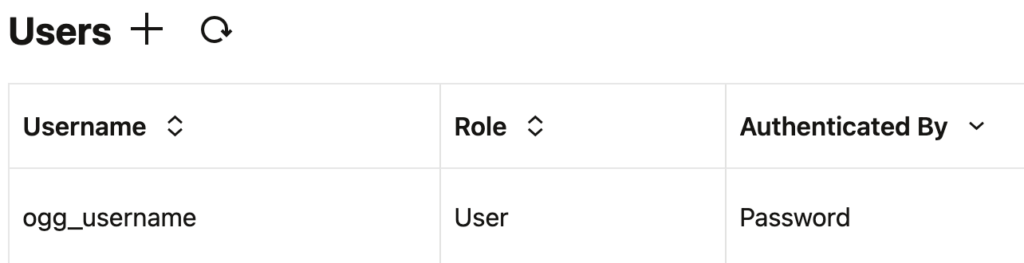
Here, the API doesn’t provide us with much information when the call succeeds:
>>> result.text
'{"$schema":"api:standardResponse","links":[{"rel":"canonical","href":"http://vmogg:7809/services/v2/authorizations/User/ogg_username","mediaType":"application/json"},{"rel":"self","href":"http://vmogg:7809/services/v2/authorizations/User/ogg_username","mediaType":"application/json"}],"messages":[]}'
A fully working OGGRestAPI Python class
When dealing with the REST API, you will quickly feel the need for a standard client object that will handle everything for you. A very basic ogg_rest_api.py script class will look like this:
import getpass
import requests
import time
import urllib3
from pprint import pprint


class OGGRestAPI:
    """Oracle GoldenGate REST API client (base class)."""

    # HTTP statuses worth retrying (transient / server-side).
    _RETRY_STATUSES = frozenset({429, 502, 503, 504})
    # Exceptions worth retrying (transient network issues).
    _RETRY_EXCEPTIONS = (
        requests.exceptions.ConnectionError,
        requests.exceptions.Timeout,
        requests.exceptions.ChunkedEncodingError,
    )

    def __init__(self, url, username=None, password=None, deployment=None, ca_cert=None,
                 reverse_proxy=False, verify_ssl=True, test_connection=True, timeout=None, version='v2'):
        """
        Initialize Oracle GoldenGate REST API client.

        :param url: Base URL of the OGG REST API. It can be:
                    'http(s)://hostname:port' without NGINX reverse proxy,
                    'https://nginx_host:nginx_port' with NGINX reverse proxy.
        :param username: service username
        :param password: service password. If omitted, the user is prompted to
                         enter it securely (input is not echoed).
        :param deployment: when reverse proxy is used, the deployment name to use (e.g. 'ogg_test_01')
        :param ca_cert: path to a trusted CA cert (for self-signed certs)
        :param reverse_proxy: bool, whether to use NGINX reverse proxy
        :param verify_ssl: bool, whether to verify SSL certs
        :param test_connection: if True, will attempt a simple GET on /services on init
        :param timeout: request timeout in seconds
        """
        self.swagger_version = '2026.01.27'
        self.version = version
        self.base_url = url
        self.username = username
        if password is None:
            password = getpass.getpass(f'Password for {username or "OGG REST API"}: ')
        self.auth = (self.username, password)
        self.headers = {'Accept': 'application/json', 'Content-Type': 'application/json'}
        self.deployment = deployment
        self.reverse_proxy = reverse_proxy
        self.verify_ssl = ca_cert if ca_cert else verify_ssl
        self.timeout = timeout
        self.session = requests.Session()
        self.session.headers.update(self.headers)

        if not verify_ssl and self.base_url.startswith('https://'):
            # Disable InsecureRequestWarning if verification is off
            urllib3.disable_warnings(urllib3.exceptions.InsecureRequestWarning)

        # Test connection
        if test_connection:
            # Verify connectivity. Raises on failure so callers can catch and handle
            # connection issues gracefully. The base class has no generated endpoint
            # methods, so a simple GET on /services is used here.
            resp = self._request('GET', '/services', raw_response=True)
            if resp.status_code == 200:
                print(f'Connected to OGG REST API at {self.base_url}')
            elif resp.status_code == 403:
                raise RuntimeError(
                    f"Authentication failed connecting to OGG REST API at {self.base_url} "
                    f"with user {self.username}. Please check your credentials."
                )
            else:
                raise RuntimeError(
                    f"Failed to connect to OGG REST API at {self.base_url}. "
                    f"HTTP {resp.status_code}: {resp.text}"
                )

    def _request(self, method, path, *, params=None, data=None, max_retries=3,
                 backoff_factor=1.0, raw_response=False):
        """Make an HTTP request, retrying transient failures, then parse the response.

        Retries are attempted for transient network exceptions (connection errors,
        timeouts, chunked-encoding errors) and for retryable HTTP statuses
        (429, 502, 503, 504), using exponential backoff. When the server sends a
        ``Retry-After`` header, that value is honored instead of the computed delay.

        Args:
            method (str): The HTTP method to use.
            path (str): The API endpoint path.
            params (dict, optional): Query parameters for the request. Defaults to None.
            data (dict, optional): The request body data. Defaults to None.
            max_retries (int, optional): Maximum number of attempts. Defaults to 3.
            backoff_factor (float, optional): Base delay (seconds) for exponential
                backoff. Delay for attempt n is backoff_factor * 2**(n-1). Defaults to 1.0.
            raw_response (bool, optional): Whether to return the raw response object. Defaults to False.

        Returns:
            dict or requests.Response: The parsed response or the raw response object.
        """
        url = f'{self.base_url}{path}'
        response = None
        last_exc = None
        for attempt in range(1, max_retries + 1):
            try:
                response = self.session.request(
                    method,
                    url,
                    auth=self.auth,
                    params=params,
                    json=data,
                    verify=self.verify_ssl,
                    timeout=self.timeout
                )
            except self._RETRY_EXCEPTIONS as exc:
                last_exc = exc
                if attempt >= max_retries:
                    raise
                delay = self._retry_delay(attempt, backoff_factor)
                print(f"Request to {url} failed ({exc.__class__.__name__}: {exc}); "
                      f"retrying in {delay:.1f}s (attempt {attempt}/{max_retries})...")
                time.sleep(delay)
                continue

            # Retry transient server-side statuses while attempts remain.
            if response.status_code in self._RETRY_STATUSES and attempt < max_retries:
                delay = self._retry_delay(attempt, backoff_factor, response=response)
                print(f"Request to {url} returned HTTP {response.status_code}; "
                      f"retrying in {delay:.1f}s (attempt {attempt}/{max_retries})...")
                time.sleep(delay)
                continue

            break

        if response is None:
            # Every attempt raised a network exception; surface the last one.
            raise last_exc

        if raw_response:
            return response
        result = self._parse(response)
        self._check_response(response, url)
        return self._extract_main(result)

    def _retry_delay(self, attempt, backoff_factor, response=None):
        """Compute the delay before the next retry.

        Honors a ``Retry-After`` response header (seconds) when present, otherwise
        falls back to exponential backoff: backoff_factor * 2**(attempt - 1).
        """
        if response is not None:
            retry_after = response.headers.get('Retry-After')
            if retry_after:
                try:
                    return float(retry_after)
                except (TypeError, ValueError):
                    pass
        return backoff_factor * (2 ** (attempt - 1))

    def _build_path(self, template, ogg_service=None, path_params=None):
        path_params = dict(path_params or {})
        if "{version}" in template and "version" not in path_params:
            path_params["version"] = self.version

        # If reverse proxy is enabled, the full service must be added before /v2/
        #   - /services/ServiceManager/v2/... for Service Manager
        #   - /services/deployment_name/ogg_service/v2/... for other services when a deployment is specified
        if self.reverse_proxy and template != '/services':
            if ogg_service == 'ServiceManager' or not self.deployment:
                template = f'/services/ServiceManager/{template.removeprefix("/services/")}'
            else:
                template = f'/services/{self.deployment}/{ogg_service}/{template.removeprefix("/services/")}'
        return template.format(**path_params)

    def _call(self, method, template, *, ogg_service=None, path_params=None, params=None,
              data=None, body_params=None, raw_response=False, if_exists='fail'):
        if self.reverse_proxy and ogg_service == '' and self.deployment:
            # This is a common endpoint and a deployment is specified. Choosing adminsrvr service by default.
            ogg_service = "adminsrvr"
        path = self._build_path(template, ogg_service=ogg_service, path_params=path_params)
        url = f'{self.base_url}{path}'

        # Merge body_params into data when provided. body_params is a dict mapping
        # payload field names to values (the generated methods pass their
        # explicit body params here). Only merge when `data` is a dict or None.
        if body_params:
            if data is None:
                data = {}
            if isinstance(data, dict):
                # Copy first so the caller's dict is never mutated.
                data = dict(data)
                for k, v in body_params.items():
                    if v is not None:
                        data[k] = v
            if not data:
                data = None

        # If caller asked to skip on existing resource, inspect the raw response and
        # treat a 409 (already exists) as a no-op instead of an error. Routing through
        # _request means this path inherits the same retry handling as normal calls.
        if if_exists == 'skip':
            response = self._request(method, path, params=params, data=data, raw_response=True)
            parsed = self._parse(response)

            if response.status_code == 409:
                titles = []
                if isinstance(parsed, dict):
                    for m in parsed.get('messages', []):
                        if isinstance(m, dict) and m.get('title'):
                            titles.append(m['title'])
                message = '; '.join(titles) if titles else 'Resource exists'
                print(f"{message} (if_exists set to skip)")
                return {'status': 'skipped', 'message': message, 'http_status': 409, 'raw': parsed}

            # Otherwise behave like normal _call: raise on errors, return parsed or extracted
            self._check_response(response, url)
            if raw_response:
                return parsed
            return self._extract_main(parsed)

        # Default behavior: use existing request flow
        result = self._request(method, path, params=params, data=data, raw_response=raw_response)
        return result

    def _get(self, path, params=None, raw_response=False):
        return self._request('GET', path, params=params, raw_response=raw_response)

    def _post(self, path, data=None, raw_response=False):
        return self._request('POST', path, data=data, raw_response=raw_response)

    def _put(self, path, data=None, raw_response=False):
        return self._request('PUT', path, data=data, raw_response=raw_response)

    def _patch(self, path, data=None, raw_response=False):
        return self._request('PATCH', path, data=data, raw_response=raw_response)

    def _delete(self, path, raw_response=False):
        return self._request('DELETE', path, raw_response=raw_response)

    def _check_response(self, response, url):
        if response.ok:
            return

        # Parse the body once; _parse returns text (not a dict) for non-JSON bodies.
        body = self._parse(response)
        messages = body.get('messages') if isinstance(body, dict) else None
        if messages:
            error_messages = []
            for message in messages:
                if isinstance(message, dict):
                    severity = message.get('severity', 'ERROR')
                    title = message.get('title', message)
                else:
                    severity, title = 'ERROR', message
                error_messages.append(
                    f"{severity} (code {response.status_code}) - {url}: {title}"
                )
            raise RuntimeError(' ; '.join(error_messages))

        print(f'HTTP {response.status_code}: {response.text}')
        response.raise_for_status()

    def _parse(self, response):
        try:
            return response.json()
        except ValueError:
            return response.text

    def close(self):
        self.session.close()

    def __enter__(self):
        return self

    def __exit__(self, *_exc):
        self.close()
        return False

    def _extract_main(self, result):
        if not isinstance(result, dict):
            return result

        resp = result.get('response', result)
        if 'items' not in resp:
            return resp

        exclude = {'links', '$schema'}
        return [{k: v for k, v in i.items() if k not in exclude} for i in resp['items']]

    def pretty_print(self, result):
        pprint(result)
With this, we can connect to the API and generate the same GET query as before to retrieve all deployments. This time, we only provide the endpoint, and not the whole URL.
>>> from ogg_rest_api import OGGRestAPI
>>> client_blog = OGGRestAPI(url="http://vmmogg:7809", username="ogg", password="ogg")
>>> client_blog._get("/services/v2/deployments")
[{'name': 'ServiceManager', 'status': 'running'}, {'name': 'ogg_test_01', 'status': 'running'}, {'name': 'ogg_test_02', 'status': 'running'}]
As you can imagine, all GoldenGate API functionalities can be integrated in this class, enhancing GoldenGate management and monitoring. Next time you want to automate your GoldenGate processes, please consider using this REST API !
REST API calls to a secured GoldenGate deployment
If your GoldenGate deployment is secure, you can still use this Python class. The requests module will handle it for you. I give two examples below for a secured deployment using a self-signed certificate:
# Checking CA automatically (Trusted CA)
>>> client_blog = OGGRestAPI(url="https://vmogg:7809", username="ogg", password="ogg")

# Providing RootCA (self-signed certificate)
>>> client_blog = OGGRestAPI(url="https://vmogg:7809", username="ogg", password="ogg", ca_cert="/path/to/RootCA_cert.pem", verify_ssl=True)

# Disabling verification
>>> client_blog = OGGRestAPI(url="https://vmogg:7809", username="ogg", password="ogg", verify_ssl=False)![Thumbnail [60x60]](https://www.dbi-services.com/blog/wp-content/uploads/2025/05/JDE_Web-1-scaled.jpg)
![Thumbnail [90x90]](https://www.dbi-services.com/blog/wp-content/uploads/2025/05/martin_bracher_2048x1536.jpg)