In the last post we’ve deployed Forgejo on FreeBSD 15. In this post we’re going to do something with it and that is: We’ll create a new organization, a new repository, and finally we want to create a simple action. An “Action” is what GitLab calls a pipeline.
Creating a new organization is just a matter of a few clicks:
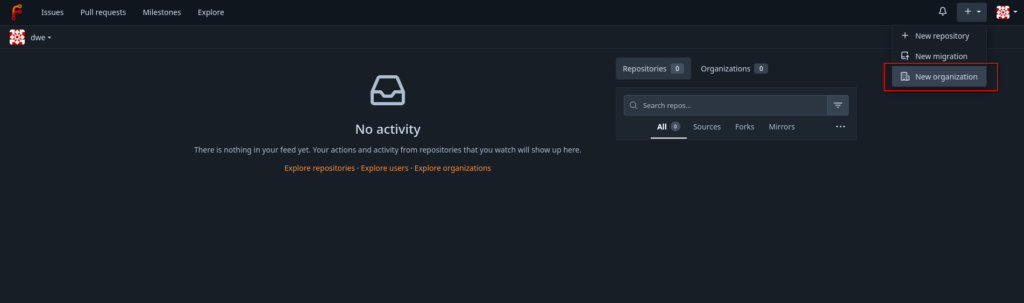

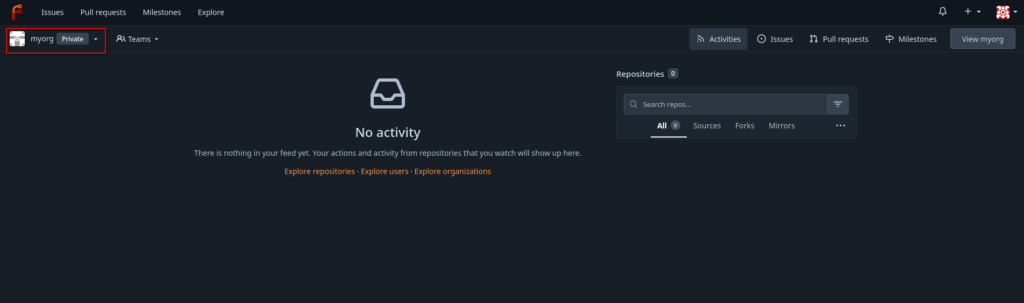
The only change to the default settings is the visibility, which is changed to private. The interface directly switches to the new organizations once it is created:
The next step is to create and initialize a new repository, which is also just a matter of a few clicks:
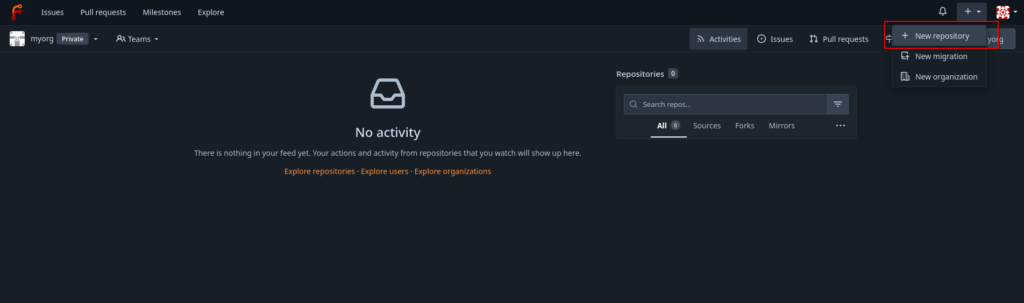
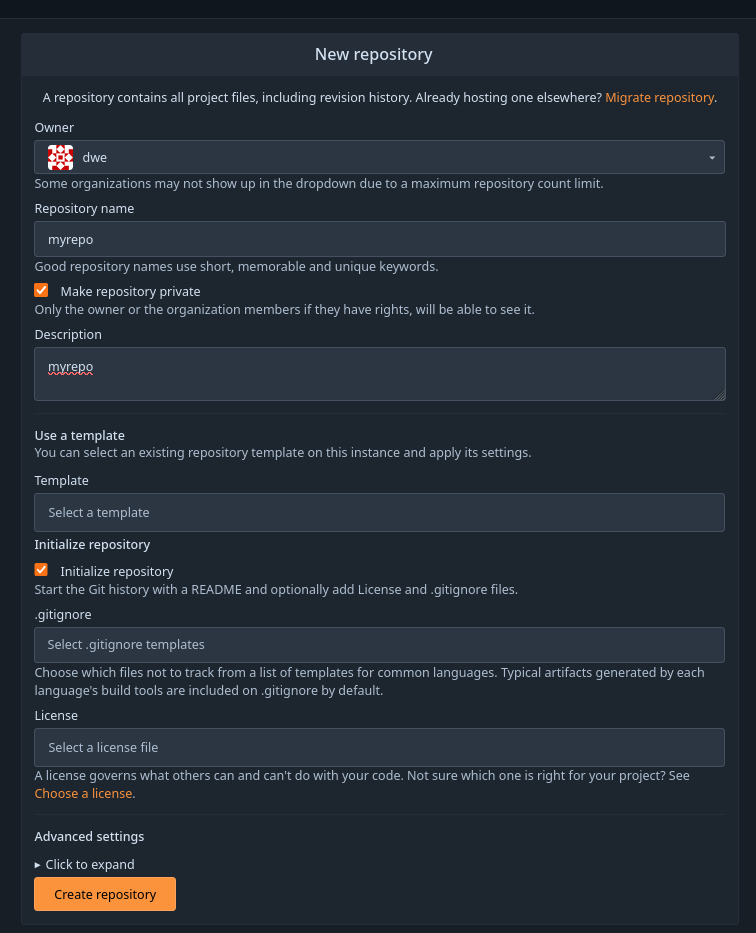
All the defaults, except for the “private” flag.
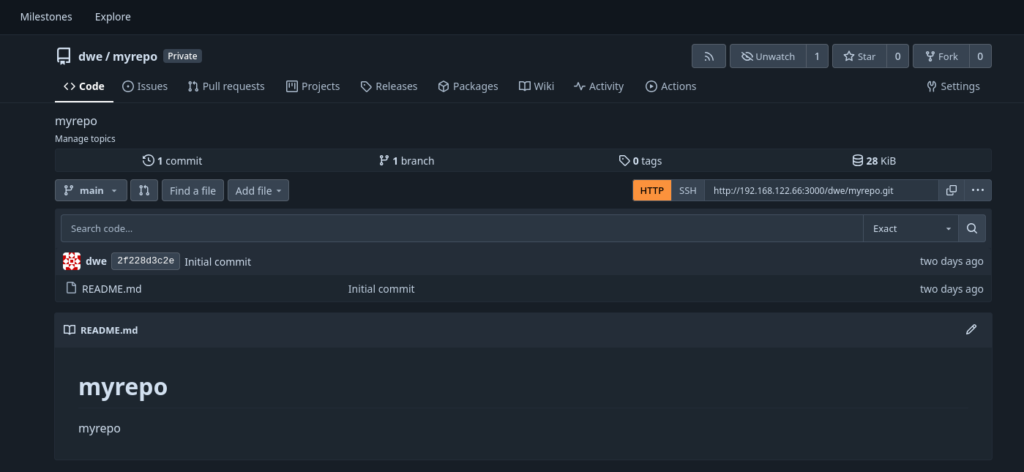
To clone this repository locally you’ll need to add your public ssh key to your user’s profile:
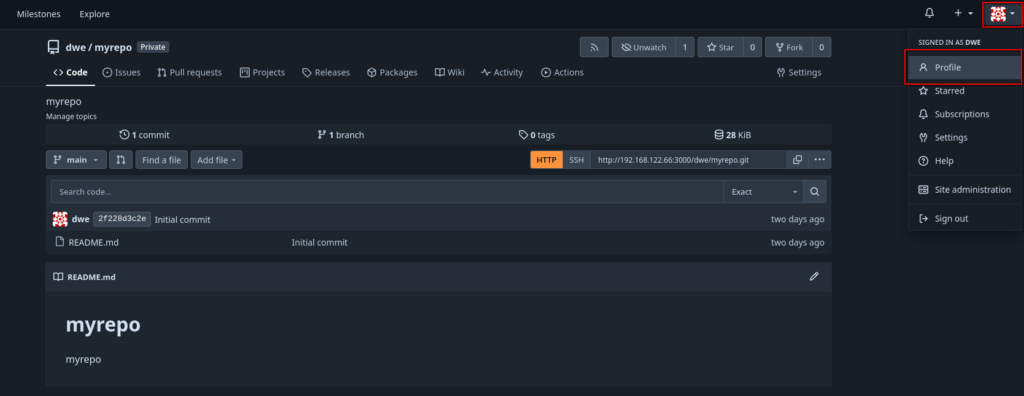
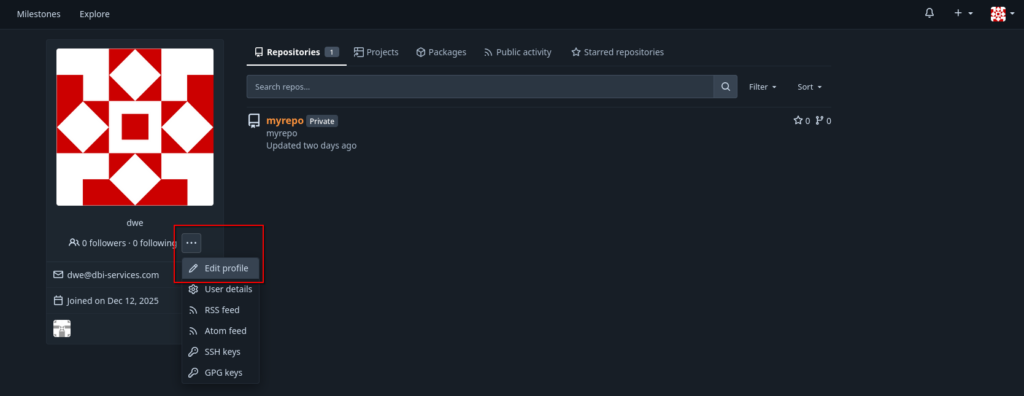
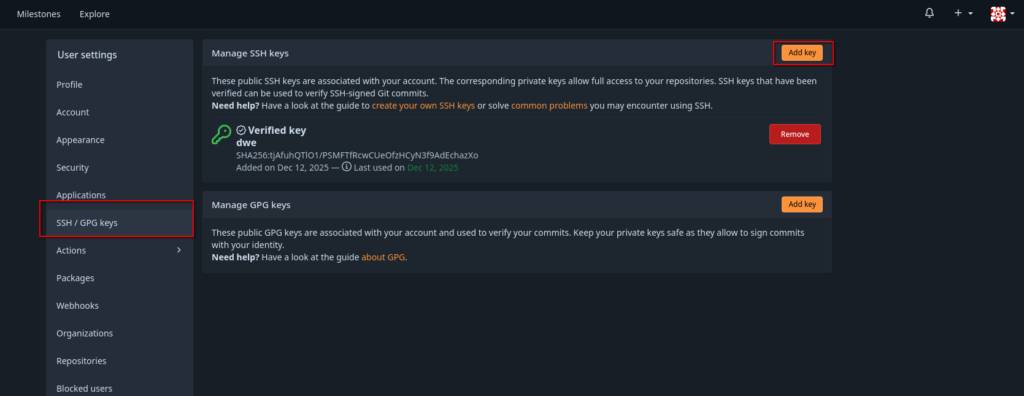
Once you have that, the repository can be cloned as usual:
dwe@ltdwe:~/Downloads$ git clone ssh://[email protected]/dwe/myrepo.git
Cloning into 'myrepo'...
remote: Enumerating objects: 3, done.
remote: Counting objects: 100% (3/3), done.
remote: Total 3 (delta 0), reused 0 (delta 0), pack-reused 0 (from 0)
Receiving objects: 100% (3/3), done.
dwe@ltdwe:~/Downloads$ ls -la myrepo/
total 4
drwxr-xr-x 1 dwe dwe  26 Dec 15 09:41 .
drwxr-xr-x 1 dwe dwe 910 Dec 15 09:41 ..
drwxr-xr-x 1 dwe dwe 122 Dec 15 09:41 .git
-rw-r--r-- 1 dwe dwe  16 Dec 15 09:41 README.md
So far so good, lets create a new “Action”. Before we do that, we need to check that actions are enabled for the repository:

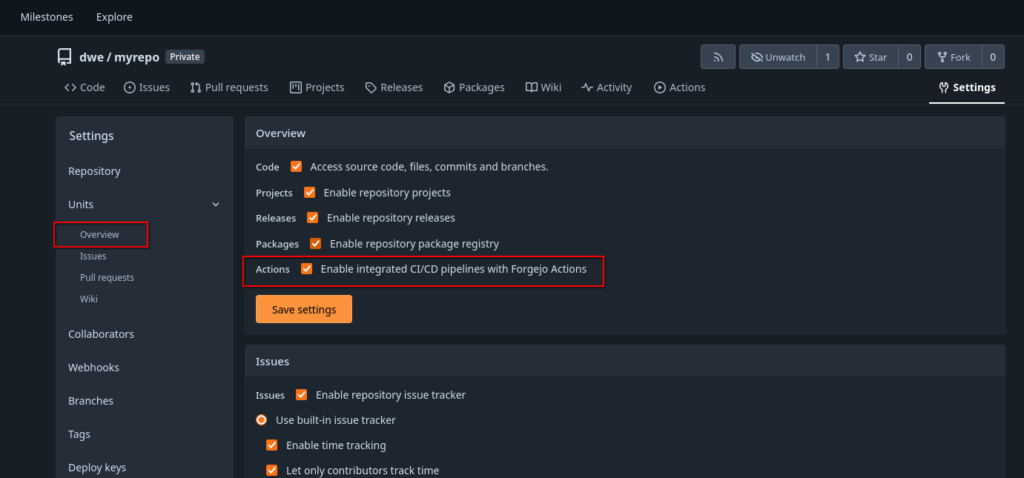
What we need now is a so-called “Runner”. A “Runner” is a daemon that fetches work from an Forgejo instance, executes and returns back the result. For the “Runner” we’ll use a Debian 13 minimal setup:
root@debian13:~$ cat /etc/os-release
PRETTY_NAME="Debian GNU/Linux 13 (trixie)"
NAME="Debian GNU/Linux"
VERSION_ID="13"
VERSION="13 (trixie)"
VERSION_CODENAME=trixie
DEBIAN_VERSION_FULL=13.2
ID=debian
HOME_URL="https://www.debian.org/"
SUPPORT_URL="https://www.debian.org/support"
BUG_REPORT_URL="https://bugs.debian.org/"
The only requirement is to have Git, curl and jq installed, so:
root@debian13:~$ apt install -y git curl jq
root@debian13:~$ git --version
git version 2.47.3
Downloading and installing the runner (this is a copy/paste from the official documentation):
root@debian13:~$ export ARCH=$(uname -m | sed 's/x86_64/amd64/;s/aarch64/arm64/')
root@debian13:~$ echo $ARCH
amd64
root@debian13:~$ export RUNNER_VERSION=$(curl -X 'GET' https://data.forgejo.org/api/v1/repos/forgejo/runner/releases/latest | jq .name -r | cut -c 2-)
root@debian13:~$ echo $RUNNER_VERSION
12.1.2
root@debian13:~$ export FORGEJO_URL="https://code.forgejo.org/forgejo/runner/releases/download/v${RUNNER_VERSION}/forgejo-runner-${RUNNER_VERSION}-linux-${ARCH}"
root@debian13:~$ wget -O forgejo-runner ${FORGEJO_URL}
root@debian13:~$ chmod +x forgejo-runner
root@debian13:~$ wget -O forgejo-runner.asc ${FORGEJO_URL}.asc
root@debian13:~$ gpg --keyserver hkps://keys.openpgp.org --recv EB114F5E6C0DC2BCDD183550A4B61A2DC5923710
gpg: directory '/root/.gnupg' created
gpg: keybox '/root/.gnupg/pubring.kbx' created
gpg: /root/.gnupg/trustdb.gpg: trustdb created
gpg: key A4B61A2DC5923710: public key "Forgejo <[email protected]>" imported
gpg: Total number processed: 1
gpg:               imported: 1
root@debian13:~$ gpg --verify forgejo-runner.asc forgejo-runner && echo "✓ Verified" || echo "✗ Failed"
gpg: Signature made Sat 06 Dec 2025 11:10:50 PM CET
gpg:                using EDDSA key 0F527CF93A3D0D0925D3C55ED0A820050E1609E5
gpg: Good signature from "Forgejo <[email protected]>" [unknown]
gpg:                 aka "Forgejo Releases <[email protected]>" [unknown]
gpg: WARNING: This key is not certified with a trusted signature!
gpg:          There is no indication that the signature belongs to the owner.
Primary key fingerprint: EB11 4F5E 6C0D C2BC DD18  3550 A4B6 1A2D C592 3710
     Subkey fingerprint: 0F52 7CF9 3A3D 0D09 25D3  C55E D0A8 2005 0E16 09E5
✓ Verified
Move that to a location which is in the PATH:
root@debian13:~$ mv forgejo-runner /usr/local/bin/forgejo-runner
root@debian13:~$ forgejo-runner -v
forgejo-runner version v12.1.2
As usual, a separate user should be created to run a service:
root@debian13:~$ groupadd runner
root@debian13:~$ useradd -g runner -m -s /bin/bash runner
As the runner will use Docker, Podman or LXC to execute the Actions, we’ll need to install Podman as well:
root@debian13:~$ apt install -y podman podman-docker
root@debian13:~$ podman --version
podman version 5.4.2
root@debian13:~$ systemctl enable --now podman.socket
root@debian13:~$ machinectl shell runner@
Connected to the local host. Press ^] three times within 1s to exit session.
runner@debian13:~$ systemctl --user enable --now podman.socket
Created symlink '/home/runner/.config/systemd/user/sockets.target.wants/podman.socket' → '/usr/lib/systemd/user/podman.socket'.
Now we need to register the runner with the Forgejo instance. Before we can do that, we need to fetch the registration token:
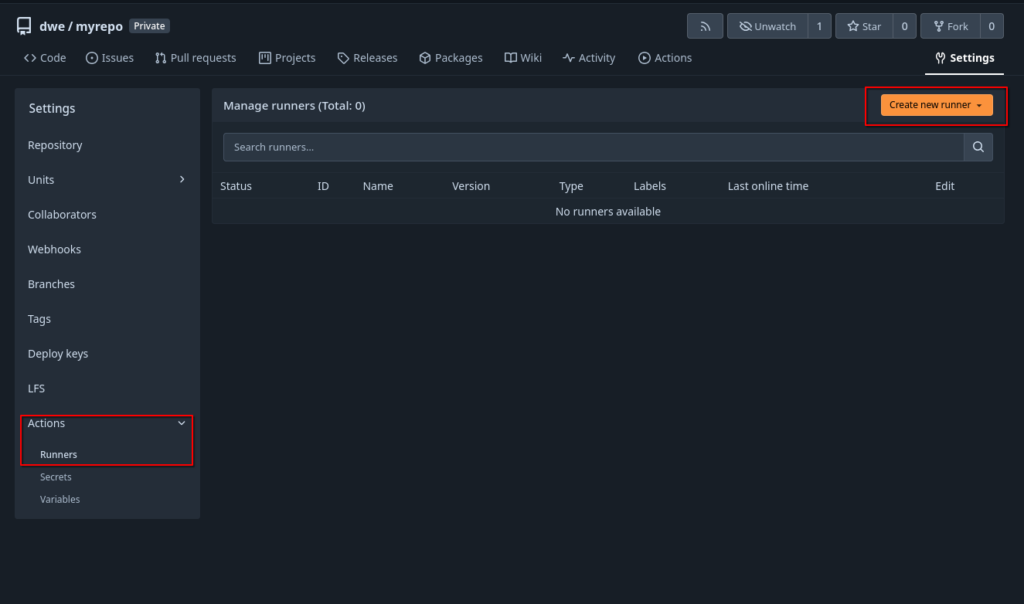
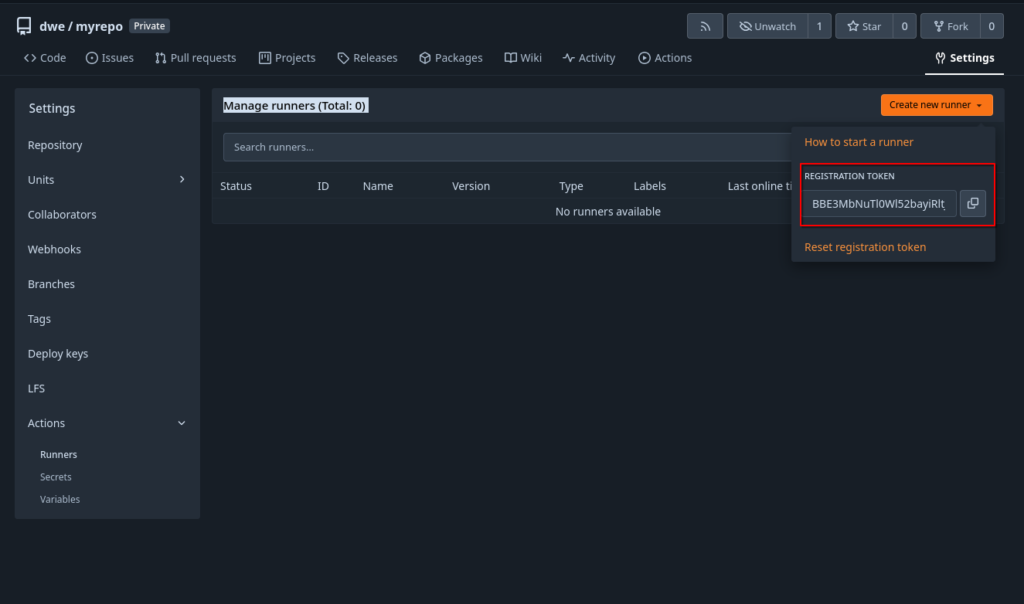
Back on the runner, register it:
root@debian13:~$ su - runner
runner@debian13:~$ forgejo-runner register
INFO Registering runner, arch=amd64, os=linux, version=v12.1.2.
WARN Runner in user-mode.
INFO Enter the Forgejo instance URL (for example, https://next.forgejo.org/):
http://192.168.122.66:3000/
INFO Enter the runner token:
BBE3MbNuTl0Wl52bayiRltJS8ciagRqghe7bXIXE
INFO Enter the runner name (if set empty, use hostname: debian13):
runner1
INFO Enter the runner labels, leave blank to use the default labels (comma-separated, for example, ubuntu-20.04:docker://node:20-bookworm,ubuntu-18.04:docker://node:20-bookworm):

INFO Registering runner, name=runner1, instance=http://192.168.122.66:3000/, labels=[docker:docker://data.forgejo.org/oci/node:20-bullseye].
DEBU Successfully pinged the Forgejo instance server
INFO Runner registered successfully.
runner@debian13:~$
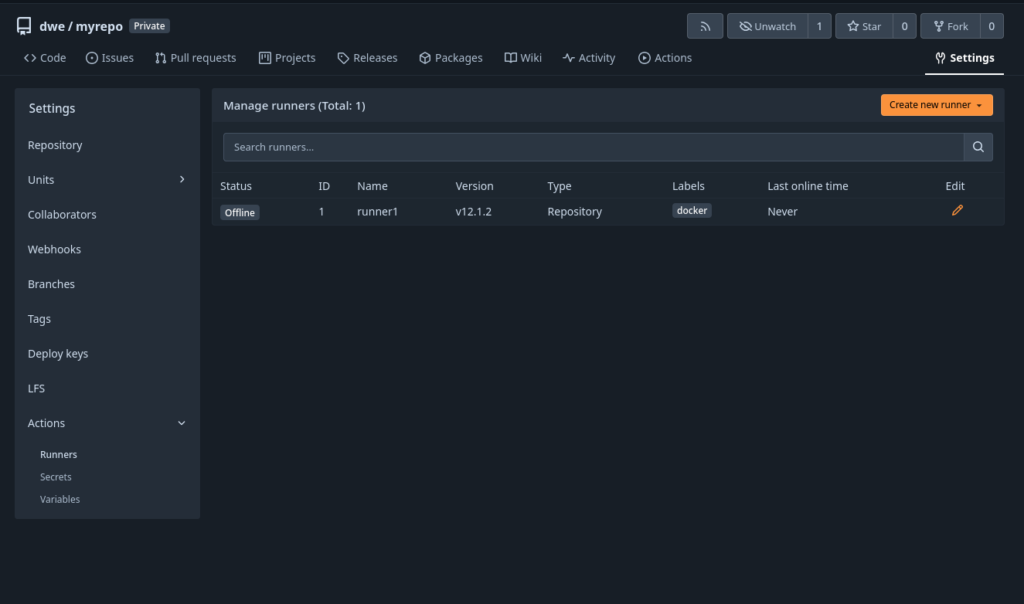
This will make the new runner visible in the interface, but it is in “offline” state:
Time to startup the runner:
root@debian13:~$ cat /etc/systemd/system/forgejo-runner.service
[Unit]
Description=Forgejo Runner
Documentation=https://forgejo.org/docs/latest/admin/actions/
After=docker.service

[Service]
ExecStart=/usr/local/bin/forgejo-runner daemon
ExecReload=/bin/kill -s HUP $MAINPID

# This user and working directory must already exist
User=runner
WorkingDirectory=/home/runner
Restart=on-failure
TimeoutSec=0
RestartSec=10

[Install]
WantedBy=multi-user.target

root@debian13:~$ systemctl daemon-reload
root@debian13:~$ systemctl enable forgejo-runner
root@debian13:~$ systemctl start forgejo-runner
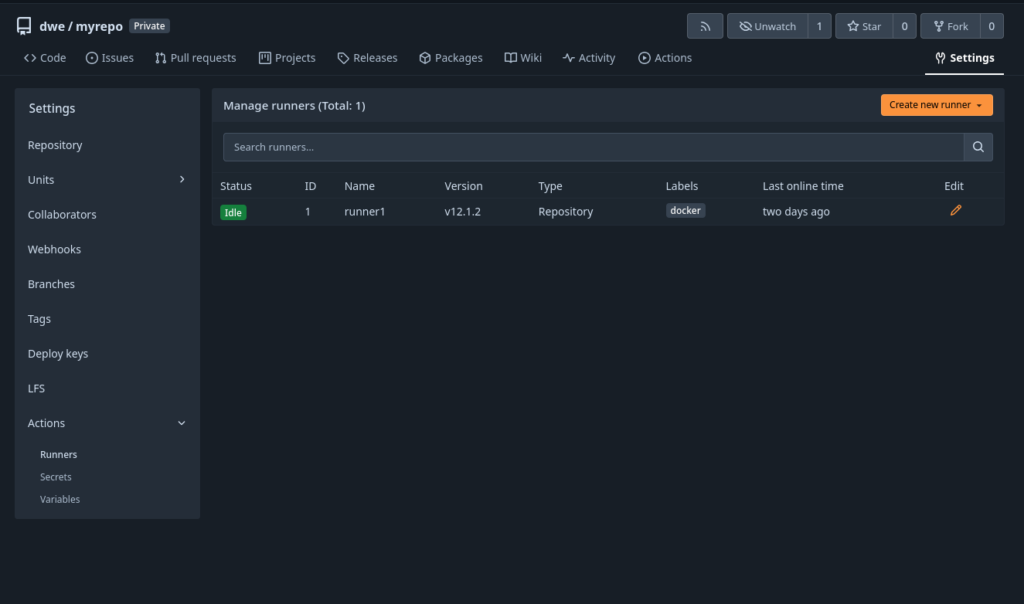
Once the runner is running, the status in the interface will switch to “Idle”:
Ready for our first “Action”. Actions are defined as a yaml file in a specific directory of the repository:
dwe@ltdwe:~/Downloads/myrepo$ mkdir -p .forgejo/workflows/
dwe@ltdwe:~/Downloads/myrepo$ cat .forgejo/workflows/demo.yaml
on: [push]
jobs:
  test:
    runs-on: docker
    steps:
      - run: echo All good!

dwe@ltdwe:~/Downloads/myrepo$ git add .forgejo/
dwe@ltdwe:~/Downloads/myrepo$ git commit -m "my first action"
[main f9aa487] my first action
 1 file changed, 6 insertions(+)
 create mode 100644 .forgejo/workflows/demo.yaml
dwe@ltdwe:~/Downloads/myrepo$ git push
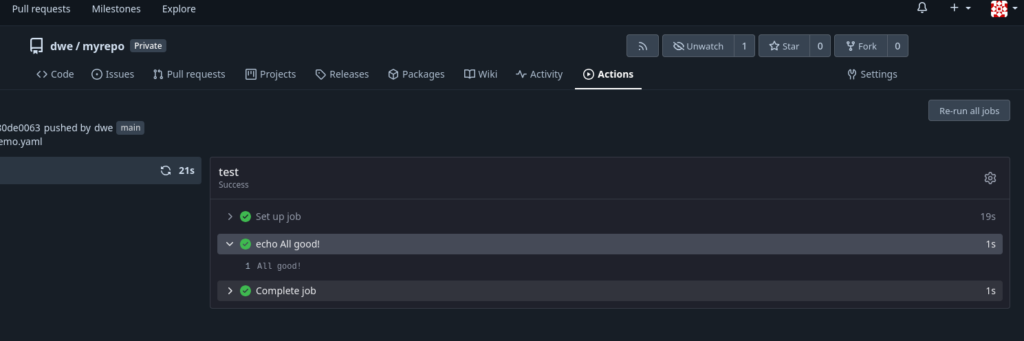
What that does: Whenever there is a “push” to the repository, a job will be executed on the runner with label “docker” which doesn’t do more than printing “All good!”. If everything went fine you should see the result under “Actions” section of the repository:

Nice, now we’re ready to do some real work, bust this is the topic for the next post.
![Thumbnail [60x60]](https://www.dbi-services.com/blog/wp-content/uploads/2022/08/DWE_web-min-scaled.jpg)
![Thumbnail [90x90]](https://www.dbi-services.com/blog/wp-content/uploads/2025/11/LTO_WEB.jpg)
![Thumbnail [90x90]](https://www.dbi-services.com/blog/wp-content/uploads/2025/05/martin_bracher_2048x1536.jpg)