In recent customer projects I had less to do with PostgreSQL but more with reviewing infrastructures and give recommendations about what and how to improve. In all of those projects GitLab is used in one way or the other. Some only use it for managing their code in Git and work on issues, others use pipelines to build their stuff, and others almost use the full set of features. Gitlab is a great product, but sometimes you do not need the full set of features so I started to look for alternatives mostly because of my own interest. One of the more popular choices seemed to be Gitea but as a company was created around it, a fork was created and this is Forgejo. The FAQ summarizes the most important topics around the project pretty well, so please read it.
As FreeBSD 15 was released on 2. December that’s the perfect chance to get that up and running there and have a look how it feels like. I am not going into the installation of FreeBSD 15, this really is straight forward. I just want to mention that I opted for the “packaged base system” instead of the distributions sets which is currently in tech preview. What that means is that the whole system is installed and managed with packages and you don’t need freebsd-update anymore. Although it is still available, it will not work anymore if you try to use it:
root@forgejo:~ $ cat /etc/os-release
NAME=FreeBSD
VERSION="15.0-RELEASE"
VERSION_ID="15.0"
ID=freebsd
ANSI_COLOR="0;31"
PRETTY_NAME="FreeBSD 15.0-RELEASE"
CPE_NAME="cpe:/o:freebsd:freebsd:15.0"
HOME_URL="https://FreeBSD.org/"
BUG_REPORT_URL="https://bugs.FreeBSD.org/"
root@forgejo:~ $ freebsd-update fetch
freebsd-update is incompatible with the use of packaged base.  Please see
https://wiki.freebsd.org/PkgBase for more information.
Coming back to Forgejo: On FreeBSD this is available as a package, so you can just go ahead and install it:
root@forgejo:~$ pkg search forgejo
forgejo-13.0.2_1               Compact self-hosted Git forge
forgejo-act_runner-9.1.0_2     Act runner is a runner for Forgejo based on the Gitea Act runner
forgejo-lts-11.0.7_1           Compact self-hosted Git forge
forgejo7-7.0.14_3              Compact self-hosted Git service
root@forgejo:~ $ pkg install forgejo
Updating FreeBSD-ports repository catalogue...
FreeBSD-ports repository is up to date.
Updating FreeBSD-ports-kmods repository catalogue...
FreeBSD-ports-kmods repository is up to date.
Updating FreeBSD-base repository catalogue...
FreeBSD-base repository is up to date.
All repositories are up to date.
The following 32 package(s) will be affected (of 0 checked):

New packages to be INSTALLED:
        FreeBSD-clibs-lib32: 15.0 [FreeBSD-base]
        brotli: 1.1.0,1 [FreeBSD-ports]
...
Number of packages to be installed: 32

The process will require 472 MiB more space.
100 MiB to be downloaded.

Proceed with this action? [y/N]: y
Message from python311-3.11.13_1:

--
Note that some standard Python modules are provided as separate ports
as they require additional dependencies. They are available as:

py311-gdbm       databases/py-gdbm@py311
py311-sqlite3    databases/py-sqlite3@py311
py311-tkinter    x11-toolkits/py-tkinter@py311
=====
Message from git-2.51.0:

--
If you installed the GITWEB option please follow these instructions:

In the directory /usr/local/share/examples/git/gitweb you can find all files to
make gitweb work as a public repository on the web.

All you have to do to make gitweb work is:
1) Please be sure you're able to execute CGI scripts in
   /usr/local/share/examples/git/gitweb.
2) Set the GITWEB_CONFIG variable in your webserver's config to
   /usr/local/etc/git/gitweb.conf. This variable is passed to gitweb.cgi.
3) Restart server.


If you installed the CONTRIB option please note that the scripts are
installed in /usr/local/share/git-core/contrib. Some of them require
other ports to be installed (perl, python, etc), which you may need to
install manually.
=====
Message from git-lfs-3.6.1_8:

--
To get started with Git LFS, the following commands can be used:

  1. Setup Git LFS on your system. You only have to do this once per
     repository per machine:

     $ git lfs install

  2. Choose the type of files you want to track, for examples all ISO
     images, with git lfs track:

     $ git lfs track "*.iso"

  3. The above stores this information in gitattributes(5) files, so
     that file needs to be added to the repository:

     $ git add .gitattributes

  4. Commit, push and work with the files normally:

     $ git add file.iso
     $ git commit -m "Add disk image"
     $ git push
=====
Message from forgejo-13.0.2_1:

--
Before starting forgejo for the first time, you must set a number of
secrets in the configuration file. For your convenience, a sample file
has been copied to /usr/local/etc/forgejo/conf/app.ini.

You need to replace every occurence of CHANGE_ME in the file with
sensible values. Please refer to the official documentation at
https://forgejo.org for details.

You will also likely need to create directories for persistent storage.
Run
    su -m git -c 'forgejo doctor check'
to check if all prerequisites have been met.
What I really like with the FreeBSD packages is, that they usually give clear instructions on what to do. We’ll go with the web-based installer, so:
root@forgejo:~ $ chown git:git /usr/local/etc/forgejo/conf
root@forgejo:~ $ rm /usr/local/etc/forgejo/conf/app.ini
root@forgejo:~ $ service -l | grep for
forgejo
root@forgejo:~ $ service forgejo enable
forgejo enabled in /etc/rc.conf
root@forgejo:~ $ service forgejo start
2025/12/12 14:16:42 ...etting/repository.go:318:loadRepositoryFrom() [W] SCRIPT_TYPE "bash" is not on the current PATH. Are you sure that this is the correct SCRIPT_TYPE?

[1] Check paths and basic configuration
 - [E] Failed to find configuration file at '/usr/local/etc/forgejo/conf/app.ini'.
 - [E] If you've never ran Forgejo yet, this is normal and '/usr/local/etc/forgejo/conf/app.ini' will be created for you on first run.
 - [E] Otherwise check that you are running this command from the correct path and/or provide a `--config` parameter.
 - [E] Cannot proceed without a configuration file
FAIL
Command error: stat /usr/local/etc/forgejo/conf/app.ini: no such file or directory

2025/12/12 14:16:42 ...etting/repository.go:318:loadRepositoryFrom() [W] SCRIPT_TYPE "bash" is not on the current PATH. Are you sure that this is the correct SCRIPT_TYPE?

[1] Check paths and basic configuration
 - [E] Failed to find configuration file at '/usr/local/etc/forgejo/conf/app.ini'.
 - [E] If you've never ran Forgejo yet, this is normal and '/usr/local/etc/forgejo/conf/app.ini' will be created for you on first run.
 - [E] Otherwise check that you are running this command from the correct path and/or provide a `--config` parameter.
 - [E] Cannot proceed without a configuration file
FAIL
Command error: stat /usr/local/etc/forgejo/conf/app.ini: no such file or directory
Seems bash is somehow expected, but this is not available right now:
root@forgejo:~ $ which bash
root@forgejo:~ $
Once more:
root@forgejo:~ $ pkg install bash
root@forgejo:~ $ service forgejo stop
Stopping forgejo.
root@forgejo:~ $ service forgejo start

[1] Check paths and basic configuration
 - [E] Failed to find configuration file at '/usr/local/etc/forgejo/conf/app.ini'.
 - [E] If you've never ran Forgejo yet, this is normal and '/usr/local/etc/forgejo/conf/app.ini' will be created for you on first run.
 - [E] Otherwise check that you are running this command from the correct path and/or provide a `--config` parameter.
 - [E] Cannot proceed without a configuration file
FAIL
Command error: stat /usr/local/etc/forgejo/conf/app.ini: no such file or directory
root@forgejo:~ $ service forgejo status
forgejo is running as pid 3448.
The web installer is available on port 3000 and you can choose between the usual database backends:
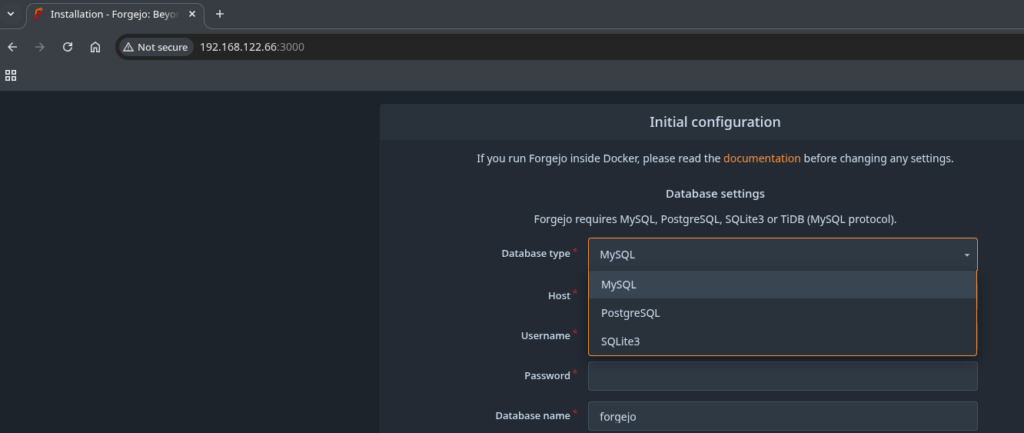
To keep it simple I went with SQLite3, kept everything at the default and provided the Administrator information further down the screen. Before the installer succeeded I had to create these two directories:
root@forgejo:~ $ mkdir /usr/local/share/forgejo/data/
root@forgejo:~ $ chown git:git /usr/local/share/forgejo/data/
root@forgejo:~ $ mkdir /usr/local/share/forgejo/log
root@forgejo:~ $ chown git:git /usr/local/share/forgejo/log
Once that was done it went fine and this is the welcome screen:
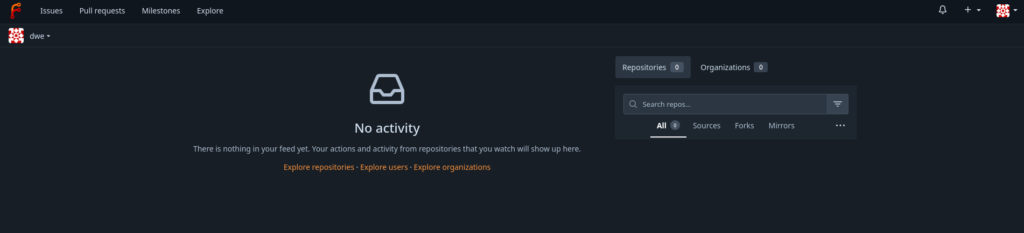
As with the other tools in that area there are the common sections like “Issues”, “Pull requests”, and “Milestones”.
In the next post we’re going to create an organization, a repository and try to create a simple, how GitLab calls it, pipeline.
![Thumbnail [60x60]](https://www.dbi-services.com/blog/wp-content/uploads/2022/08/DWE_web-min-scaled.jpg)
![Thumbnail [90x90]](https://www.dbi-services.com/blog/wp-content/uploads/2025/05/martin_bracher_2048x1536.jpg)
![Thumbnail [90x90]](https://www.dbi-services.com/blog/wp-content/uploads/2025/11/LTO_WEB.jpg)