Context
Working with XML in SQL Server can feel like taming a wild beast. It’s undeniably flexible and great for storing complex hierarchical data, but when it comes to querying efficiently, many developers hit a wall. That’s where things get interesting.
In this post, we’ll dive into a real-world scenario with half a million rows, put two XML query methods head-to-head .exist() vs .value(), and uncover how SQL Server handles them under the scenes.
Practical example
To demonstrate this, we’ll use SQL Server 2022 Developer Edition and create a table based on the open-source StackOverflow2010 database, derived from the Posts table, but storing part of the original data in XML format. We will also add a few indexes to simulate an environment with a minimum level of optimization.
CREATE TABLE dbo.PostsXmlPerf
(
    PostId        INT           NOT NULL PRIMARY KEY,
    PostTypeId    INT           NOT NULL,
    CreationDate  DATETIME      NOT NULL,
    Score         INT           NOT NULL,
    Body          NVARCHAR(MAX) NOT NULL,
    MetadataXml   XML           NOT NULL
);

INSERT INTO dbo.PostsXmlPerf (PostId, PostTypeId, CreationDate, Score, Body, MetadataXml)
SELECT TOP (500000)
       p.Id,
       p.PostTypeId,
       p.CreationDate,
       p.Score,
       p.Body,
       (
           SELECT
               p.OwnerUserId     AS [@OwnerUserId],
               p.LastEditorUserId AS [@LastEditorUserId],
               p.AnswerCount     AS [@AnswerCount],
               p.CommentCount    AS [@CommentCount],
               p.FavoriteCount   AS [@FavoriteCount],
               p.ViewCount       AS [@ViewCount],
               (
                   SELECT TOP (5)
                          c.Id           AS [Comment/@Id],
                          c.Score        AS [Comment/@Score],
                          c.CreationDate AS [Comment/@CreationDate]
                   FROM dbo.Comments c
                   WHERE c.PostId = p.Id
                   FOR XML PATH(''), TYPE
               )
           FOR XML PATH('PostMeta'), TYPE
       )
FROM dbo.Posts p
ORDER BY p.Id;

CREATE nonclustered INDEX IX_PostsXmlPerf_CreationDate
ON dbo.PostsXmlPerf (CreationDate);

CREATE nonclustered INDEX IX_PostsXmlPerf_PostTypeId
ON dbo.PostsXmlPerf (PostTypeId);
Next, let’s create two queries designed to interrogate the column that contains XML data, in order to extract information based on a condition applied to a value stored within that XML.
SET STATISTICS IO ON;
SET STATISTICS TIME ON;

DBCC FREEPROCCACHE;

SELECT PostId, Score
FROM dbo.PostsXmlPerf
WHERE MetadataXml.exist('/PostMeta[@OwnerUserId="8"]') = 1;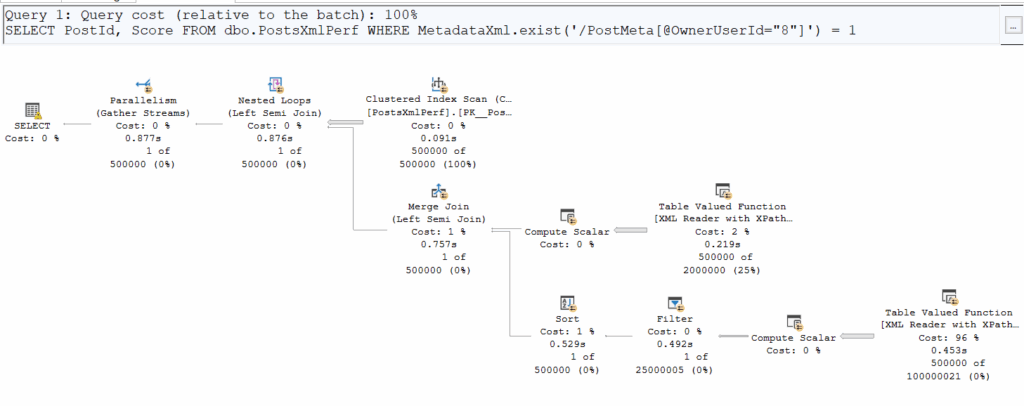
DBCC FREEPROCCACHE;

SELECT PostId, Score
FROM dbo.PostsXmlPerf
WHERE MetadataXml.value('(/PostMeta/@OwnerUserId)[1]', 'INT') = 8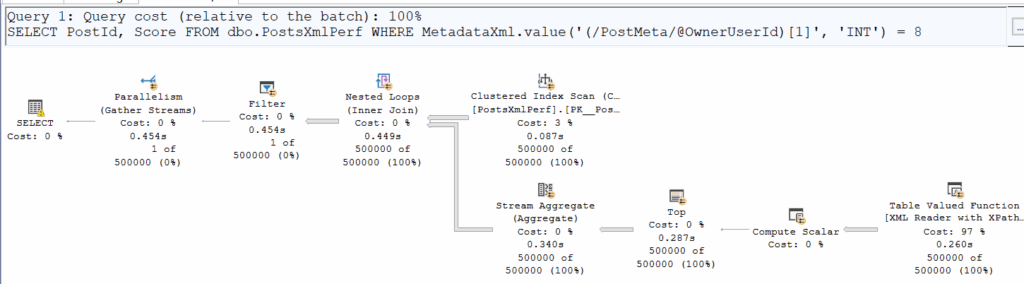
Comparing logical and physical reads, we notice something interesting:
| Logical Reads | CPU Time | |
| .exist() | 125’912 | 00:00:05.954 |
| .value() | 125’912 | 00:00:03.125 |
At first glance, the number of pages read is identical, but .exist() is clearly taking more time. Why? Execution plans reveal that .exist() sneaks in a Merge Join, adding overhead.
Additionally, on both execution plans we can see a small yellow bang icon. On the first plan, it’s just a memory grant warning, but the second one is more interesting:
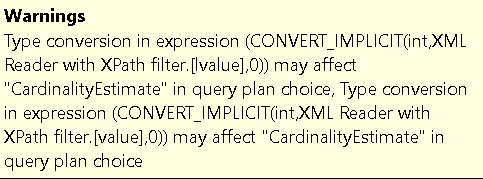
Alright, a bit strange ; let’s move forward with some tuning and maybe this warning will disappear.
To help with querying, it can be useful to create a more targeted index for XML queries.
Let’s create an index on the column that contains XML. However, as you might expect, it’s not as straightforward as indexing a regular column. For an XML column, you first need to create a primary XML index, which physically indexes the overall structure of the column (similar to a clustered index), and then a secondary XML index, which builds on the primary index and is optimized for a specific type of query (value, path, or property) – to know more about XML indexes : Microsoft Learn, MssqlTips.
So, let’s create these indexes !
CREATE PRIMARY XML INDEX IX_XML_Primary_MetadataXml
ON dbo.PostsXmlPerf (MetadataXml);

CREATE XML INDEX IX_XML_Value_MetadataXml
ON dbo.PostsXmlPerf (MetadataXml)
USING XML INDEX IX_XML_Primary_MetadataXml FOR Value;
Let’s rerun the performance tests with our two queries above, making sure to flush the buffer cache between each execution.
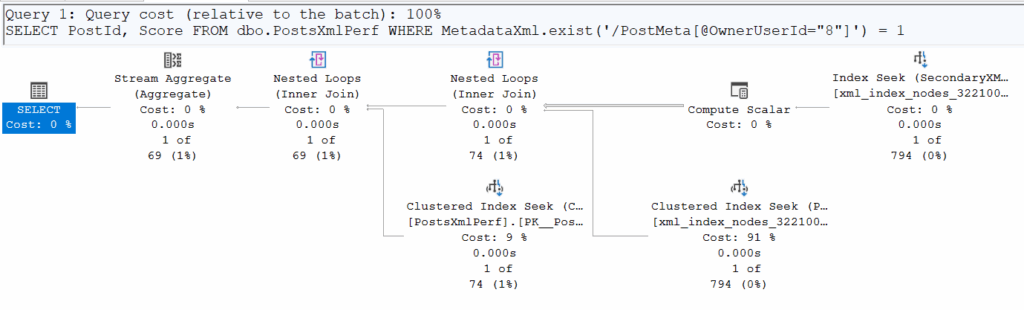
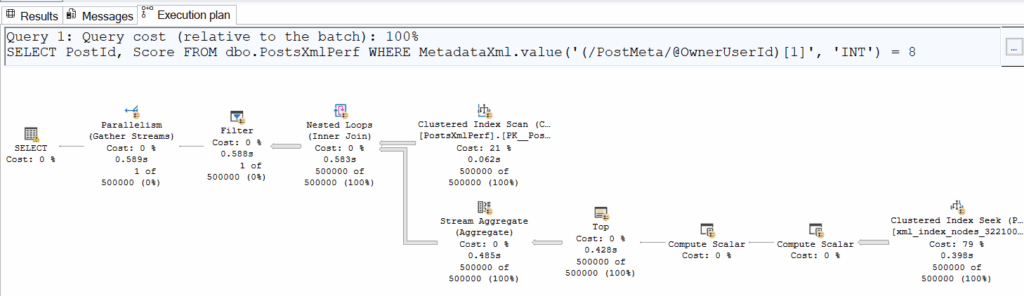
| | Logical Reads | CPU Time |
| .exist() | 4 | 00:00:00.031 |
| .value() | 125’912 | 00:00:03.937 |
The inevitable happened: the implicit conversion makes it impossible to use the secondary XML index due to a data type mismatch, preventing an actual seek on it. We do see a seek in the second execution plan, but it occurs for every row in the table (500’000 executions) and is essentially just accessing the underlying physical structure stored in the clustered index. In reality, this ‘seek’ is SQL Server scanning the XML to retrieve the exact value of the requested field (in this case, OwnerUserId).
This conversion issue occurs because the function .exist() returns a BIT, while the function .value() returns a SQL type.
This difference in return type can lead to significant performance problems when tuning queries that involve XML.
As explained by Microsoft: “For performance reasons, instead of using the value() method in a predicate to compare with a relational value, use exist() with sql:column()“
Key take-aways
Working with XML in SQL Server can be powerful, but it can quickly become tricky to manage. .exist() and .value() might seem similar, but execution differences and type conversions can have a huge performance impact. Proper XML indexing is essential, and knowing your returned data types can save you from hours of head-scratching. Most importantly, before deciding to store data as XML, consider whether it’s truly necessary ; relational databases are not natively optimized for XML and can introduce complexity and performance challenges.
Sometimes, a simpler and highly effective approach is to extract frequently queried XML fields at the application level and store them in separate columns. This makes them much easier to index and query, reducing overhead while keeping your data accessible.
If your application relies heavily on semi-structured data or large volumes of XML/JSON, it’s worth considering alternative engines. For instance, MongoDB provides native document storage and fast queries on JSON/BSON, while PostgreSQL offers XML and JSONB support with powerful querying functions. Choosing the right tool for the job can simplify your architecture and significantly improve performance.
And to dive even deeper into the topic, with a forthcoming article focused this time on XML storage, keep an eye on the dbi services blogs !
![Thumbnail [60x60]](https://www.dbi-services.com/blog/wp-content/uploads/2025/11/LTO_WEB.jpg)
![Thumbnail [90x90]](https://www.dbi-services.com/blog/wp-content/uploads/2024/03/AHI_web.jpg)
![Thumbnail [90x90]](https://www.dbi-services.com/blog/wp-content/uploads/2025/05/martin_bracher_2048x1536.jpg)