If you start using the GoldenGate web UI after installing it, you might end up thinking that extending the session timeout would be nice. Since there is no clear Oracle documentation on that matter, here are multiple ways of doing it.
Table of contents
- Modifying the configuration files: quick but with downtime
- Using the Rest API: online but more complex
- Can I just paste the authorization fields and not the whole configuration file in the patch request ?
- Do I have to update the configuration file after modifying the configuration with the Rest API ?
- Will the parameters affect connections opened through the adminclient ?
- After modifying the configuration files manually and restarting GoldenGate, my sessions are not affected by the changes
Modifying the configuration files: quick but with downtime
The first way of doing it is to modify the deploymentConfiguration.dat files located in your $OGG_CONF_HOME directory. By default, OGG_CONF_HOME is set to $OGG_ETC_HOME/conf.
Inside this directory, the deploymentConfiguration.dat file looks similar to this:
{
    "ServiceManager": {
        "$schema": "ogg:service",
        "config": {
            "csrfHeaderProtectionEnabled": false,
            "securityDetails": {
                "network": {
                    "common": {
                        "fipsEnabled": false,
                        "id": "OracleSSL"
                    },
                    "inbound": {
                        "authMode": "clientOptional_server",
                        "crlEnabled": false,
                        "sessionCacheDetails": {
                            "limit": 20480,
                            "timeoutSecs": 1800
                        },
                        "role": "server",
                        "cipherSuites": [
                            "TLS_AES_256_GCM_SHA384",
                            "TLS_AES_128_GCM_SHA256",
                            "TLS_CHACHA20_POLY1305_SHA256"
                        ],
                        "certACL": [
                            {
                                "name": "ANY",
                                "permission": "allow"
                            }
                        ],
                        "sessionCacheEnabled": false,
                        "protocolVersion": "TLS_ALL"
                    },
                    "outbound": {
                        "authMode": "clientOptional_server",
                        "crlEnabled": false,
                        "role": "client",
                        "cipherSuites": "^.*$",
                        "sessionCacheEnabled": false
                    }
                }
            },
            "workerThreadCount": 5,
            "csrfTokenProtectionEnabled": true,
            "network": {
                "ipACL": [
                    {
                        "address": "ANY",
                        "permission": "allow"
                    }
                ],
                "serviceListeningPort": {
                    "address": "0.0.0.0",
                    "port": 7809
                }
            },
            "hstsEnabled": true,
            "authorizationDetails": {
                "movingExpirationWindowSecs": 900,
                "common": {
                    "allow": [
                        "Digest",
                        "x-Cert",
                        "Basic",
                        "Bearer"
                    ],
                    "customAuthorizationEnabled": true
                },
                "useMovingExpirationWindow": false,
                "sessionDurationSecs": 3600
            },
            "security": true,
            "defaultSynchronousWait": 30,
            "authorizationEnabled": true,
            "hstsDetails": "max-age=31536000;includeSubDomains",
            "asynchronousOperationEnabled": true,
            "taskManagerEnabled": true,
            "legacyProtocolEnabled": false
        },
        "enabled": true,
        "id": "30316382-c77b-495c-b69e-fd910d525b36",
        "status": "restart"
    },
    "pluginsrvr": {
        "$schema": "ogg:service",
        "config": "external",
        "critical": true,
        "enabled": false,
        "status": "stopped",
        "locked": false,
        "id": "eea1497d-8ff2-473f-90b3-84fffa57ebc7"
    }
}
There are two parameters that impact session timeout:
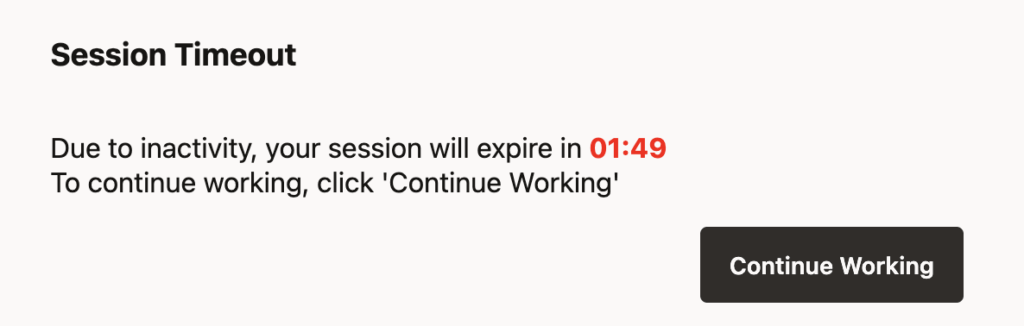
sessionDurationSecs: Duration of the authorization. Defaults to 3600 (one hour). After this delay, the session will be terminated, even if it has been active.sessionInactiveSecs: Maximum number of seconds an unexpired authorization session may be inactive before expiring. Defaults to 1800 (30 minutes). If set to 0, a session’s inactivity time will be unlimited. This parameter is the one responsible for the pop-up you see after some time in the UI (see below)
Depending on your goals, two changes can be made:
- If you want to increase the overall session duration, but still want inactive sessions to be disconnected after 30 minutes, you just have to increase
sessionDurationSecs. - If you feel limited by the inactivity timeout and want to increase it, then you have to increase
sessionInactiveSecs. If you want your sessions to last longer than one hour, you will also have to increasesessionDurationSecs.
Let’s check how it looks inside the configuration file:
[oracle@vmogg conf]$ grep -E 'sessionDurationSecs|sessionInactiveSecs' deploymentConfiguration.dat
                "sessionDurationSecs": 3600
The authorization limit is present (and set to the default value of 3600 seconds), but the inactivity parameter is absent. If you want to modify it, you will first have to add it. To update the session timeout, just modify these parameters (in seconds). After this, just restart the service manager and it’s done !
Here is a full configuration file example, modified with the two parameters sessionDurationSecs and sessionInactiveSecs added:
{
    "ServiceManager": {
        "$schema": "ogg:service",
        "config": {
            "csrfHeaderProtectionEnabled": false,
            "securityDetails": {
                "network": {
                    "common": {
                        "fipsEnabled": false,
                        "id": "OracleSSL"
                    },
                    "inbound": {
                        "authMode": "clientOptional_server",
                        "crlEnabled": false,
                        "sessionCacheDetails": {
                            "limit": 20480,
                            "timeoutSecs": 1800
                        },
                        "role": "server",
                        "cipherSuites": [
                            "TLS_AES_256_GCM_SHA384",
                            "TLS_AES_128_GCM_SHA256",
                            "TLS_CHACHA20_POLY1305_SHA256"
                        ],
                        "certACL": [
                            {
                                "name": "ANY",
                                "permission": "allow"
                            }
                        ],
                        "sessionCacheEnabled": false,
                        "protocolVersion": "TLS_ALL"
                    },
                    "outbound": {
                        "authMode": "clientOptional_server",
                        "crlEnabled": false,
                        "role": "client",
                        "cipherSuites": "^.*$",
                        "sessionCacheEnabled": false
                    }
                }
            },
            "workerThreadCount": 5,
            "csrfTokenProtectionEnabled": true,
            "network": {
                "ipACL": [
                    {
                        "address": "ANY",
                        "permission": "allow"
                    }
                ],
                "serviceListeningPort": {
                    "address": "0.0.0.0",
                    "port": 7809
                }
            },
            "hstsEnabled": true,
            "authorizationDetails": {
                "movingExpirationWindowSecs": 900,
                "common": {
                    "allow": [
                        "Digest",
                        "x-Cert",
                        "Basic",
                        "Bearer"
                    ],
                    "customAuthorizationEnabled": true
                },
                "useMovingExpirationWindow": false,
                "sessionDurationSecs": 7200,
                "sessionInactiveSecs": 3600
            },
            "security": true,
            "defaultSynchronousWait": 30,
            "authorizationEnabled": true,
            "hstsDetails": "max-age=31536000;includeSubDomains",
            "asynchronousOperationEnabled": true,
            "taskManagerEnabled": true,
            "legacyProtocolEnabled": false
        },
        "enabled": true,
        "id": "30316382-c77b-495c-b69e-fd910d525b36",
        "status": "restart"
    },
    "pluginsrvr": {
        "$schema": "ogg:service",
        "config": "external",
        "critical": true,
        "enabled": false,
        "status": "stopped",
        "locked": false,
        "id": "eea1497d-8ff2-473f-90b3-84fffa57ebc7"
    }
}
Of course, you will have to do the same for all the services of all your deployments. You can repeat the same process (including a restart) for all deployments, or use one of the methods described below.
Warning: The root object will differ depending on the configuration file ! It is called ServiceManager for the service manager, and adminsrvr, recvsrvr, distsrvr and pmsrvr for the services of a deployment. Adapt the commands accordingly.
Update with jq
jq is a powerful utility to manage JSON objects. I described it in more details in a blog about Log Analysis in MongoDB. To put it simple, you can retrieve a configuration option like this:
[oracle@vmogg ~] jq '.ServiceManager.config.authorizationDetails.sessionDurationSecs' deploymentConfiguration.dat
3600
And change it with the following commands:
# For the service manager
cd /u01/app/oracle/product/ogg23ai_sm/etc/conf
jq '.ServiceManager.config.authorizationDetails.sessionDurationSecs = 7200' deploymentConfiguration.dat > tmp && mv tmp deploymentConfiguration.dat

# For the services of your deployment
cd /u01/app/oracle/product/ogg_test_01/etc/conf
jq '.adminsrvr.config.authorizationDetails.sessionDurationSecs = 7200' deploymentConfiguration.dat > tmp && mv tmp deploymentConfiguration.dat
jq '.recvsrvr.config.authorizationDetails.sessionDurationSecs = 7200'  deploymentConfiguration.dat > tmp && mv tmp deploymentConfiguration.dat
jq '.distsrvr.config.authorizationDetails.sessionDurationSecs = 7200' deploymentConfiguration.dat > tmp && mv tmp deploymentConfiguration.dat
jq '.pmsrvr.config.authorizationDetails.sessionDurationSecs = 7200' deploymentConfiguration.dat > tmp && mv tmp deploymentConfiguration.dat
Unfortunately, there is no option to edit files in place with jq. Even though it’s a powerful tool, you will have to go through a temporary file to modify files. To add the absent sessionInactiveSecs parameter, just use the exact same command, replacing sessionDurationSecs, and jq will take care of adding the necessary commas and delivering an uncorrupted file.
Finally, to verify the values across your deployments, use [] to go through all services, and ? to avoid errors for missing keys:
[oracle@vmogg ~] jq '.[].config?.authorizationDetails?.sessionDurationSecs' /u01/app/oracle/product/*/etc/conf/deploymentConfiguration.dat
7200
7200
7200
7200
7200
[oracle@vmogg ~] jq '.[].config?.authorizationDetails?.sessionInactiveSecs' /u01/app/oracle/product/*/etc/conf/deploymentConfiguration.dat
3600
3600
3600
3600
3600
Update via sed
Modifying the JSON file with sed is less practical, but probably more familiar. Unfortunately, the tool was not made to modify JSON directly. While you can edit an existing parameter, adding a new one without corrupting your configuration might be harder. Anyway, here is a command that will update sessionDurationSecs in all your deploymentConfiguration.dat files, keeping the correct indentation and not corrupting your file by keeping commas at the end of the lines when there is one.
sed -i 's/"sessionDurationSecs": [0-9]\+\(,\)\?/"sessionDurationSecs": 7200\1/g' /u01/app/oracle/product/*/etc/conf/deploymentConfiguration.datWarning: When applying changes to the configuration file, pay attention to the line endings ! If you don’t use the provided sed command, you might remove commas at the end of some lines, and your configuration file might become invalid !
Update with Python
If you plan on doing any serious automation work around your GoldenGate configuration files, you should most certainly use Python. With the native json module, you can easily access and modify not just these two session parameters, but any aspect of the configuration. Here is a little code snippet that will modify a specific configuration file from a service manager:
import json
import os
import sys

file = "deploymentConfiguration.dat"

if not os.path.exists(file):
    print(f"File not found: {file}")
    sys.exit(1)

with open(file, "r") as f:
    data = json.load(f)

# sessionDurationSecs and sessionInactiveSecs will be changed, or added if they didn't exist before
data["ServiceManager"]["config"]["authorizationDetails"]["sessionDurationSecs"] = 7200
data["ServiceManager"]["config"]["authorizationDetails"]["sessionInactiveSecs"] = 3600

with open(file, "w") as f:
    json.dump(data, f, indent=4)
Output example:
[oracle@vmogg ~]$ grep -E "sessionDurationSecs|sessionInactiveSecs" deploymentConfiguration.dat
                "sessionDurationSecs": 3600
[oracle@vmogg ~]$ python3 ogg_conf_session_setting.py
[oracle@vmogg ~]$ grep -E "sessionDurationSecs|sessionInactiveSecs" deploymentConfiguration.dat
                "sessionDurationSecs": 7200,
                "sessionInactiveSecs": 3600
And for a more robust code that will search in all */etc/conf/deploymentConfiguration.dat files, and for all services of GoldenGate, not just the service manager:
import json
import glob
import os

def modify_ogg_configs(path_pattern, duration=7200, inactive=3600):
    file_list = glob.glob(path_pattern, recursive=True)
    if not file_list:
        print("No configuration files found.")
        return
    services = ["ServiceManager", "adminsrvr", "distsrvr", "recvsrvr", "pmsrvr", "pluginsrvr"]
    for file in file_list:
        print(f"Modifying GoldenGate configuration file: {file}")
        try:
            with open(file, "r") as f:
                data = json.load(f)
        except Exception as e:
            print(f"  Skipping {file}: failed to parse JSON ({e})")
            continue
        modified = False
        for service in services:
            try:
                cfg = data[service]["config"]
                if "authorizationDetails" in cfg:
                    cfg["authorizationDetails"]["sessionDurationSecs"] = duration
                    cfg["authorizationDetails"]["sessionInactiveSecs"] = inactive
                    print(f"  Updated {service}")
                    modified = True
            except KeyError:
                print(f"  {service} section not found, skipping")
        if modified:
            backup_file = file + ".bak"
            os.replace(file, backup_file)
            with open(file, "w") as f:
                json.dump(data, f, indent=4)
            print(f"  Changes saved (backup at {backup_file})")
        else:
            print("  No changes made to this file.")

# Example usage:
modify_ogg_configs("/u01/app/oracle/product/*/etc/conf/deploymentConfiguration.dat")
Output example:
[oracle@vmogg ~]$ python3 ogg_conf_session_setting_global.py
Modifying GoldenGate configuration file: /u01/app/oracle/product/ogg23ai_sm/etc/conf/deploymentConfiguration.dat
  Updated ServiceManager
  adminsrvr section not found, skipping
  distsrvr section not found, skipping
  recvsrvr section not found, skipping
  pmsrvr section not found, skipping
  Changes saved (backup at /u01/app/oracle/product/ogg23ai_sm/etc/conf/deploymentConfiguration.dat.bak)
Modifying GoldenGate configuration file: /u01/app/oracle/product/ogg_test_01/etc/conf/deploymentConfiguration.dat
  ServiceManager section not found, skipping
  Updated adminsrvr
  Updated distsrvr
  Updated recvsrvr
  Updated pmsrvr
  pluginsrvr section not found, skipping
  Changes saved (backup at /u01/app/oracle/product/ogg_test_01/etc/conf/deploymentConfiguration.dat.bak)
Using the Rest API: online but more complex
GoldenGate Rest API is not so hard to use when you’re used to it. I will probably write about this soon, but in the meantime, I will summarize what you need to know. You cannot directly modify a single parameter through the Rest API. To do so, you first have to retrieve the whole configuration, update it and push it.
You can do this in many ways, but I will just give you a minimal script example with the requests module from Python, to achieve what we’re looking for here:
import requests
import json


class OGGRestAPI:
    def __init__(self, host, port=7809, username=None, password=None, protocol='https'):
        """Initialize Oracle GoldenGate REST API client"""
        self.base_url = f'{protocol}://{host}:{port}'
        self.auth = (username, password)
        self.headers = {'Accept': 'application/json', 'Content-Type': 'application/json'}

    def _get(self, path, params=None):
        url = f'{self.base_url}{path}'
        response = requests.get(url, auth=self.auth, headers=self.headers, params=params)
        self._check_response(response)
        return self._parse(response)

    def _post(self, path, data=None):
        url = f'{self.base_url}{path}'
        response = requests.post(url, auth=self.auth, headers=self.headers, data=json.dumps(data or {}))
        self._check_response(response)
        return self._parse(response)

    def _put(self, path, data=None):
        url = f'{self.base_url}{path}'
        response = requests.put(url, auth=self.auth, headers=self.headers, data=json.dumps(data or {}))
        self._check_response(response)
        return self._parse(response)

    def _patch(self, path, data=None):
        url = f'{self.base_url}{path}'
        response = requests.patch(url, auth=self.auth, headers=self.headers, data=json.dumps(data or {}))
        self._check_response(response)
        return self._parse(response)

    def _delete(self, path):
        url = f'{self.base_url}{path}'
        response = requests.delete(url, auth=self.auth, headers=self.headers)
        self._check_response(response)
        return self._parse(response)

    def _check_response(self, response):
        if not response.ok:
            print(f'HTTP {response.status_code}: {response.text}')
            response.raise_for_status()

    def _parse(self, response):
        try:
            return response.json()
        except ValueError:
            return response.text

    def _extract_main(self, result):
        if isinstance(result, dict):
            resp = result.get('response', result)
            if isinstance(resp, dict) and '$schema' in resp and 'items' in resp:
                resp_items = resp['items']
                exclude = ['links', '$schema']
                resp = [{k: v for k, v in d.items() if k not in exclude} for d in resp_items]
                return resp
            return resp
        return result

    def list_deployments(self, version='v2'):
        """
        GET /services/{version}/deployments
        Required Role: User
        Retrieve the collection of Oracle GoldenGate Deployments.

        Parameters:
            version (string): Oracle GoldenGate Service API version. Example: v2

        Example:
            client.list_deployments()

        """
        path = f"/services/{version}/deployments"
        result = self._get(path)
        return self._extract_main(result)

    def list_services(self, deployment, version='v2'):
        """
        GET /services/{version}/deployments/{deployment}/services
        Required Role: User
        Retrieve the collection of Oracle GoldenGate Services in a deployment.

        Parameters:
            deployment (string): Name for the Oracle GoldenGate deployment. Example: deployment_example
            version (string): Oracle GoldenGate Service API version. Example: v2

        Example:
            client.list_services(
                deployment='deployment_example'
            )
        """
        path = f"/services/{version}/deployments/{deployment}/services"
        result = self._get(path)
        return self._extract_main(result)

    def retrieve_service(self, service, deployment, version='v2'):
        """
        GET /services/{version}/deployments/{deployment}/services/{service}
        Required Role: User
        Retrieve the details of a service in an Oracle GoldenGate deployment.

        Parameters:
            service (string): Name of the service. Example: service_example
            deployment (string): Name for the Oracle GoldenGate deployment. Example: deployment_example
            version (string): Oracle GoldenGate Service API version. Example: v2

        Example:
            client.retrieve_service(
                service='service_example',
                deployment='deployment_example'
            )
        """
        path = f"/services/{version}/deployments/{deployment}/services/{service}"
        result = self._get(path)
        return self._extract_main(result)

    def update_service_properties(self, service, deployment, data=None, version='v2'):
        """
        PATCH /services/{version}/deployments/{deployment}/services/{service}
        Required Role: Administrator
        Update the properties of a service.

        Parameters:
            service (string): Name of the service. Example: service_example
            deployment (string): Name for the Oracle GoldenGate deployment. Example: deployment_example
            version (string): Oracle GoldenGate Service API version. Example: v2
            body (object):  Example: body_example

        Example:
            client.update_service_properties(
                service='service_example',
                deployment='deployment_example',
                data={
                    "enabled": true,
                    "status": "running"
                })
        """
        path = f"/services/{version}/deployments/{deployment}/services/{service}"
        result = self._patch(path, data=data)
        return self._extract_main(result)


if __name__ == "__main__":
    client = OGGRestAPI(
        host="10.0.0.1",
        port=7809,
        username="ogg",
        password="password_ogg",
        protocol="http")

    deployments = [d["name"] for d in client.list_deployments()]
    for deployment in deployments:
        services = [s["name"] for s in client.list_services(deployment)]
        for service in services:
            print(f'\n\ndeployment: {deployment}, service: {service}')
            modified = False
            data = client.retrieve_service(service, deployment)

            try:
                if "authorizationDetails" in data["config"]:
                    data["config"]["authorizationDetails"]["sessionDurationSecs"] = 7200
                    data["config"]["authorizationDetails"]["sessionInactiveSecs"] = 3600
                    print(f"  Updated {service}")
                    modified = True
                else:
                    print(f"  'authorizationDetails' not found in {service} section, skipping")
            except KeyError:
                print(f"  'config' not found in {service} section, skipping")

            if modified:
                patch_data = {
                    "config": data['config']
                }
                print("Updating service properties...")
                client.update_service_properties(service, deployment, patch_data)
                print("Service properties updated.")
                data = client.retrieve_service(service, deployment)
                print(f"  sessionDurationSecs: {data['config']['authorizationDetails']['sessionDurationSecs']}")
                print(f"  sessionInactiveSecs: {data['config']['authorizationDetails']['sessionInactiveSecs']}")
And the output from the script:
[oracle@vmogg ~]$ python3 minimal_example_update_service_properties.py

deployment: ServiceManager, service: ServiceManager
  Updated ServiceManager
Updating service properties...
Service properties updated.
  sessionDurationSecs: 7200
  sessionInactiveSecs: 3600


deployment: ServiceManager, service: pluginsrvr
  'authorizationDetails' not found in pluginsrvr section, skipping


deployment: ogg_test_01, service: adminsrvr
  Updated adminsrvr
Updating service properties...
Service properties updated.
  sessionDurationSecs: 7200
  sessionInactiveSecs: 3600


deployment: ogg_test_01, service: distsrvr
  Updated distsrvr
Updating service properties...
Service properties updated.
  sessionDurationSecs: 7200
  sessionInactiveSecs: 3600


deployment: ogg_test_01, service: pmsrvr
  Updated pmsrvr
Updating service properties...
Service properties updated.
  sessionDurationSecs: 7200
  sessionInactiveSecs: 3600


deployment: ogg_test_01, service: recvsrvr
  Updated recvsrvr
Updating service properties...
Service properties updated.
  sessionDurationSecs: 7200
  sessionInactiveSecs: 3600
Can I just paste the authorization fields and not the whole configuration file in the patch request ?
Unfortunately, with the method described above, you cannot. If you do so, the request will not fail, but you will erase all fields that were in the field but not in the configuration of your patch requests. This is why I would rather get the configuration first, and then update it.
Do I have to update the configuration file after modifying the configuration with the Rest API ?
When modifying the configuration with the Rest API, changes are dynamic, but the configuration file is also updated, so there is nothing else to change in the configuration file.
Will the parameters affect connections opened through the adminclient ?
Yes, connections opened through the adminclient will be impacted when changing the value of sessionDurationSecs. These connections will not be asked for credentials again, but you will receive the following error:
# Connected to the deployment for less than sessionDurationSecs
OGG (http://vmogg:7809 ServiceManager) 2> status service * deployment *
Deployment Name                   Service Name     Service Status

ServiceManager                    SERVICEMANAGER   RUNNING
ServiceManager                    PLUGINSRVR       STOPPED
ogg_test_01                       ADMINSRVR        RUNNING
ogg_test_01                       DISTSRVR         RUNNING
ogg_test_01                       PMSRVR           RUNNING
ogg_test_01                       RECVSRVR         RUNNING

# After at least sessionDurationSecs seconds of inactivity
OGG (http://vmogg:7809 ServiceManager) 3> status service * deployment *

Error: Authorization failure for user 'ogg'.

# Whenever you enter the command again, you will be connected without having to re-enter credentials
OGG (http://vmogg:7809 ServiceManager) 4> status service * deployment *
Deployment Name                   Service Name     Service Status

ServiceManager                    SERVICEMANAGER   RUNNING
ServiceManager                    PLUGINSRVR       STOPPED
ogg_test_01                       ADMINSRVR        RUNNING
ogg_test_01                       DISTSRVR         RUNNING
ogg_test_01                       PMSRVR           RUNNING
ogg_test_01                       RECVSRVR         RUNNING
After modifying the configuration files manually and restarting GoldenGate, my sessions are not affected by the changes
If you try the non-dynamic methods described earlier on your deployments, make sure to log out from the UI and log in again. Even after restarting the service manager and services, old sessions could still be connected and benefit from the old sessionDurationSecs and sessionInactiveSecs value.
![Thumbnail [60x60]](https://www.dbi-services.com/blog/wp-content/uploads/2025/05/JDE_Web-1-scaled.jpg)
![Thumbnail [90x90]](https://www.dbi-services.com/blog/wp-content/uploads/2025/11/LTO_WEB.jpg)
![Thumbnail [90x90]](https://www.dbi-services.com/blog/wp-content/uploads/2022/08/MAW_web-min-scaled.jpg)