

By Mouhamadou Diaw
A refreshable clone PDB is a way to refresh a single PDB instead of refreshing all PDBs in a container as in a Data Guard environment. It consists to make a clone of a source PDB and the clone PDB is updated with redo accumulated since the last redo log apply
In this blog I did some tests of this feature Refreshable pluggable databases.
I am doing my test with Oracle 21c but this feature exists since Oracle 12.2.
The configuration I use in the following
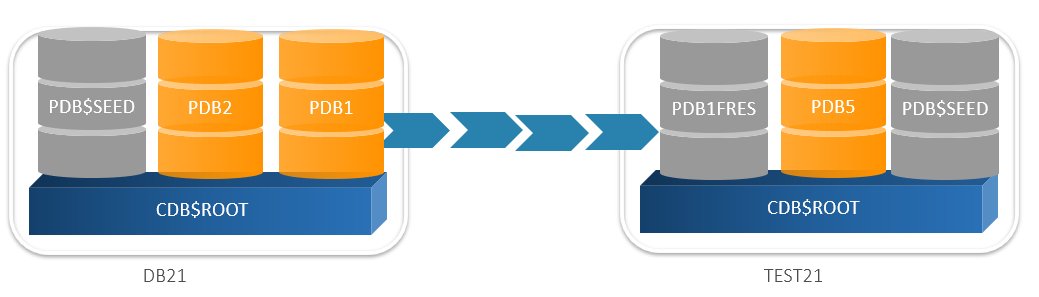
An Oracle 21c source CDB : DB21 with a source pluggable database PDB1
An Oracle 21c target CDB : TEST21 which will contain the refreshable clone of PDB1. The clone will be named PDB1FRES
Note that the refreshable clone can be created in the same container.
The first step is to create a user in the source CDB DB21 for database link purpose
|
1
2
3
4
5
6
7
8
9
10
11
|
SQL> create user c##clone_user identified by rootroot2016 temporary tablespace temp container=ALL;User created.SQL>SQL> grant create session, create pluggable database, sysoper to c##clone_user container=ALL ;Grant succeeded.SQL> |
In the target CDB TEST21 let’s create a database link to the source CDB. We will use the user c##clone
|
1
2
3
4
5
6
7
8
9
10
11
12
13
|
SQL> create database link clonesource connect to c##clone_user identified by rootroot2016 using 'DB21';Database link created.SQL>SQL> select * from dual@clonesource;D-XSQL> |
Now we can create a refreshable clone PDB1FRES of PDB1 in the database TEST21.
First we will create a manual refreshable clone
|
1
2
3
4
5
|
SQL> create pluggable database PDB1FRES from PDB1@clonesource refresh mode manual;Pluggable database created.SQL> |
When created the new clone is mounted
|
1
2
3
4
5
6
7
|
SQL> show pdbs; CON_ID CON_NAME OPEN MODE RESTRICTED---------- ------------------------------ ---------- ---------- 2 PDB$SEED READ ONLY NO 3 PDB1FRES MOUNTEDSQL> |
We can see the refresh mode
|
1
2
3
4
5
6
7
|
SQL> select PDB_NAME,REFRESH_MODE,REFRESH_INTERVAL,LAST_REFRESH_SCN from dba_pdbs where PDB_NAME='PDB1FRES';PDB_NAME REFRES REFRESH_INTERVAL LAST_REFRESH_SCN--------------- ------ ---------------- ----------------PDB1FRES MANUAL 39266271SQL> |
Ok now let’s do some change on PDB1 and let’s see how to propagate these changes on PDB1FRES
|
1
2
3
4
5
6
7
8
9
10
11
12
13
14
15
16
17
18
19
20
|
SQL> show con_nameCON_NAME------------------------------PDB1SQL> create table test(id number);Table created.SQL> insert into test values (1);1 row created.SQL> commit;Commit complete.SQL> |
PDB1FRES must be closed (mounted) to be refreshed with changes in PDB1. As the clause REFRESH MANUAL was used during it’s creation, we have to manually do the refresh
|
1
2
3
4
5
6
7
8
9
10
11
|
SQL> show con_nameCON_NAME------------------------------CDB$ROOTSQL> alter pluggable database PDB1FRES refresh;Pluggable database altered.SQL> |
Let’s now open PDB1FRES in Read Only mode to verify the refresh
|
1
2
3
4
5
6
7
8
9
10
11
12
13
14
15
16
17
18
19
20
21
22
23
24
25
26
27
28
29
30
31
32
33
|
SQL> alter pluggable database PDB1FRES open read only;SQL> show pdbs; CON_ID CON_NAME OPEN MODE RESTRICTED---------- ------------------------------ ---------- ---------- 2 PDB$SEED READ ONLY NO 3 PDB1FRES MOUNTEDSQL> alter pluggable database PDB1FRES open read only;Pluggable database altered.SQL> show pdbs; CON_ID CON_NAME OPEN MODE RESTRICTED---------- ------------------------------ ---------- ---------- 2 PDB$SEED READ ONLY NO 3 PDB1FRES READ ONLY NOSQL> alter session set container=PDB1FRES;Session altered.SQL> select * from test; ID---------- 1SQL>SQL> alter pluggable database PDB1FRES close immediate;Pluggable database altered. |
As seen, the manual refresh works fine.
Can we change the manual refresh mode to an automatic one?
Let’s try
|
1
2
3
4
5
6
7
8
9
10
11
|
SQL> alter pluggable database PDB1FRES refresh mode every 4 minutes;Pluggable database altered.SQL> select PDB_NAME,REFRESH_MODE,REFRESH_INTERVAL,LAST_REFRESH_SCN from dba_pdbs where PDB_NAME='PDB1FRES';PDB_NAME REFRES REFRESH_INTERVAL LAST_REFRESH_SCN--------------- ------ ---------------- ----------------PDB1FRES AUTO 4 39272240SQL> |
Now let’s again do some changes in PDB1
|
1
2
3
4
5
6
7
8
9
10
11
12
13
|
SQL> insert into test values (10);1 row created.SQL> insert into test values (20);1 row created.SQL> commit;Commit complete.SQL> |
4 minutes after we can see the the last LAST_REFRESH_SCN has changed on PDB1FRES
|
1
2
3
4
5
6
7
|
SQL> select PDB_NAME,REFRESH_MODE,REFRESH_INTERVAL,LAST_REFRESH_SCN from dba_pdbs where PDB_NAME='PDB1FRES';PDB_NAME REFRES REFRESH_INTERVAL LAST_REFRESH_SCN--------------- ------ ---------------- ----------------PDB1FRES AUTO 4 39272403SQL> |
Let’s open PDB1FRES on read only mode and let’s verify that the latest changes are replicated
|
1
2
3
4
5
6
7
8
9
10
11
12
13
14
15
16
17
18
19
20
|
SQL> show pdbs; CON_ID CON_NAME OPEN MODE RESTRICTED---------- ------------------------------ ---------- ---------- 2 PDB$SEED READ ONLY NO 3 PDB1FRES READ ONLY NOSQL> alter session set container=PDB1FRES ;Session altered.SQL> select * from test; ID---------- 1 10 20SQL> |
Note that the automatic refresh will success only if the PDB clone is mounted. Note also that a manual refresh can be done even if the auto refresh is configured.
Another question may be if we can open PDB1FRES in read write mode.
Let’s try
|
1
2
3
4
5
6
7
8
9
10
11
|
SQL> alter pluggable database PDB1FRES open read write;Pluggable database altered.SQL> show pdbs; CON_ID CON_NAME OPEN MODE RESTRICTED---------- ------------------------------ ---------- ---------- 2 PDB$SEED READ ONLY NO 3 PDB1FRES READ ONLY NOSQL> |
What? The command open read write returns SUCCESS but the database is real openend in read only mode.
To open the database in a read write mode, we have to set the refresh mode to none
|
1
2
3
4
5
6
7
8
9
10
11
12
13
14
15
16
17
18
19
20
21
22
23
24
25
26
27
28
29
30
31
32
33
|
SQL> alter pluggable database PDB1FRES refresh mode none;alter pluggable database PDB1FRES refresh mode none*ERROR at line 1:ORA-65025: Pluggable database PDB1FRES is not closed on all instances.SQL> alter pluggable database PDB1FRES close immediate;Pluggable database altered.SQL> alter pluggable database PDB1FRES refresh mode none;Pluggable database altered.SQL> col pdb_name for a15SQL> select PDB_NAME,REFRESH_MODE,REFRESH_INTERVAL,LAST_REFRESH_SCN from dba_pdbs where PDB_NAME='PDB1FRES';PDB_NAME REFRES REFRESH_INTERVAL LAST_REFRESH_SCN--------------- ------ ---------------- ----------------PDB1FRES NONE 39272683SQL> alter pluggable database PDB1FRES open read write;Pluggable database altered.SQL> show pdbs; CON_ID CON_NAME OPEN MODE RESTRICTED---------- ------------------------------ ---------- ---------- 2 PDB$SEED READ ONLY NO 3 PDB1FRES READ WRITE NOSQL> |
Now that PDB1FRES is opened in read write mode, let’s close it and let’s try to transform it again in refreshable clone
|
1
2
3
4
5
6
7
8
9
10
11
12
13
14
15
16
17
18
|
SQL> alter pluggable database PDB1FRES close immediate;Pluggable database altered.SQL> show pdbs CON_ID CON_NAME OPEN MODE RESTRICTED---------- ------------------------------ ---------- ---------- 2 PDB$SEED READ ONLY NO 3 PDB1FRES MOUNTEDSQL> alter pluggable database PDB1FRES refresh mode manual;alter pluggable database PDB1FRES refresh mode manual*ERROR at line 1:ORA-65261: pluggable database PDB1FRES not enabled for refreshSQL> |
It’s not possible to convert back an opened R/W PDB to a refreshable PDB. It’s clearly specified in the documentation
You cannot change an ordinary PDB into a refreshable clone PDB. After a refreshable clone PDB is converted to an ordinary PDB, you cannot change it back into a refreshable clone PDB.
Conclusion
One usage of refreshable PDB is that the clone can be used as a golden master for snapshots at PDB level. And these snapshots can be used for cloning environments for developers.
I know the comment above is old but as you can see, i stumbled too into this blogpost so:
yes. You can use this option for migration a non$cdb with “near zero downtime” to a new host.
create pluggable database xyz non$cdb@remote_db refresh mode manual file_name_convert=(‘/abc/’,/def/’);
before starting downtime, final refresh, refresh mode none (convert to normal pdb), open, (restrict per default), @noncdb_to_pdb.sql -> congratulations!
Hi,
many thanks for your advice!
we gonna try to migrate large PDBs to a new cluster as follow:
– day before migration
* Clone PDB to new Cluster with refresh manual option
will this transfer all the data to new cluster disks or is this only a snapshot copy?
– migration day:
* manually refresh the PDB to transfer changed and new data
* setting refresh mode to none
Is this a valid aproach. What else I’ve to consider?
Cheers Peter